
Web Page Thumbnails, Create, Archive Web Page Screenshots

Two options are available to save a website. The first is to save it as a html document which is supported by all web browsers. The second option to create a high resolution screenshot of the website. Web Page Thumbnails is a free software for Windows that can create screenshots of web pages. All created pages are stored in an archive inside the application but naturally available for direct access on the local system as well.
The program is easy to use and there is just one setting that needs to be edited before the program is ready for use. Web Page Thumbnails saves the screenshots in thumbnail format by default. Users who would like a larger resolution need to change the horizontal width from 150 to a larger value.
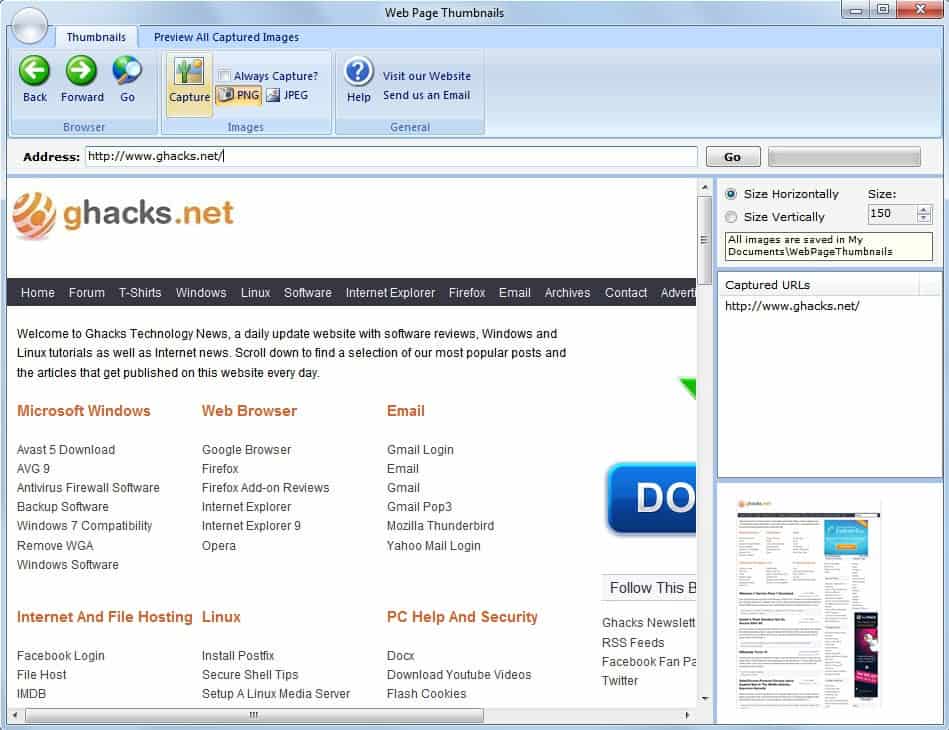
After that is is just a matter of entering the website address in the url form to load the web page directly in the interface. A click on Capture saves the displayed website manually, an option is provided to always capture web pages that are displayed.
It is possible to navigate the website, links are clickable and the display appears to be accurate as well. Images are saved as png files by default with an option to switch to jpg instead.
The web page screenshots are saved in the My Documents/WebPageThumbnails folder from where they can be accessed.
The captured websites can be accessed in the application as well. A click on Preview All Captured images displays a listing of all pages that have been previously created.
Web Page Thumbnails can be downloaded directly at the developer website. It is compatible with 32-bit and 64-bit editions of Windows.
Advertisement


















There is online version of this service. Give a try this : http://www.domdigger.com/screenshots/
You can set up a new screenshot service, that will make weekly full-size screenshots weekly, so you can create your own, private screen archive. It’s free and I am using it for couple of my websites. Pretty funny to see all these changes visually .]
How is the app transferring the web activity? Is it calling home?
The app uses its own browser that you must use to enter your url and yes there is is a constant IP address connected to that browser when the app is running. It also disappears when you close the program so it appears to be there only when running the app.
I didn’t actually do any packet sniffing, but at the very least it is capturing your IP, the url, time spent on the site, advertisers being used by those sites (great for when you are selling data), the types of sites you are using and I’m sure more if one puts their mind completely to this.
There is no reason for using this that I can see. Taking a screenshot can be done using your browser of choice and if you wanted to automate it, using an addon like imacro.
This is really nothing more than an app to track and sell web activity. Take a look at the EULA – there is absolutely nothing about what information they gather and whether they will sell it.
While that’s certainly a possibility for tech-savvy users it is not one for inexperienced users. The main advantage of the application is its ease of use. Sure, you could install a screen capturing software instead that supports scrolling and create screenshots of websites this way but it is still not as comfortable.
How is the app transferring the web activity? Is it calling home?
But why would inexperienced user need to use this? Why would he need to make screenshots or thumbnails of webpages.
To embed them in PowerPoint presentations, what do you think ;)
You should include couple of reasons why would anyone might need this app.