
Speed Monitor, Track Loading Speed Of Websites Over Time

Webmasters and search engine optimizers need to be aware that speed, or better a website's loading time, is now part of the algorithm that search engines use to rank websites. At least Google has mentioned that speed is a ranking factor.
Optimizations need to be verified and speed tests are one of the best options to do that. Speed Monitor is a free application that can test the loading time of multiple websites over time.
It begins by adding one or multiple websites or pages to the application. Websites are stored in rows in the main application interface and all it takes to add another one is to click on a new row and enter the website address or IP to do so.
The default frequency is set to 60 seconds which means that the program will download each page every minute. The program lists the current time in ms that it took to download the page, the last ten, 100 and 1000 times.
Charts are provided to visualize the data for a selected website address.
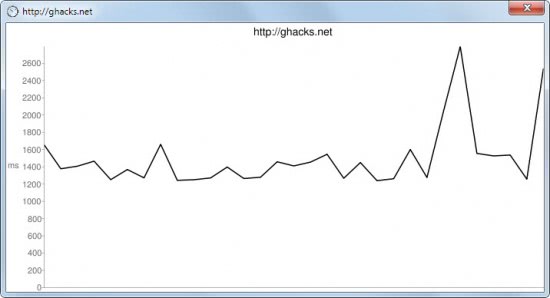
Webmasters can clear the data which can be handy before tests to get a new set of results. Speed Monitor can also be used to compare the page loading time of a website with another one. This may help discover further room for loading time improvements.
Speed Monitor is a portable handy program for the Windows operating system. The software has been developed as part of Donation Coder's NANY 2011 challenge. Downloads and options to communicate with the developer are provided there as well.
The latest version of Speed Monitor needs the Microsoft .NET Framework 4.0 on the PC it is started on. The developer has added new features to recent versions, like drag and drop support or support for charts. The program itself can be started without installation.
Advertisement


















FasterFox Lite (FF add-on) has a page load timer which I display in the soon to be defunct status bar. This is real pages, as opposed tot eh synthetic page testing that SpeedMonitor offers.
I would like FasterFox or a similar real-time monitor to track page loading like this SPeedMonitor does. That would be really useful!
Then I could say that this page took this amount of time on this day at this time.
If that would generate too much data, then it could be limited to only high-level URL tracking or maybe only one level deep.
FasterFox monitors the speed with which the page is shown on your browser — e.g. it factors in the rendering time, etc. SpeedMonitor is not a “synthetic” measure of download time. It simply measures the amount of time required to download the page / file.
What I meant by synthetic is that it is not a measure of what you are experiencing in real world surfing in real time.
I would like to have a record of what the page download/rending time is whenever _I_ go to a particular site and/or specific website page over a period of time in my real-time.
What is meant by site loading speed exactly ? Is it the display of the raw page or that of the page, complete ? For instance, Chrome — here — is slower than Opera to display the page fully completed, when the raw display is about the same …
It is the speed taken to completely download the page/file over HTTP.
-The Developer
I’m not quite sure what you’re asking…but the program does no caching. Google, however, does a lot of caching on servers all over to make sure their homepage loads as fast as possible.
I see on the screen capture example above an average of 96ms over last 1000 http://www.google.com page downloads. 96ms for a full page display ?! I don’t get it, because only first page with no cache is relevant and 89ms (“last” above) is impossible with no cache. Am I missing something ? 96ms with cache is possible on 1,000 minus 1st load !
I believe it is the raw page loading time
Gosh, Opera is darn fast … :)