
How To Remove Elements From Google Chrome's New Tab Page

Update: Things have changed in the meantime, additional information have been added after the article.
The new tab page of the Chrome browser does not display a white page, but links to features or modules of the web browser. It will for instance list the most visited websites, the recently closed websites, the new Google Chrome Apps web store and apps that have been installed from it as well as bookmarks and an add for the new Chrome notebook (which is shown to everyone even though only users from the US can apply to test it).
It got a bit crowded in there, especially with the introduction of the Apps section. Users who do not use the web store or apps may prefer to remove that element from the new tab page of the browser. Other users may prefer to hide the most visited or recently closed site listing instead, or the ad for the Chrome notebook.
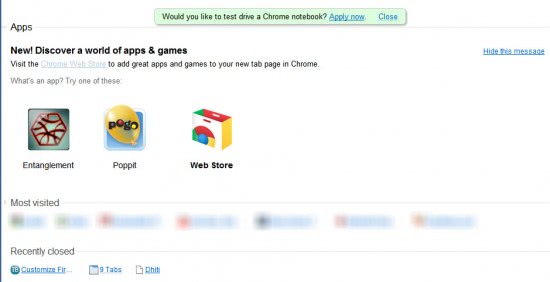
Chrome users who want to get rid of one feature or the other need to pay close attention to the page. There are two - light - elements on the new tab page, one next to the module heading which is always visible, and one at the rightmost location on mouse hover.
The left arrow / down arrow at the left of the module name can be used to expand or compress that listing on the new tab page. It reduces the space needed for the module but will not remove it from the new tab page.
The tiny x on the right while hovering on an entry on the other hand allows just that. Just move the mouse over the module that you do not want to see anymore on the new tab page and click it to remove it. But be careful with that, as there does not seem to be an option to restore the new tab page.
Update continued: Chrome's New Tab Page has been changed fundamentally in recent time. The most recent version displays a number of top sites that you have visited and a Google Search form.
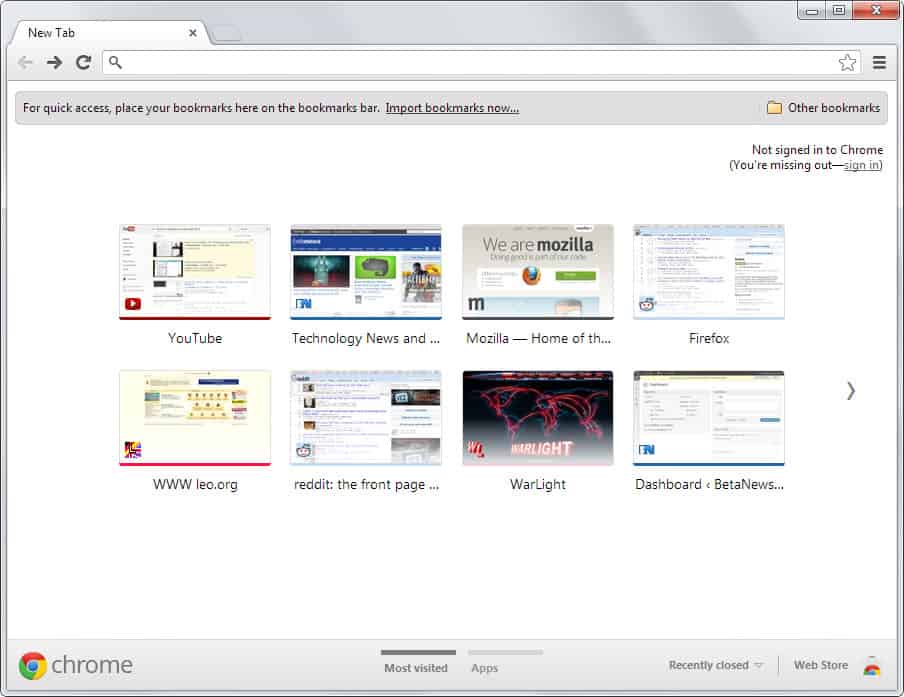
It is not possible to get rid of the search form, but you can still remove sites that are listed here. Just hover over them and use the x button to remove them from Chrome. If you want an older version of the New Tab Page back, check out this guide that explains how to do so.
Advertisement















From what I saw using Chrome 10 Dev, clicking the little x that appears on hover merely collapses that item to the bottom of the screen and it can be restored. In other words, I”m not sure that it’s a permanent change.