
Sandboxie Review

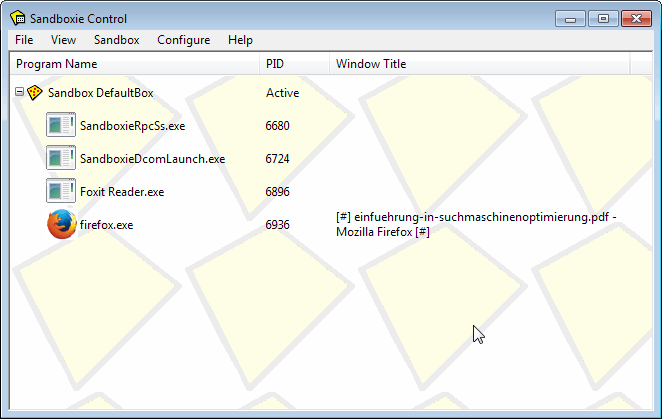
Sandboxie is a program for Windows that puts applications on the operating system in a sandbox to improve security. A sandbox separates programs run in it from the underlying operating system and other software or data, effectively preventing those programs from making permanent changes to the system.
Even malicious software is restrained to the sandbox which means that it cannot infect the operating system itself and that all traces of it will be removed from the system once the sandbox is terminated.
Software that is run in the sandbox is isolated from the system which makes it ideal for testing purposes, and to improve the overall security of the system by running applications that are often targeted by malware developers in the sandbox.
Sandboxie has been around for years, and its developer Ronen Tzur has added new features regularly to the program in that time. Today, it is one of the best -- many say the best -- sandboxing solution for Windows.
Note: Sandboxie was acquired by Invincea in 2013.
Sandboxie Versions
Sandboxie is a shareware program. A free version of the application is offered for download on the program's homepage that misses a couple of features and will display a reminder after 30 days of use that you should upgrade to the paid version of the software. It remains fully functional though and the author notes that users are encouraged -- but not required -- to upgrade to the paid version.
The paid version offers two additional features that are not available in the free version of the software. You can force programs to run in the sandbox; this means that they will be launched in the sandbox environment regardless of how they are started which makes the whole process more comfortable for the user.
The second feature lets you create and use multiple sandboxes on the system, and run the same program in multiple sandboxes at the same time.
It is available for the reasonable price of €15. Pricing changed in recent time. Sandboxie for Home Use requires a subscription that is available for $20.95 per year.
Sandboxie Review

Note: Sandboxie 4.06 was used for the initial review, Sandboxie 5.26 was used for the update.
Installation of Sandboxie is straightforward. The program is compatible with 32-bit and 64-bit versions of Windows. The installer is clean and does not hold any surprises. Sandboxie needs to install a driver on the system which it does during installation.
The application displays software compatibility information on first start. It highlights detected applications on the system and recommends compatibility setting for these. You can remove programs from the list and add new ones, and hide future software compatibility dialogs.
Sandboxie opens the main Sandboxie Control interface afterward. A default sandbox is available right away. Previous home versions of Sandboxie limited use to a single sandbox. This restriction appears to have been lifted as I could create new sandboxie using Sandbox > Create New Sandbox in the unregistered version.
Run programs in the sandbox
To run programs in a sandbox, select Sandbox > DefaultBox > Run Sandboxed > Run from the toolbar menu.You may also right-click on any sandbox and select "run sandboxed" from the context menu to do so.
Web browsers, Email clients and Windows Explorer are displayed here directly, but you can also use the menu to run a program from the start menu or any program that is available on the system.
It is alternatively possible to drag and drop applications -- or their shortcuts -- into the Sandboxie environment to run them sandboxed.
Sandboxie adds a context menu item to Windows Explorer which you can also use to run programs or files in the sandbox.
In addition to that, you can also create shortcuts for sandboxed programs. To do so, do the following:
- Select Configure > Windows Shell Integration in the Sandboxie Control window.
- Click on the Add shortcut Icons button.
- A window appears the first time that explains what is happening next. The Sandboxie Start Menu is displayed which you can use to select an application that you want to create a shortcut for.
- Select the sandbox that you want to run the program in.
- Select the application from the list of programs.
- The shortcut is saved to the desktop afterwards.
You can run the shortcut whenever you want to load the software it links to in the selected sandbox.
Note: If you run a program in a sandbox, it means that it won't be able to interact with data on the system in a permanent fashion by default. This may be problematic in some cases. Say you run Firefox in the sandbox and the browser updates itself to a new version.
When you close Firefox or terminate the sandbox, the update is gone and you will be asked to update again next time you run the program.
In the case of updates, be it program updates or updates to add-ons, it is best to run the program outside of the sandbox during the update so that it can update just fine provided that is what you want.
Registered users who force programs to run in the sandbox can disable forced programs for a short while using the tray icon menu.
The same is true for downloads that you make and any other content that changes. If you need the change to be permanent, you need to disable the sandbox functionality or use built-in controls.
Sandboxie offers controls to bypass the sandbox in certain cases.
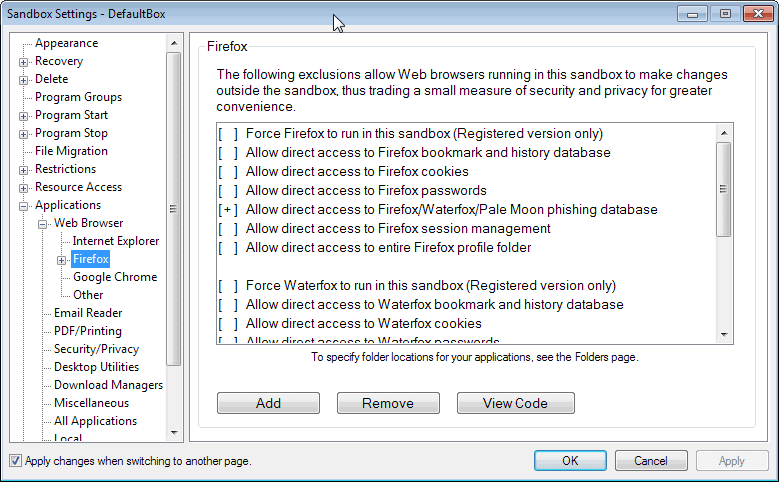
Sometimes, you may want to allow programs access to certain files on the underlying system. In the case of web browsers, you may for instance want to keep new bookmarks, passwords and session cookies.
Sandboxie offers default controls for popular programs such as the Firefox or Internet Explorer web browser, Thunderbird and Outlook email clients, and various other products such as security software, download managers or PDF readers.
Firefox users can for example enable direct access to passwords, bookmarks, cookies or sessions directly here.
While you could navigate to the sandboxed folders to move files out of it while the sandbox is up and running, it is often better to use Sandboxie's Quick Recovery or Immediate Recovery features instead.
Quick Recovery
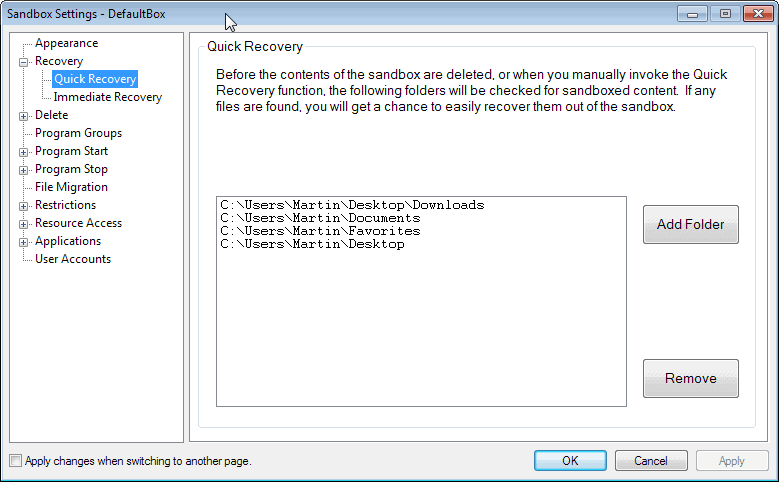
Whenever you close a sandbox, or run Quick Recovery manually, contents of select folders will be scanned for files that you have saved to them while the sandbox was up and running. The default locations are the downloads folder, My Documents, Favorites and the Desktop.
The idea here is to provide you with the means to save files that would otherwise be lost when the sandbox is terminated.
Tip: You can add folders to Quick Recovery under Sandbox > [Name of Sandbox] > Sandbox Settings > Recovery > Quick Recovery.
Immediate Recovery
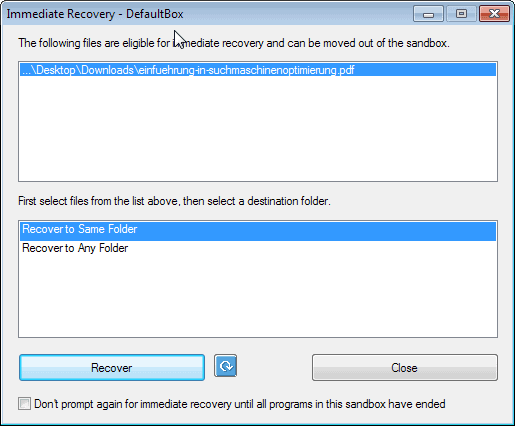
Immediate Recovery automates the recovery process for you. It monitors select folders on the system and file extensions, and will suggest to move them out of the sandbox as soon as they get saved in a program that is running in the sandbox.
The benefit here is that you do not have to invoke the recovery manually.
Tip: You can disable the Immediate Recovery feature under Sandbox > [Name of Sandbox] > Sandbox Settings > Recovery > Immediate Recovery.
Identifying sandboxed programs
All programs that you run in a sandbox look on first glance just like any other program you run on your system. When you move the mouse cursor to the window border however, you will notice a colored border that is painted around it by Sandboxie. This indicates that the program is sandboxed.
You can naturally also see that in the main program window, as all sandboxes and programs running in them are displayed here at all times.
Another option that you have is to click on File >Â Is Window sandboxed to find out if a particular program window is running in the sandbox.
In addition to that, it is possible to add permanent indicators to windows. You find the options under Sandbox Settings > Appearance.
The first option that you have is to make the window border that Sandboxie adds permanently visible instead of just when you hover the mouse cursor over it.
The second option is to add an indicator to the window title (#) or to show the sandbox name in the title directly.
Terminating a sandbox
Once you are finished using a sandbox, or more precisely the programs within, you can terminate it. Simply select the delete contents option from the tray icon menu or from the main window's menu bar.
Sandboxie will display a Delete Sandbox window that displays any files that you may want to save before the sandbox is deleted.
By default, the sandbox is not deleted automatically when you close the last program that runs in it. You can change the behavior under Sandbox Settings > Delete > Invocation to automatically delete contents of sandbox.
When you close the last program after making the change, the sandbox itself will be deleted as well.
Which programs should you run in a sandbox?
While it is possible to run any third-party program in the sandbox, it is usually better to run only programs in it if system security benefits from it.
All programs with network or Internet connections like web browsers, email client, messengers or P2P software need to be mentioned in this regard among others.
The reason for this is that they are exposed to attacks from the web, be it through user action, e.g. the download of a new program or file, automatic attacks such as drive by downloads, or indirect attacks where files get downloaded automatically but need to be executed by the user.
You may also want to run any new executable file that you downloaded in the sandbox to verify that it is safe to use.
Sandboxie Tips
- You can select View > Files and Folders in Sandboxie Control to see the changes made to your system. This is excellent to monitor program installations or the behavior of software running in the sandbox. This works best if the monitored program is the only one running in the sandbox.
- Use the same view mode to recover files to the same or another folder. Simply right-click them and select the appropriate action from the context menu.
- To improve working in the settings, check "Apply changes when switching to another page" in the Sandbox Settings. If you do not, you will receive a prompt every time you switch pages if you have modified a preference on it.
- You can limit Internet access of programs running in the sandbox. All programs are allowed access by default, which you can change under Sandbox Settings > Internet Access.
Verdict
Sandboxie is an excellent security software for the Windows operating system. It should be used in addition to traditional security programs such as antivirus software, and if configured and used correctly, will improve system security significantly.
Most important updates since the review in 2013
- Sandboxie supports 8.1 and Windows 10 fully.
- Support for Secure Boot.
- Support for Firefox multi-process under Windows 7 and later.
- Microsoft Office Click-To-Run support for subscribers.
- Sandboxie binaries dual-signed to eliminate warnings.
















Is sandboxie relevant in 2022 especially with Windows 10/11 Hyperv Core Isolation? For me it still is, while core isolation is pretty decent, it damn well interferres like hell with my current VMware and Virtualbox VMs. Microsoft have allows different hypervisor compatibility but of course put resource priority for hyperv while other hypervisors wait. Disabling core isolation and using sandboxie instead allows selective and similar sandboxing functionality while still retaining VM performance without resource interferrence from hyperv.
Using Win XP Can not make Skype run in the Sandbox as it refuses to connect .
After I opened the main data base file of the skype program i found to my dismay email data and other visited website stored there. How did they get in there? A sure sign that the MS Skype is spying on us surreptitiously. How can I get it to function in a Sandbox environment? or is it another MS violation?
DO NOT SANDBOX WINDOWS EXPLORER OR YOU”LL LOSE 90% OF CONTROL OF YOUR COMPUTER.
Just sandbox programs that connect to the internet like browsers, email and ftp clients, music players etc.
Wow this article has a lot of comments. Does anyone know of a way to _install_ MS Office 2013 in a sandbox, so that it still works?
is there any way to extract tested applications, I can copy-paste the files but how to deal with the Registry keys in its RegHive?
REGARDS
If you install software in the sandbox, it is dealt with automatically.
Sandboxie is my all time favorite software.
Personally I use Sandboxie to test new software and sometimes crack software ;)
It would be great if you can arranged a giveaway of this awesome software.
Essential software that should be a default feature in every operating system. Even though I understand that Chrome sandboxes some processes…that typically only applies to plug-ins with known vulnerabilities such as Java. Sandboxie free is now installed on all of my systems and I strongly enforce that my children use it as well while surfing the web.
Amazing software.
The shame now is the program been sold to another company and a USA one at that, as much as this program had it’s good days it seems it’s going to be downhill from this point on.
Hi Martin, Please award me, Sandboxie license.
I like this Software. Please count me in too.
I have been using the free version. Please count me in. Merry Christmas
I run Firefox in the sandbox. Thanks
As the majority of people, I’m also using Sandboxie to browse the net and to test new programs before I decide whether it’s worth it to install them outside the sandbox. Very useful for keeping your Windows installation as clean as possible!
Please count me in for the giveaway, if I’m not too late, of course!
Yeah! Sandboxie! A very useful program and really helps you out when you need it.
I use Sandboxie for all my Android and desktop app testing. I would love a real copy!
Bummer! We just missed out on the now discontinued lifetime licenses by two days as of when this review was written!
Sandboxie is great! I used to pay ridiculous money to use a program called DeepFreeze. While it is a good program, paying the exorbitant prices every year to renew the license was beyond me. Sandboxie offers a much better priced and very well done option!
Hello,
Please count me in to win a license for this excellent software i`d like to use in order to test applications and browse safely on the net.
Many thanks.
I would like to run browser and any suspicious programs
Primarily I would use Sandboxie for surfing the net as this will safe guard my pc.
Thank you for the giveaway.
Please include me in the raffle thanks. I would love to win this software.
I would like to use every new program first in Sandboxie
Sandboxie is a great software.
Sandboxing or light brutalization are today one of the most important line of defenses because most average users are mostly vulnerable to drive-by malware or other attacks trying to install malicious code on the system.
Other security layers are a nice complement, a single line of defense in never a best practice, but sandoxing is becoming one of the most important one.
Furthermore, Sandboxie is under constant development and Tzuk is very responsive, that alone justifies the very fair price of the software.
Overall it is a great solution for novice and advanced users (who will be able to tweak and harden it even more) alike. It serves a very specific functionality, and does so extremely well.
Highly recommended as part of any security layered solution on Windows.
I seem to want to do anything as long as it can get sandboxie key, the best application I’ve ever met
Would like this for browsing and testing new programs.
Thanks
I’d sandbox my browser for sure.
I would run Firefox and Adobe Reader in the sandbox. Thanks.
I currenly use mozilla in sandbox.Thanks for the giveaway
My family runs all programs in a sandbox for added security & piece of mind.
This is to ensure that the computer is totally protected from virus etc2.
Running programs in a sandbox also provide privacy & operating system integrity.
Irrespective of whether one surf in the internet or not, sandboxing gives you confidence.
Warmest regards
I would use sandboxie as a container during software development, rather than having a isolated development PC.
Very good giveaway! Thanks!
Im run confidicional document with MS Word 2010
Please count me in
This sandboxie sounds very amazing.
I’ve never dared me to install so many software,
cause this so often ends in slow systems or even worse instable system.
The only solution was to ask friends to fix it or reinstall system.
If I understand your very nice and detailed review correctly sandboxie would help me to improve system stability and let the problems be a thing of the past.
Nowadays browser is also a dangerous place to deal with.
So I try my luck here in hope to get a software in my hand to protect my system.
I wish all here a beautiful christmas time.
I like testing giveaway programs in sandbox. Please count me in. Thanks
This is one of the first software I install on a new PC so while the free version is more than fine i can’t pass the chance to get the pro :)
Thanks
I’ll use it to run my browser and some programs I want to test.
Spare me the overhead of running it in a VM.
Sandboxie is best program for security. Period.
It might give me secure web browsing by running my web browser under the protection of Sandboxie.
Thank you for this giveawy!!!
The best program to surf in internet.
Count me in.
I would like to have my all browsers in sandbox.
I am going to use Sandboxie to everything new in my computer, every new software.
Definitely run my Waterfox browser with this fine software. Along with any downloaded programs from suspicious sites or test software. I run Kapersky 2013 IS, With Sandboxie this should help my defense posture Thanks
I will run my browser.
I’d run new programs in the Sandbox, to see how I like them.
And if I don’t? They vanish, poof, like they were never there at all. :D
I would like to run my web browser Firefox in a sandbox.
Thanks Ghacks for the great giveaway!
I use sandboxie in a webbrowser with a free ramdisk, it works nicely, also might be fun to use it for virtual machines, though having trouble with some right now.
I would use
1. Firefox
2. A few .exe for analyzing.
3. Pidgin
4. All new executables.
Excellent program. And worth having it on windows 8.1.
Count me in.
Have always liked sandboxie and would like to use it on firefox.
Thanks Martin for this fabulous giveaway.
I would like to use Sandboxie for my web browsers to keep my PC clean.
I hope I win, this would be a great early Xmas gift.
As one of last years winner and a lifetime owner of sandboxie this is one software everyone should have period on their computer.
Only thing I do recommend is using version 3.76 if your on Windows XP it”s way more friendlier and compatible with most programs.
Happy Holidays everyone.
Count me in, if the giveaway is real.
thanks,
Siddhartha.
hmm, so far I only use it with browser. it seems more useful and powerful than I magine. thanks for the review :)
How / When do we find out if we’ve won or not? When is the contest deadline for entries?
I’ve googled some other prior Ghacks giveaway pages and none of them seemed to have ever announced a cut off date or winner.
Thanks a lot for this Giveaway.
Please kindly to count me in..
ANY new programs I try which are unknown I can run them in a sandbox.
My Browsers (i.e. IE and FF), pdf files, and doubtful downloaded files.
Thank you for this Give Away!
Please, count me in for it!
Thanks to sandboxie, Now I could run any malicious program securely, merry Christmas to all!!
Well, I hope that us poor folks who saw this not too long ago will still get a stab at a license key. I have used Sandboxie for about a 3 months now and had just missed out on their lifetime license. I use Sandboxie for securing my web browsing after this whole NSA thing blew up. Having everything contained within sandboxie makes better privacy an option.
Thank you for the great contest! Which programs i would like to run in a sandbox? All programs that are vulnerable to attack – that is, they have vulnerabilities. Here are some of them: Internet Browsers with Flash plug-in, pdf viewers, e-mail clients. The program is also ideal for testing unknown applications. Thanks that everything is done in a virtual environment, it does not affect the real system. Sandboxie is the perfect way to live without the viruses. Merry Christmas :)
Thanks! Browsers and PDF readers.
Thanks Martin
I would sandbox Firefox while I’m doing online banking & shopping.
Also Thunderbird if I wanted to open attachments I wasn’t too sure of.
Merry Christmas
many people say about Samdboxie I would like to try out this program and install the Mozilla browser in a sandbox.
I would sandboxie to try out new programs.
A lot of comments here talk about using it with browser. I want to try that too.
It seems that sandboxie can also run usb drives. That’s cool too.
Thanks Martin for this giveaway. Merry Christmas
I will be banally predictable: browser, browser and browser. :)
And then flash player.
New software is first installed in the sandbox to observe what is installed where…
Count me in—Reliving my childhood playing in the sandbox!
Would love to try it with Firefox.
I use Sandboxie for my browser Firefox.
Good luck to all.
I would use it to test new programs and see the changes the new installed programs makes on the computer. This feature would show me what changes were made, better that just a Saved and Restored Computer Image of which you never know what was changed.
This one feature means Sandboxie has move value than just a good security program.
Thank you for this Interview.
Hi Martin,
My most favorite program of all time. I wish I had the money to support Mr. Tzur’s work but I don’t. SandboxIE has saved my bacon more than once against fully undetectable (FUD) malware and fake codecs. I would have to say that sandboxIE is the best defense against unknowns with a bit of common sense.
The programs I usually sandbox are usually browsers, media, games (some games have anti-sandbox measures), plugins, torrents (rarely), and unknown programs (usually programs that pique my interest on the internet…I know…that is dangerous).
My old computer cannot handle loading a virtual machine. SandboxIE is not a complete replacement for virtual machines but it’s pretty darn close. SandboxIE is also lightweight.
I wish I could say the same for my brother. He sometimes get hidden surprises and I would have to clean up his computer all day. SandboxIE would save him but he hates that popup reminder in the free version every time he reboots the computer.
This would be a very useful program to run my Firefox in when downloading software that, despite my best efforts to research, could be potentially iffy in Windows. The free version is too weak compared to the paid. Would be nice to run my Outlook in as well. Another great review, Martin! :)
I would use it to test new programs installs and see the changes the new installed programs make on the computer. This one feature makes Sandboxie worth more than just a good security program.
I would like to run web browsers in sandbox.
I always use sandboxie when testing problem if I unsure with the download and while browsing. If I could win this. I will use this to automate sandboxing of my browser.
I’d love to win this. I would actually use it mostly for surfing (IE/FF) and occasionally for testing a new app.
Hello Martin, thank you very much for these Christmas giveaways. Sandboxie is one of my favorite applications. I intend to run my browser and also to have the possibility to try new programs, to test how they work without compromising my pc.
All the best :)
Paf
I would like to run untrusted programs or code in a sandbox.
I use it to test all new programs and to install programs so i can run them portabley without cluttering up my registry and hard drive with installer junk.
I have wanted to try this out for some time. :)
I would use it for
(S)…ecure webbrowsing (with Firefox and Chrome)
(A)…ttached usb devices
(N)…ot safe resources (jscripts, …)
(D)…ownload manager
(B)…ootable media (DVD, …)
(O)…pening images and PDF files (XnView, Adobe Reader, …)
(X)…treme software testing
(I)…nstantmessenger
(E)…mail client (Thunderbird)
I hope you’ll place this wonderful present under my christmastree.
Thank you also for your many tips and review.
I test and run a ton of programs and visit tons of sites on the web. I currently have anti-malware, anti-virus and anti-ransomware programs running, but I would feel so much safer with Sandboxie. I would be grateful for a copy.
Thanks!
Sandboxie is excellent, I’m (shamefully) one of those shareware users. I use it whenever someone sends me a file– I don’t trust scanners with so many morphic virii going around. Would love a real version.
In Sandboxie runs your web browser and any test versions of the programs.
Thanks
Blimey, there are loads of great response here.
I used Sandboxie free for a while but couldn’t afford a full licence.
i’d be interested in testing software in this, checking out does it or doesn’t it work, and resetting with confidence.
Virus checking also, as even with Truecrypt its been should sandboxie can help.
I’d run normally my web browser in here for the kids also to make sure they had a session that wouldn’t effect the computer itself and could be wiped when I wished.
its a great program, I’d love a copy if picked.
Thanks for this opportunity!
I’d use Sandboxie for browsing; and for testing new apps.
Best review yet for Sandboxie, the best sandbox application you can get..
I run all browsers, e-mail and feed reader in a sandbox. Also do testing in it as well. Would love to try the paid version.
I’d be running my web browsers in the Sandbox.
Thanks for the giveaway.
Great giveaway. I run browser in the sandbox. Thanks
any suspicios apps which I sometimes download
Hello Martin
Running all my browsers and my e-mail client sandboxed.That’s how i would use SBIE.
Thank you for this giveaway.
I use a cloned XP partition to try out freeware, but sometimes an app needs w7. Sandboxie would allow that without risking my main install.
I’ll run browsers and test softwares I’m not very sure of in Sandboxie.
Great giveaway, have tried many times to get a license but failed and hope to be lucky this time.
Thank you,
Hi there Martin!
I’m still reading your daily ghacks after all these years. The info you impart is always top quality. Please don’t get fed up continuing your excellent website.
I’ve utilised the free copy of Sandbox IE in the past very successfully. Would love to be included in this your annual Christmas Giveaway for the latest paid version.
May you and your family have a peaceful Christmas and a fruitful 2014..
With all good wishes
Jerry Chance
Great giveaway! I will run Chrome in the sandbox, specially on suspicious sites.
I use Sandboxie whenever I’m testing new software and for some browsing. Definitely useful for any unfamiliar or internet-connected program.
I would like to run them on my web browsers but would try on some different programs.
I just started using free Sandboxie, and am impressed. It, in combination with ToolWiz’s Time Freeze, make an effective shield against malware when examining and working on external drives. That is what I would use this for. Lock down the machine using those two progs, and then plug in the drive and operate on it. It’s good that we have tools like these to work with to do this sort of thing.
Count me in
Ahoy :)
I like to run all my progs with Sandboxie.
Sandboxie -> to be careful by yourself.
Thx.
Hello, I would also love to participate in the free sandboxie giveway contest.
I am an avid user of protableapps style software and like making sure that application only interact with my OS to the extent that they need to. I never run processes as administrator rights unless I am absolutely certain of their functions. it’s not so much as paranoia as it is making sure I don’t throw sand into a machine.
I would use sandboxie for those applications that I’m suspicious of or don’t fully understand their functions. Why does a self-extracting zip file need admin rights? What is that setup executable really installing? If I have to use java on a webpage, can I keep it from interacting with my system?
I’ve been thinking for a while about getting sandboxie but never was convinced I fully needed it with my own practices. After your review, I feel I really want it now. Thank you for the information.
Would definitely cut down on my registry editing, and allow me to try some ‘maybe’ decent software.
As always: Good luck to all!
What a great giveaway! Count me in.
What to run in a sandbox?
There’s so many but the most common programs I’ll be running on it will be Firefox (duh!), IE (double duh!), Eudora Mail (can’t trust all attachments), Adobe Reader (lots of PDF exploits), MSOffice (gotta be careful of infected docs and xls), Window Media Player, & Skype.
And then there’s the occasional program that I want to test first before actually installing on my system.
I would use it to see if downloaded programs install additional unwanted software before actually installing that program on my PC.
Hi martin, i had used sandboxie long ago,its a amazing program,i would like to run all types of suspected malicious programs executables,Thus i dont have to worry about viruses anymore,i will be happy if i can win one.
Would love to win a license.
I currently use the free version to sandbox browsers, Thunderbird, Skype and Miranda. Occasionally I sandbox new software to test it before deciding if it fits my needs.
Greetings
Never tried Sandbox but I hear it is good so a full version would be the way to do it.
Thanks so much Martin for this article.
This software seems much improved from earlier versions i read about.
I own a license and run keygens in it. If awarded a copy I’d give it to my father so he could run Firefox in it.
Three times he’s ran into malware and I’ve had to clean his computer. I installed Sandboxie on his machine and it’s saved him once since. A full license would be a good Christmas present.
Marty
very good software. I will use it during my internet surfing on chrome and firefox.
Hi Martin, thanks for the giveaway. I’m using Parralells and am curious how they compare. Are the same?
“Note that Sandboxie can help prevent damage from Cryptolocker”
Is that true? Would that be true in Parrallels?
Thanks Martin for Ashampoo Movie Studio.
Bob
Sandboxie can prevent damage, as everything that is happening when the Cryptolocker executes is happening in the sandbox, and not on the underlying system. Once you shut down the sandbox, the Cryptolocker is gone again, provided that you do not allow it to make modifications to your system.
I have not used Parallels so cannot say.
Hi Martin, thanks for the giveaway. I’m using Parralells and am curious how they compare. Are they the same?
“Note that Sandboxie can help prevent damage from Cryptolocker”
Is that true? Would that be true in Parrallels?
Thanks Martin for Ashampoo Movie Studio.
Bob
I have always save and good protection for the pc with sandboxie. I have use the trial version of sandboxie.Good giveaway
Thanks for the review of Sandboxie. I would use it to run firefox and chrome.
Hi, Martin. In the free version of Sandboxie is it possible to run the browser that is NOT the default browser? And does it protect me against malware when banking and online shopping? Thank you and merry Christmas.
Yes you can run any browser in the default version. Sandboxie does not necessary protect you against malware that is already on your PC, but if someone tries to deploy malware while you are banking, then it may be able to stop it dead in its tracks.
Sandboxie does offer protection against some forms of malware, certain types of key loggers for example: http://www.sandboxie.com/index.php?DetectingKeyLoggers
Is this the giveaway????
The giveaway is already over unfortunately.
Thank you!
Good review of Sandboxie. I would run my browsers, email clients and probably media players in Sandboxie. To have them run sandboexed automatically no matter how they were launched would be great.
I currenly use firefox in sandbox for the good clean security for the pc.
Thanks you so much for this contest
It would be a nice Xmas gift if receive licensed copy of sandboxe as I could keep my computer safe after trying a program on sandboxie first.
Surfing throu the web.
Thanks!
I would use it mainly for browsers and office/PDF viewers, but I would probably use it to experiment on other kinds of software as well.
And thanks for this great offer! :)
Great software. Running Google Chrome securely would be great. Cheers
I will run browsers and any files from unverified sources.
For web browsing mainly.
its one of the best .i’d like to have one
Would run all my browsers in the sandbox
Sandboxie will offer great protection for running my Fave browser Firefox
have used the free version for running any software i’m not sure about so pro version would be great
I’d like to run my browser in a sandbox.
would be useful to run my browser sandboxed unless i’m intending making changes to the browser
Hi Martin,
Sandboxie is indeed a great piece of software.
If I were to win a license, I would definitely be using it for my browser and any other Internet access.
A great additional security layer on any system.
Thanks for this great offer!
Richard
count me in .i like that
Use the free version for my browser now~~
Another excellent review from Mr. Brinkmann and his GHacks team. I personally have v. 4.04 of Mr. Tzur’s Sandboxie, which I find is wonderfully suited to the task of isolating high-vulnerability programs such as browsers and e-mail clients in a controlled, protected environment. I also find it especially useful for examining the results of various program’s installation routines, where it’s use has significantly increased my understanding of modern implementations – and the unintended consequences for context menu handling and the like that less-than-adequately-written code often presents. I would value this software were this feature its only claim to fame – which it certainly is not – but must admit I find the prospect of utilizing its additional features quite intriguing.
Thanks again to Martin Brinkmann & his GHacks team for providing such straightforward and insightful information (not to mention such perks as this Christmas Giveaway); following quite a few similar operations as I do, I find GHacks to consistently rank near or at the top. Thanks also to Mr. Tzur for his valuable work in extending better security to all `Net denizens. Here’s wishing a Happy Holidays and very Merry Christmas to all
I would like to run my browser in a sandbox.
I would like to run browser and any suspicious programs. Thanks for the giveaway
I will run my default browser, which is Firefox in it, or any other unknown application.
It would be great to use this while browsing the net, I heard a lot about this program but never used it myself.
Downloading free or shareware programs comes at a security risk.
Sandboxie would be just the safe way to use these programs.
Thanks Martin for the giveaway. I have been using the free version now.
I run browsers inside sandbox, along with any new software’s that I test
Count me in Please.
Run browsers in sandbox and testing new software. I have used “sandboxie”, “deep freeze” and “steady state” like sandboxie the best.
Thanks Merry Christmas !
Mainly I would run browsers in Sandboxie and plus any new software that I need to test. Thanks for the giveaway.
I run Firefox inside Sandboxie. I would also like to run unknown programs in it.
I would like to run pretty much most programs connecting to the internet. Utorrent and other programs I download to test out temporarily.
Great review.
Almost all infections come from browser. So for everyday use, I would use it to sandbox my browser.
Hi Martin
Thank you for this giveaway and for your complete review.
I usually run the browsers installed in my computer within sandboxie with admin rights dropped.
I currently use the latest sandboxie 4.07.04 beta.
Sandboxie is a gem of software. It would be a wonderful gift for Christmas
Cheers:)
I would like to use Sandboxie for web browsing as well as testing new software. Thank you for this fantastic giveaway. I truly hope I get to win. Best wishes.
I would put some try out programs in the sandbox to test the features in a safe and secure environment without any harm to my pc.
I would rather like to have all programs downloaded from internet to run in sandboxie in order to keep my system all the times safe.
Thanks to Ghacks for this Special Giveaway this Christmas!
first, thank you guys for great articles though personally i think you could criticize mozilla less ;)
what i wanna run in sandboxie:
-chrome
-IE
-malware samples that i occasionally download >:)
I test new software all the time. I would love to have an opportunity to run software in a sandbox environment using Sandboxie. Thanks!
Hi Martin,
thanks for your new detailed review and this giveaway.
In the past I only used VirtualBox to emulate a virtual system for testing new software.
This brought some negative side-aspects with it e.g.
– loading time of virtual system,
– consuming more system resources and
– more complex handling through switching between real and virtual system.
Then sandboxie comes in to my life. =)
It simplified and solved many of the above mentioned aspects,
cause it is a leightweight solution for the most use cases.
Until now I use the freeversion of Sandboxie which works great
but all my applications run together in the default sandbox only.
So it would be great to separate some of them into different sandboxes like one for
– web-browser
– mailclient
– viewer applications (e.g. foxit reader, …)
– testing software (e.g. giveawayoftheday, …)
– and so on.
This separation would bring more security.
As you can see there are some application beneath the above-mentioned,
that have to interact with the system for a short time.
For many popular software like firefox this can be realized through option presets.
But the registered feature to disable forced programs for a short time puts the cherry on the cake and would simplify my daily tasks more.
So I hope to win to gain more comfort and stay more secured.
Thank you Martin for this very nice christmas giveaway
and Ronen Tzur the developer of this wonderful piece of software.
Best Regards
BlogWurm
Currently using Shadow Defender, would love to utilize Sandboxie.
Perfect for painlessly discovering crapware in a package.
Hi,
I would use sandboxie mainly for testing new software of all kind, not just web browsing.
Thanks for the giveaway
I used it with any program on my computer. It is thé program to experiment in a safe way with a downloaded software program, either you’re not sure it will be safe or you don’t know if you want to keep the program.
It’s the best software I’ve worked with!
I use the free sandboxie version on a regular basis to surf the internet and I love its protection. Very reliable. Please count me in. Thanks Sandboxie. Thanks Ghacks.
I’ve been using Sandboxie for at least 2 years now and dealing with the nag screen. I wouldn’t mind if the nag screen went away… *wink*
I like having an additional layer of security (apart from MSE) when browsing the web, so I always keep my browser sandboxed. And if there’s ever a shady app that I need to install for whatever reason but don’t want it to spread its crap all over my system, I use Sandboxie for that too.
I would run my browser in there to keep it separate from the OS
I would really like to have a license.
I would find it useful to try free and shareware software downloaded from the internet, without making permanent changes to my setup.
I love this great software. I use the free version. I use it to protect the browser and for testing browser add-ons. Thanks for the giveaway.
I’ve been curious about this program now for some time but haven’t managed to convince myself to try it yet. I’m an almost blind computer user making use of screen reader software including JAWS, System Access and NVDA. I test and install quite a wide range of programs – partly out of personal interest and partly to see how compatible they are with different screen readers. In listening to the informative review, it seems like most indications that you’re dealing with a sandboxed application are visual (coloured borders, etc.) but beyond this, I’m curious as to how logical (or confusing) this program would be to use for a blind user. Many thanks & happy holidays to all visitors of GHacks.
Hands down the best program ever, its vital when you just need to use that odd program off the internet as a one time thing. I couldn’t imagine life without this, all it needs really are hotkey support.
I have been lucky over the years and I have thought about buying a sandboxie licence.
…but have been waiting for a giveaway!
I would like to use an extra layer of safety, thanks for the chance☺
Sounds like a good program for the safety-conscious. Would like to give it a try.
Currently using the free version. I would like very much a proper license for full features. Please count this comment as an entry for the raffle.
I want to surf in the internet safely.
Tahnks!
I would like to have a license so I would run any programs I’ve downloaded from Internet which I don’t trust/know developer to protect my security.
thank you
currently my program is all trusted (I would say) and open source thus to be honest there ain’t many program to “sandboxed” however it will be come in handy for my future beta testing apps I would install, if there is any.
Downloading the trial version to use for “iffy” sites I’m not familiar and to , test new software to make sure it doesn’t contain spy/malware. Also for temporary program installs,
Thanks for a great product.
I don’t know who you are but don’t copy & edit my comment and post it as your own.
That’s just pathetic.
Martin – please do not think I’m spamming or cheating. I don’t know why this person copied my comment.
No worries!
This is a very good program especially for the like of me whom play and test around new software frequently without affecting the current system settings in real time.
Thank you.
Great giveaway. Sandboxie is an excellent software. I run browser in the sandbox. I using free version of Sandboxie. Thanks Martin for this giveaway. Good luck to all.
Great giveaway. Sandboxie is an excellent software. I run browser in the sandbox. I using free version of Sandboxie. Thanks Martin for this giveaway. Good luck to all.
I think a good idea is to use Sandboxie to test a software for functionality and usability.
In Windows 7 Pro there is Virtual XP mode so it is possible to test a software in virtual environment without cluttering real operating system.
Using Sandboxie is easy to test a piece of software and forget it if it’s a rubbish. Obviously keeping system clean of suspicious software is the simplest use of Sandboxie, but it can be used in many other professional cases.
Thank for this awesome giveaway! Please count me in!
I’ve been using Sandboxie for a while now and it’s quite amazing. It’s a very good choice in adding an extra layer of security, regarding any kind of software that needs Internet access. I mostly use it with my browser, only once tried it while using Bittorrent, out of curiosity, but from what I’ve seen in its options, anything can be sandboxed.
Along antivirus and firewall it is a must install for the OS.
I’d love a copy! Hook me up!!!
Sandboxie would help keep my family’s shared computer safe while the kids are doing their web surfing using Opera. Thanks!
I need the features offered by Sandboxie. Please let me win!
Hi , have enjoyed your column for a long time. merry christmas .
I would like to try and use it when on facebook, as there are so many potential problems these days with applications, many from real friends, which we don’t know what they do in the background.
Like many, I want to use with new downloads from such as G.O.T.D to save my registery if it needs uninstalling.
Cheers
John
I would like a license plz. Avast’s sandbox is too confusing to use.
Great giveaway, count me in, please. I will use sandboxie for internet surfing and testing new software.
Best regards!
I´ll run the entire computer through the sandbox ;)
Got the shovel & bucket ready so bring on the Sandbox :)
Thanks for amazing giveaway! I will definitely use Sandboxie for Firefox. Merry Christmas Ghacks.net!
If only I could run my boss with sandboxie, because then at the end of the day we would be able to undo any mistakes he had made easily. Maybe that will be in a future upgrade :) Until that day, I would probably just put it on his computer to protect us from all the things he tries on the internet.
Any such program that I have not used before and does not come from a trusted source..
I guess browsers would be the best thing to run in a sandbox. What if you have a torrent client running in a sandbox, but the file save location somewhere else? What happens then? :)
I will run my browser.
Following are the various scenarios for me using Sandboxie:
1. I use Sandboxie to change program settings to see how they apply. This also applies to editing .ini files/registry without risk. And after I’m fully satisfied about them, I apply the new settings outside Sandboxie. This prevents me from using improper settings.
2. I always open an external USB drive in a Sandbox to prevent malware etc. infecting my PC.
3. I open Opera in a Sandbox and give it to my friends for surfing. This safeguards my system from everything malicious online.
4. I install new programs in Sandboxie first to see which files they install, which registry keys they add, which drivers/services they install and it is worth using or not. If useless, I delete the Sandbox to get rid of the program easily.
I am very thankful to tzuk for this awesome little program. I beta test every version to give him feedback. He has best support. I love to have full version of Sandboxie and I highly recommended to everyone. Its concept is difficult to understand initially but after a while it is very easy to use. Although I don’t understand all of the settings, default settings are fine for me.
Thanks for the giveaway and I keep my fingers crossed to get Santa’s gift!
Don’t work on Windows Server 2012 R2!
(I have tried that with a company license)
Would use it to prevent wear-and-tear in Windows by installing software and for browsing I think.
Like others, I’d use it to test shady programs that I wouldn’t download otherwise. Also any program with internet connectivity or that opens downloaded files, i.e. browsers and viewers.
Many thanks for the contest! I’d like to run my browsers (Firefox, IE, Opera, Chrome) and Thunderbird in Sandboxie… so please count me in.
I want to run my multiple browsers in sandbox plus testing any new software.
Thanks
All the web facing apps.
I’d use it for web browers (Firefox Portable is my main browser) and maybe to test/trial programs.
any suspicious ones…many people just don’t realise,how much it helps if we talking about PC protection…
I want to run firefox in sandbox.
Please count me in.
Thanks.
I’ve tweeted this @ https://twitter.com/ecsjjgg/status/410747649256464384
, and I would really like to win a license for this program…
I’m using free version of Sandboxie. I primarily use it to test new programs to check how they work. Using Sandboxie to test new programs will not clutter Registry/File system. I also use it to install and play PC games on my Laptop. I use Portable Sandboxie by Wraithdu. It works beautifully with multiple PC and portable data. I sometimes use it to test questionable programs eg. keygens and to surf sometimes. This program is essential to me. Free version is not crippling but I would love to have full version as it provides many more features. I wish I’ll win this giveaway.
Woo Hoo! I won! Thanks gHacks for the Christmas gift!
I don’t really have any sandbox program. If i need to sandbox something I’ll do the long way and launch a VM. Also wanted to win a license for Sandboxie. Thanks
Thats great! Thank you
Thank you for the review and giveaway, Martin. Please enter me in the contest. With Sandboxie, I would run the installers from “questionable” software sources. I am an avid software collector and try many applications, even for a short time. Sandboxing them is probably advisable.
Note that Sandboxie can help prevent damage from Cryptolocker. If you happen to get bit with this malware, all the encrypted files will be in the sandbox–leaving your originals safely untouched.
I’d love to have a Sandboxie license. Thanks Martin!
I would appreciate the chance to win a Sandboxie license, too! My primary use case would be to sandbox certain browsers (esp. Chrome) as well as any new / untrusted applications downloaded for testing purposes.
Cheers!
-D.
[Please don’t put me in the drawing] Just wanted to post that I love Sandboxie so much, I bought several licenses. It’s great to install on little children’s computers and than mark the browser(s) as run in Sandboxie mode ONLY. Cuts down on calls from their idiotic parents to come “visit”.
I have use the free software of sandboxie.
Thanks for the good giveaway.
Cool Thanks
Hello,
thks for this review and tips. Very good program to be protect. I run my browser on it.
I never took the time to really test this. Cause of paid version.
But i’m pretty sure it would be better than my other methods with VMWare Player etc. to test safely applications…
I would use Firefox to be safe from malicious websites. Thanks for the giveaway.
test programs
I’m in. :D
I would like to surf the web with sandboxie and not worry about anything nasty.
Browsers and PDF readers. I also run installers inside a sandbox to test software and see what “junk” they install, and if OK, I create “portable” versions by copying out of the sandbox.
Frankly speaking I would sandbox every new piece of software :) I try to test many applications – you may call me software-addict (and this is what brings me to ghacks.net) and install many new programs. This, of course, could result in messied system. I try to avoid this by using virtualbox and/or programs like Comodo Programs Manager to log install processes and for easy uninstalling. And Sandboxie with “virtual” registry, system folders and so on would be great tool for such tests.
Extremely useful application protection
thanks Giveaway
Best regards
I would run Internet explorer in it :) And also use it for browsing.
I use Firefox in the sandbox every day. Because Sandboxie can increase browsing security for my computer.
Thanks! I would like to use every new program first in Sandboxie.
I want to run programs in Sandboxie that I get per E-Mail. I am often not sure if they are secure to use. And Sandboxie will help me to reduce that danger.
I want this in order to run all kind of programs and email clients.
Good luck to all
I am always trying new programs so this would help me with testing them.
I really appreciate it.
Thanks
would be useful to test software i’m not sure whether i want to keep.
cheers martin.
I would like to run multiple instances of a few different programs at the same time. With the free version, I can only do 1 extra instance.
I will use sandboxie for internet surfing and mayby testing new software without infecting or leaving behind unwanted program/registry files.
Sandboxie – good software for protect to your computer. Count me in, please.
I want to use Sandboxie to run Firefox safely on my PC. Thanks!
I would like to run IE11 in a sandbox because of drive-by exploits.
Count me in Martin. I would love a Sandboxie license.
I’ve been using the trial version for a second browser for “iffy” sites I’m not familiar with, test-installing new software to make sure they don’t have spy/mal/crapware attached to them, and for temporary program installs so I don’t end up bulking up the registry unnecessarily.
Any test software to keep my pc clean.
In sandbox I run programs I’ve downloaded from the net and I’m not completly sure that they are safe.
I’m in this one :) Currently using the free version of this software :)
i want to run google chrome in sandbox and utorrent, skype vs.
any suspicios keygens etc. :)
i would like to run my browser in the sandbox, to keep my pc clean
Agreed