
XBOOT, Create MultiBoot ISOs On Disk And USB

Many developers provide ISO images of their applications as free downloads, especially in the antivirus and security niche but also in utility and Linux.
An antivirus ISO image can for instance be used to scan a PC by booting from that burned disc which may be the only possible way depending on the state of infection of the PC. You burn the distribution to a blank CD or DVD, boot your PC from it afterwards, to scan all of its files for infection before the operating system has a chance to boot.
A problem that some users face is that there does not seem to be a way to combine multiple ISO images on a single optical disc (like a CD or DVD) or USB devices.
That's why Xboot has been created by its developer. The free application can combine multiple ISO images into one multiboot disc or USB device.
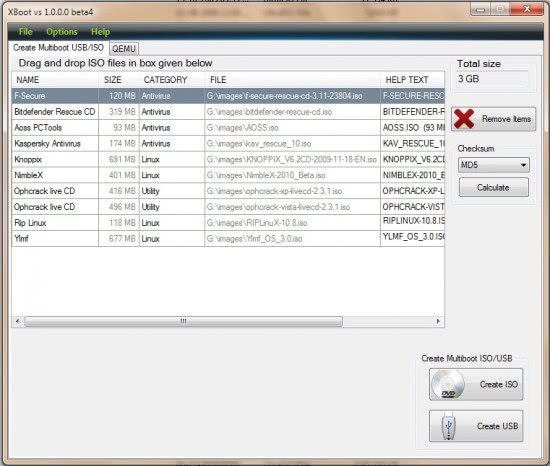
ISO images can be dragged and dropped into the main program interface. Each ISO is listed with its name, size, a category, file path and other information. The program will automatically calculate the combined file size and display it as the total size in the same program window. That's handy to keep below the maximum storage space of CDs, DVDs or USB sticks.
An option to calculate checksums is provided which may come in handy to verify the integrity of an ISO image. ISO images can be added via the file menu as well which opens a file browser to select ISO images from connected storage devices.

The file menu contains a listing of supported ISO download locations from popular software developers. They do however link to the download page only from where the disc images have to be downloaded separately. An option to download them directly in the program would be a comfortable addition.
A click on Create ISO or Create USB creates the the multiboot ISO image or USB device. Any ISO image created this way needs to be burned to disc before it can be used.
Xboot is a helpful tool to add multiple ISO images to one multiboot ISO image or USB device. The creation process is easy to complete, only the download of the ISO images (if that is needed) is not comfortable enough. Xboot is compatible with 32-bit or 64-bit editions of Windows. The free software requires the Microsoft .NET Framework 4.0 on the computer system.
XBoot supports the following ISO image formats:
- All DOS-based CDs.
- G4L
- Hiren Boot CD
- Macrium Reflect Rescue CD
- Damn Small Linux and other Linux distributions.
Note that the application requires the Microsoft .Net Framework 4.0. For USB devices, it is recommended to format them to Fat32 as it is supported by the majority of ISO images. If you select NFTS, you may run into issues booting into some Linux distributions.
Verdict
XBoot is an excellent program to consolidate or merge multiple ISO disc images into a single bootable CD, DVD or USB device.
Advertisement


















You can also try Yumi
Official Website : http://sites.google.com/site/shamurxboot
Download Link : https://sites.google.com/site/shamurxboot/xbootvs1.0.0.0beta6.zip?attredirects=0
Martin,
You’ve called our attention to many useful applications, but I think this may be the best yet. I purposely waited several days before posting because I wanted to test the disk on multiple PCs. Yes…I had one old E Series Gateway that refused to boot, but otherwise I’ve had 100% success. In addition to the numerous free AV apps and the like, I also included ISOs for my copies of Acronis and Paragon Hard Disk Manager Suite. I’ve eliminated about 15 CDs and made my life as a tech (servicing everything under the sun) a lot easier! Thanks!!!
Jim Carter
Jim I’m glad that you like the application ;)
I tried Xboot and it loaded many .iso fine but when it came to running the kernal it always froze on many disk attempts burned and with many supported and unsupported Live-CD. I like the GUI though I’ll give 10 for effort. I will come back when the software is better developed and can be fairly be bug free. I love the utility that is like a virtual maching for loading .iso in the software I think for that alone its worth downloading to test bootable .iso. otherwise I’ll look for something else for now. hope the project keeps going I’ll be back looking in a few months to test it.
Nice tool but no source or via link in this post?
I got it from a software directory, not your blog.
I have been using this one over the last few months. It’s pretty good and the developer actively supports their users.
http://www.sarducd.it/
Thanks for the tip. A must try!
There allso is another app like this, that has been around for a while. SARDU is the name, and its realy good.
http://www.sarducd.it/