
Video Converter for Windows Review And Giveaway

Why would someone need a video converter in first place? The answer is pretty simply. Because there are to many darn video formats out there, and devices and software that can only play some of them. If you download a video you may need to convert it before you can watch it on your Xbox 360, or your iPhone. The same is true for media coming from your iPhone that you want to play on your PC for instance.
Video Converter for Windows is a video conversion software that supports all popular video formats and then some that you probably never heard of before. Chance is, if it is a video then Video Converter can convert it for you. Lets take a look at the supported video and audio formats, and the corresponding output formats first.
Supported video and audio input formats
- Standard video formats: AVI, MP4, MPG, MPEG, DPG, VOB, 3GP, 3G2, WMV, ASF, RM, RMVB, DAT, MOV, FLV, f4v, DVR-MS, M4V, MKV, MOD, TOD, GIF, AP3, AIF, DV, NUT, NSV
- HD video formats: MTS, TS, M2TS, TP, TRP,TOD, HD MKV, HD WMV, HD MOD, HD MOV, HD FLV
- Audio: AA, AAX, AAC, AC3, AIFF, APE, AMR, AU, CUE, FLAC, MP3, M4A, M4B, M4P, M4R, MKA, MPA, MP2, OGG, RA, RAM, WAV, WMA
Supported video and audio output formats
- Standard video formats: ASF, MOV, M4V, MP4 Video(AVC), MP4 Video(Xvid), MP4 Video(MC), WMV, MKV, AVI, Xvid, DV, MPEG-1, NTSC, MPEG-1 PAL, MPEG-1 SECAM, MPEG-2 NTSC, MPEG-2 PAL, MPEG-2 SECAM, DVD-Video NTSC, DVD-Video PAL, DVD-Video SECAM
- HD video formats: TS, TRP, AVI, MP4, MPG, WMV, MOV
- Common Audio: MP3, M4A, AC3, AAC, WMA, WAV, OGG, APE, MKA, AU, AIFF, FLAC, M4B
- Online Video: FLV, F4V, SWF, YouTube Video, YouTube Video HD, Facebook Video, Yahoo Video, Vkontakte.ru Video
Video Converter for Windows
There is not a lot to see when you start up Video Converter. A menu bar on the top, a header bar with some icons and two larger panes of which the right can be used to preview videos that have been added to the left.
Videos can be added by dragging and dropping them into the program interface, or by using the File > Add Video Files, Add Video Folder or Load files from devices. The toolbar button offers similar options except for adding a video folder.
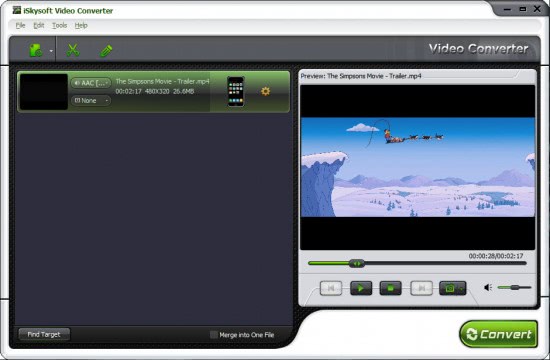
Information about each video that has been added are displayed in its left-pane listing. This includes the video's playtime, resolution and size, but also audio and subtitle information.
Videos can be previewed right away by selecting them first and clicking the play button in the video player on the right pane. The video player offers the usual controls like pausing, using a slider to go back and forth or a volume control.
A click on the output settings icon on the right of the listed videos opens a menu with all available video output options.
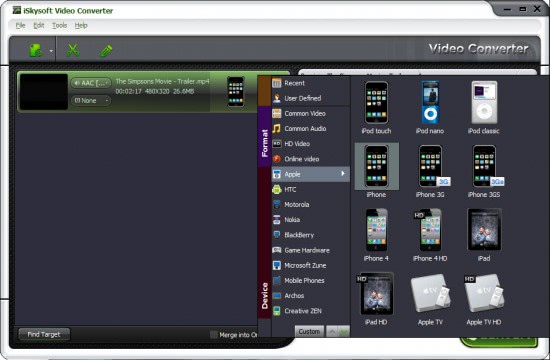
As you can see on the screenshot above there is a lot to chose from. Available are device specific conversions with all popular devices available from Apple devices such as the iPad or iPhone, o Microsoft's Zune, Creative Zen, Game Hardware, Blackberry to HTC and Nokia.
In addition common video formats, online video conversions and custom conversions are offered. It is possible to convert a video into a Youtube HD or Facebook video with ease using the software.
A click on the settings icon next to the selected video output opens an Advanced tab with options to make changes to conversion. Here it is possible to change the audio and video encoder, resolution, sample rate, frame rate or bitrate among other things which can be saved as custom profiles. Users from countries that use PAL and not NTSC need to change the frame rate of the videos manually here if they want to play it on a device that only supports PAL. An option to change the default frame rate would have been handy, but does not seem to be there.
Users can overcome it by creating custom profiles that they then use to convert the files.

A click on Convert converts the video into the selected format. The conversions are speedy, and NVIDIA users with a CUDA compatible video card can make use of the graphics processing unit to speed up the conversion further.
It is furthermore possible to merge the video files into one file which will basically create one video file out of all video files that have been added by the user.
The output format is located in the My Documents folder of the user profile. It can be changed easily in the program options along with the temp directory or the number of cpu cores used for the conversion.
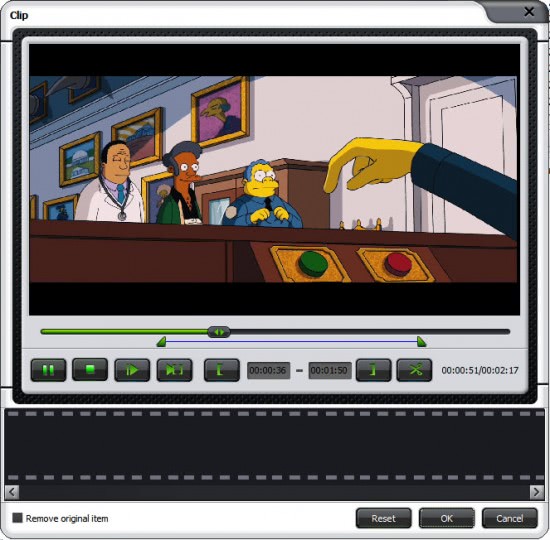
Videos can be clipped and edited before they are processed. This is done by selecting the video in the main program interface and clicking on the Click or Edit buttons afterwards.
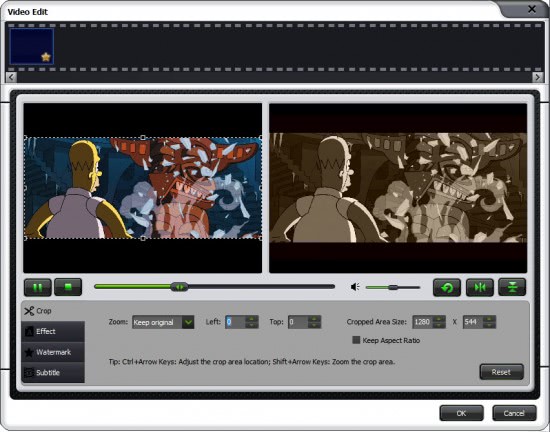
The video editor offers to change several aspects of the video. It is possible to crop it, change the aspect ratio and to add effects, watermarks and subtitles to it. The original video and the edited video are displayed on the same screen with changes being directly visible on the screen.
Video Converter for Windows Verdict
Video Converter for Windows is a handy program for users who need to convert video formats. The program supports all important video formats and a lot of lesser known ones as well. Conversions are very fast, especially with CUDA compatible video cards. The only gripe that I had during the review was that it was not possible to change the default frame rate in the video convert.
All in all it is a fantastic program to convert videos on the Windows operating system.
Advertisement


















looks like the best of the best!! please enter me in the drawing.
iskysoft THE BRAND, love to have
GUI looks very good. pl give me one license.
I’ve gone through a couple of video converter programs and all of them are just like missing important features or are not doing the job right. They are all freeware, but I’m interested if this one can do the job :)
I will very happy if i win this license of this program. I looking for a program like this for a long time.
Thanks
guess I’m too late for this giveaway but looks like a great little converter!
This looks quite polished and useful.
fingers crossed
Thanks for offering such a good program. I wish I can get a free license of it.
Always willing to give a new video conversion package a real workout…
Can’t miss this,
awesome this is sweet I’m in =D
Thanks for adding me to win a licence of this useful piece of software,
Impressed by this program. I would like own one license.
This software surely awesome. Not only can convert so many formats. Also can edit and crop the video even adding some effect to it.
another nice giveaway ,
hook it up!
Thanks for this giveaway.
Please count me in.
Thanks,
Grr
Hi count me in the draw thanks!
A very nice software
Thanks for the giveaway!
Please… I want it!!!!!
Now i use Aiseesoft Total Video Converter. It works really well, fast and high quality.
But this one seems also a nice choice. hope i can get it.
used quite a few video converters, but none of them are doing a good job converting HD video. wanna give a try on this one. so hope can get a license.
Hello Martiin!
Looks like a good converter for all kinds of video formats.
Would love to have one, please.
TIA
Jay
having this would be sweet…
I could use this converter, as it supports so many different formats.
Hi,
This would be very helpful to me. Please count me in.
thanks, Cg.
Thanks,
I hope to win my gift for Christmas.
thanks, Cg.
This is such a critical piece of the landscape today. With families needing entertain for trips, flights, etc. This is a top priority for any family on the go.
I’m in!
Excellent program by the looks of it. Can’t wait to use it.
I counted fast.. in before 30?
Count Me in. :)
Quite useful to convert older style formats into more
playable modes.
Hi, thanks for this nice giveaway, please include me.
A really useful piece of software specially if you have lots of portable devices. If I win, I will include this as one of my present to my brother this christmas.
Nice piece of software! :-)
Count me in,
Thanks !
Looks nice! I want one =)
Very impressive looking.
hello,
Thanking you for the givingaway. I am win here yesterday and I am very happy and thanksful.
Please count me in the giveaway of Video Converter for Windows Review And Giveaway [Ghacks Christmas Giveaway].
Regards,
Mr. G.T.
Please count me in for Video Converter for Windows.
Thank you Martin and iSkysoft for the giveaway.
Regards
Count me in, thanks !
Gotta enter…
I’d like to win one of the licenses :)
Currently I have a few video converter programs I got from GOTD, but they are really simple or don’t allow to set encoding settings, sometimes resulting in poor quality videos.
This converter supports lots of formats (more than the converters I currently have, I think), allows the user to set encoding options, and even has a few filters and effects. Really nice :)
Thank you very much for the GHacks christmas giveaways, and Merry Christmas :)
Count me in too. Thanks.
Please count me in
Thanks
Looks cool to me.
I could really use this for all my old family videos ;)
I wish to win!
I’d like to win too. I could use this.
can I try it?
Me too!
It would be a great Christmas present to have the license! :)
Simpsons Movie FTW btw :D
Martin thanks for another great gift :) and for your work
Please don’t count me in. I wish all the luck in this contest :)
Best Regards
Naits
I’d love to win this!
Can i win a copy
Thanks for this giveaway.iSkysoft video converter is able to convert almost all sort of formats with the best video quality.Hope i win a free license for this.
Regards,
niroop
Seems like almost everybody’s in, so why not me…
Looks like a great piece of software.
I’m in
I am a technology teacher and having access to this program would be awesome. I am constantly being asked to “makes things work” and this program would take some of the stress off.
Thanks for this nice giveaway.
I would love a license for this converter.
This would be very useful in my classroom.
This looks like a great piece of software, liking the opportunity to win a license!
Thanks for the change to win.
Going to download a trial version of video converter in order to test playing videos on my android phone device.
Please add me to the compo! Could do with a decent CUDA video encoder to speed up those long tasks.
please please count me in…
Looks nice than format factory..
definitely don’t want to miss this one.
I’m in .
thanks in advance if i win it.
This software looks interesting, tried the trial-version and it seemed pretty nice! hope i win one.
nice one
good luck to all
I`m impressed by this program. I`d like to win on license for it.
Thanks.
I’m in
Never heard of it before, it would be nice to have such a software
Interesting piece of software.
count me in
Count me in please!!!
Gave the trial a try and it’s a great converter !.
Will my trial-period be over soon, or ….
Cheers.
Count me in please!
Hi there,
count me in!
Definitely one I’d be interested in! Please pop me in for an entry :)
Since this one has CUDA support & I own an Nvidia card, I’d love to get a license key. Finally no more conversion process that took more than an hour.
count me in
Awesome product with nice interface. Much better than FormatFactory. I would love to have it on my PC.
Hi,
this software seems very good.
Currently I use Format Factory, which is freeware.
But Video Converter seems to be better.
Count me in, thanks !
Hope I can win. Thanks in advance Ghacks