
Audials One Review And Giveaway [Ghacks Christmas Giveaway]

The majority of computer users have music on their computer, usually in the form of mp3s that they ripped from their own CDs, purchased online or downloaded from the Internet. There are several options available to download music from the Internet, from using free resources like Jamendo to free offers and P2P networks.
Recording music straight from Internet radio stations has never gotten the attention it deserves, as it offers an easy and convenient way of adding music to a collection.
Audials One is not only about music and recording Internet radio but it is a large part of the application. It offers a lot more than that, including unique features that make it a lot easier to find that one song that you have been wanting to have in your collection. How does Internet media recording, audio and video conversions and music collection organization sound?
Audials One Review
Audials One will scan the selected folder for music if the selection has been made during installation. The music is added to the database of the program so that it can be managed in the Organizer. Music is also listed on the right side of the interface with the ability to play and browse it directly there.
The two panes can be detached from each other, so that only the music player remains visible on the screen. That's handy during recordings of music as the recordings are automatic and require no user interaction.
All recorded songs are automatically added to the playlist of the most recent songs with options to play, cut or remove files. Even better, Audials One automatically adds mp3 tags and cover art to the music if available.
The Radio tab is the default selection on startup. This screen can be used to record multiple radio stations at once. Radio stations can be selected by genre, e.g. Rock > Metal, Top 40 Charts or from one of the favorites lists that can be created by the user of the application.
The easiest way to download new music is to select a genre at the top, make a selection of the radio stations that should be recorded simultaneously (default 16) and start the recording by clicking on Start recording. A quick no-limits test on a 50 Mbit Internet connection allowed the recording of music from more than 80 stations simultaneously.
Audials One will automatically pull a list of radio stations from its database and start the recording of those stations. It is possible to switch to a bandwidth limit instead which is easier to handle for most users. Users on slow Internet connections may need to reduce the number of simultaneous recordings to avoid corrupt files.
Jobs can be created to record a certain number of tracks based on songs, data downloaded, total duration of songs or time of the day.
There is also an option to automatically convert music into mp3 format if the radio station streams it in a different format.
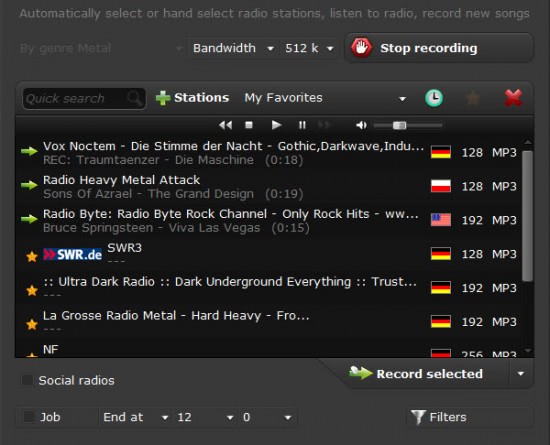
Lastly, it is possible to configure filters in the options. Filters range from preventing the saving of incomplete songs on the computer (or defining how much at the end and beginning may be missing), filtering radio station jingles, duplicates that are already in the database (unless they are of higher quality) and a so called hatelist that can be used to block specific artists or tracks so that they never get recorded.
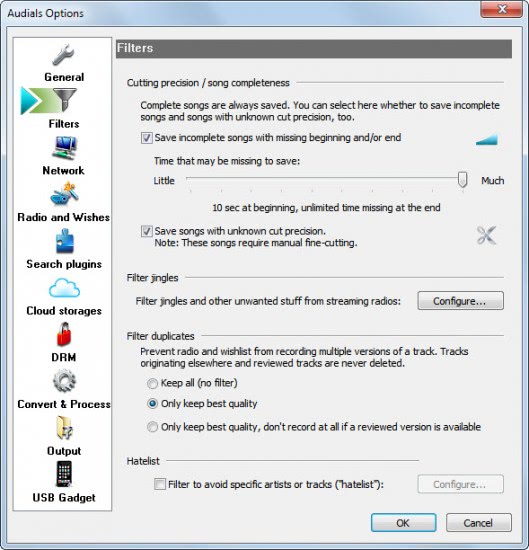
Users who configure favorites have a far better option to customize the recording. It is possible to create multiple favorites, for instance for different genres. Favorites can be added and configured in the Manage Stations window. The very same window offers to manage all radio stations in the database, and offers an option to update the station listing and add stations manually to the application.
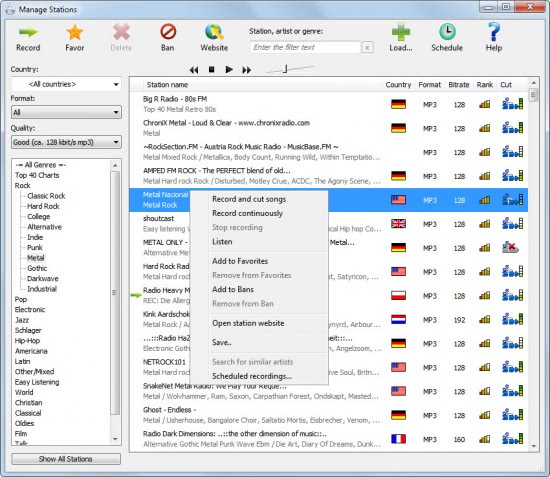
The station manager offers several filtering options. Stations can furthermore be sorted by various parameters including country, format or bitrate.
A right-click on a station displays options to record that radio station immediately, add it to the ban list, schedule recordings for that radio station, and to add it to the currently selected favorites. A link to the stations website is provided as well if available.
Audials One comes with a search that offers the user an option to find a specific song on radios or websites. The search is partly powered by plugins with the option to add new ones manually. The program links to a user forum of Audials One where users post their plugins.
The converter will automatically convert selected songs into mp3 format, or another one of the available formats (like aac). Users may need to switch the conversion options from the default mp3 wmv to all to mp3, otherwise they end up with a video track if the source is video.
The search is an excellent option to find and download specific music from the Internet.
Another interesting related option is the ability to create wishlists which can then be fulfilled in the program. Fulfilled means that Audials One will search for the selected songs and download them if found. It is basically a batch version of the search feature with additional community features (e.g. to upload the wishlist).
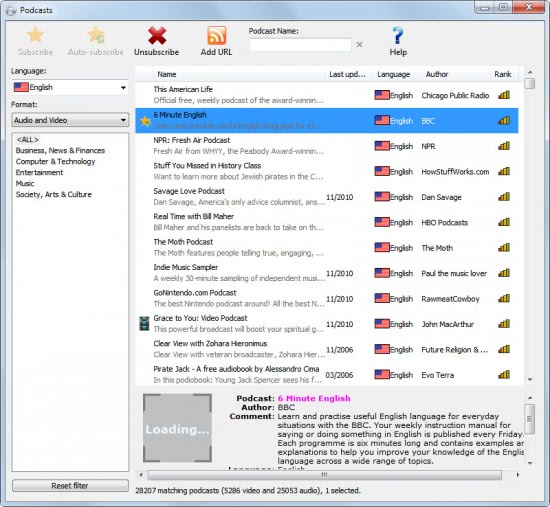
Audials One supports podcasts and users can add podcast subscriptions to the application. A large selection of podcasts is available in the podcast directory. Users can pick a language, select if they want audio, video or audio and video podcasts. A right-click on a podcasts offers to subscribe, or auto subscribe to podcasts. The latter option starts the recording right away.
That's still not everything offered by the program. The converter is used to convert files to the right format. One interesting option here is the ability to convert audio and video files from media as well. Audials One uses records the DVD while it is playing on the screen. Some countries have laws that prevent users from circumventing copy protections. This way the recording stays legal in those countries. The same is true for audiobooks, the second available option. Audials One can furthermore scan for files with DRM (digital rights management) and record them so that they become available without DRM.
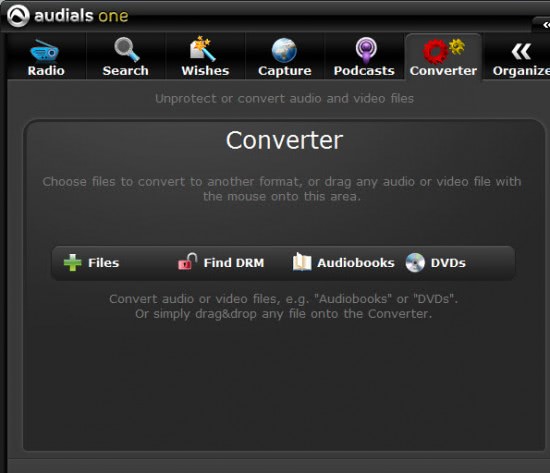
It is naturally also possible to convert selected files that are stored on the local computer system.
Audials One offers two additional modules. The first is the capture module which can be used to record Internet media, the screen or sound.
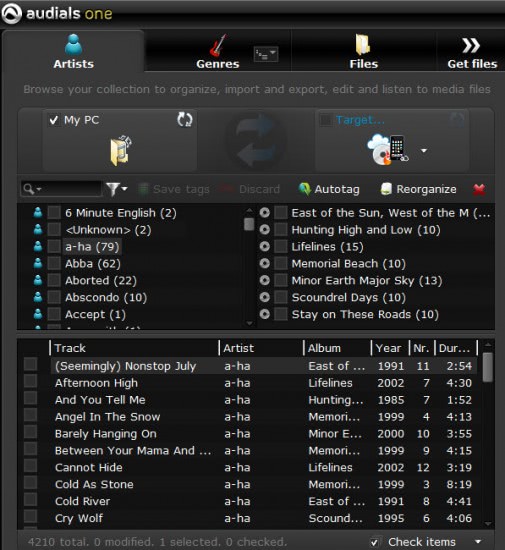
The music organizer displays the current music collection. It offers options to search, reorganize and tag music. It is furthermore possible to sync music with another device easily.
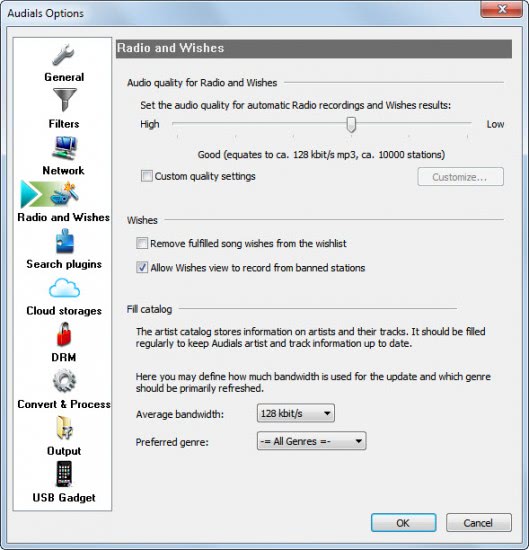
Users should pay a visit to the program's options. They find highly configurable settings here. Important are for instance the audio quality settings for recordings, the output folders and network settings.
Audials One Installation
The installation of the software is straightforward. It is possible to install it on a hard drive or on an USB storage device. Users will also see a prompt with an option to integrate the existing music collection into the application. That can be done during installation, or later on in the program as well. The import may take some time depending on the size of the local music collection. The actual scan of the selected folder is started on the first run if the integration option is activated during installation.
Verdict
Downloading music, lots of music, was never that easy. I have seen a lot of programs in the past that made it possible to download music from the Internet but not one was as sophisticated as Audials One. The ability to search for music, the automatic conversions, plugin system, creation of different favorite groups and the customization surrounding the recording of multiple Internet stations at once is superb. The software is ideal for users who want to grow their music collection, and for collectors who have a hard time finding music that they have been looking for a long time.
Advertisement



















My Music Collection is very small about 1000 songs. Please count me in your contest to enlarge it. Thanks and regards
Not too big but not too small :)
6 GB, much of this from ripping CDs that I’ve acquired over the years. Just started purchasing online music in last couple years. A happy user of devices by Creative.com, NOT IPOD.
Very small. I usually get them burned pretty quickly. My hard drive is only 160gigs
My music collection on PC is at 15.33 GB but I have yet to rip all my CDs and convert a large collection of Classic LPs. It’s a lot easier to go forward than back in tech and time!
Audials One seems like a reasonable and fairly affordable way to do both particularly if I win it!
Thanks for the review and the chance! All the best of the season to all!
140 GB, mostly space hogging lossless CD rips.
About 20GB, most at VBR converted from old CDs an LPs
About 200 GB Audio (generally lossless)
My music collection grows and grows.
At the moment it’s about 10 GB.
… and with Audials One it would become bigger even faster :-)
I have about 50 songs of music
This looks like wonderful software! My music collection is around 350 songs; but I want more…
My collection is about 60GB, and it’s cumbersome to manage by current methods.
have 90Gb of mp3’s and video music thanks … tom
My digital music collection is a small 15gb, were I to win this licence key it’d expand hugely.
16389 files. 289GB
I have a couple of GBs in some DVDs…
I need this program for my music collection – 260GB of music.
I’ve 35 GB of music files, for a total of about 5500 songs.
My music collection is more than 20 GB. Its around 25 days of music. This toll will be helpful. Thanks,
I have 28GB of music in my PC.
Please count me in. Thanks a lot.
After cleaning duplicates I arrived to 12.7 go of music albums. Thanks for the contest.
The winners have been notified, you can see the list over at the forum.
https://www.ghacks.net/forum/news/ghacks-christmas-giveaway-winners-1074/
Hey I posted earlier but it is gone. I have about 15gb music and would love to have this. Thanks, Norman
Do you know how many OST has been produced throughout anime history? Even my 100 GB harddisk won’t be enough to keep them all. But Audials One can help organizing them. So, please count me in!
exciting, thahk you. Hope to win
I have almost 1TB full of song and counting…
Thanks for the giveaway!
2.7 Gb…..400 mp3’s….
Audials One has been around for some time now and it simply rocks.
Only about 15GB at the moment. Audials One looks like quite a useful program with all it’s features.
Sound like a great program. I would love a copy. My music collections is 35.4Gb
Freddo
Its Huge.. I got 150 GB of music Collection.. This software will help me get some more..
Count me in for the contest..
hello,
thanking you for the givingaway.
I have approximately 100Gb size of my music collection.
Please count me in this giveaway of Audials One Review And Giveaway [Ghacks Christmas Giveaway].
Regards,
Mr. G.T.
Hi Martin,
Thanks for this giveaway opportunity.
In total on my laptop and 2 external HDDs (1x1Tb and 1x3Tb), I have 369Gb of music files. This is the data as of now. And this includes all genre of music.
Please count me in this giveaway.
Thanks,
Grr
Hi
How big is your music collection on your computer?
I have some 69Gb of music collection on my computer. Rest is being burnt on DVDs and CDs.
please count me in.
john d
Around 5 to 6 GB only. Anyway hope can win this giveaway. Thanks
Just a shade over 1100
While I only (currently) have 6.5GB of music on my computer, I’ve found that RadioTracker 6 has been a great help in finding new music. Having the full Audials One package would be great!
Thanks for setting up the giveaway – my music collection is about 30GB at a guess – but I would love to be able to listen to spunout radio stations using this software – please count me in the draw.
Hi about 15 GB on this computer, this sounds great, would love a free copy
I have almost 3 GB. :(
A license for AudialsOne would rock.
Hi, thank you very much for this opportunity. I have more or less 900 songs on my computer (+ – 4 GB), and a lot more on one external drive. It would be great to win a license. Thanks in advance. Cheers.
I currently have 6583 mp3 files in my music collection.
I’m a fan of older music and it sure is hard to get legally without getting costly. Would sure love this software. I’ve got a small collection started
About 80GB of music (~6000 songs).
ca 100GB
I hope to win a license
lovely. I want to win!
Hi,
10Gb of music.
Thanks !
My music collection is ~40 GB, but thats mostly because I have lots of lossless music (FLAC) :-)
I have at least more than 1000 pop,classical music on my system.
Please count me in.
18GB
Hi Martin,
I have a humble collection of 36.3 GB combined collected of video and audio collection. :)
Thank you for the giveaway.
Regards
Ich habe 200 Musik CD und 900 mp3
thanks for this giveaway :)
my music collection is around 16GB.
hope to win the key :)
Hi, I have just over 2670 song which are on my computer and around 140 music CDs.
Hope I win one
Thanks
Approximately 10 GB
I have about 60 GB of music. Did I win? :-D
Count me in…And of course i have 50GB of video songs and 15GB of audio songs..:)
I have about 500GB of music.
Hi my music collection is more than 70GB. thanks for the giveaway and all the best….thanks.
I have a relativelt small collection of songs, roughly 10 GB. I plan on increasing that soon. This program would really help me with that.
Thanks for the chance to win this great software.
It’s about 10GB
As a musician myself, i ‘d say 50 giga of pure rock music, ain’t THAT much enough!!! Hope to win that giveaway, thank you Ghacks…
I have about 2500 songs on my computer!
I have ca. 6 GB constantly on my computer.
My Music Collection is some 80GB large consisting of some 18000+ songs. BTW the review is well constructed. Lets hope I win one.
yes my music collection is in my pc (17.3Giga)
In terms of time, if I started playing the music on my computer now, it would continue for 2 days 8 hrs. 8-)
Thanks for the giveaway
1037 mp3 songs or approximately 4GB. Looks like I got smallest collection among the people above.
A disk-hogging 600GB. Quite a lot of dupes in there (and way too many lacking proper tags). Let’s say effectively 400GB.
About 1 GB (600 songs) currently.
What’s that? Oh! I know you wouldn’t believe I have 290GB of music. Well, okay, I actually only have 290GB of music. Favorites? Likey old time radio, folk & heavy on the blues.
Just 5.5GB – 1700 MP3s, but a lot of music on CDs, and thanks very much Martin for your fantastic work (forgive my bad english – I’m french guy (from Montreal)).
Some 20000 songs. All are legal except for some 20 which are so rare I couldn’t find them legally (LP, CD, …)
About half of the collection is Blues with half of them from CD’s which I bought and got authographed during concerts.
YES! I’ve won a license. Thanks Ghacks. Being a bit short on available time right now it’s gonna be christmas holiday before I install it. But I’ll keep you posted on my experiences.
I think between 50-70GB, all collected DJ-Sets since about 10 years. This year I started recording with RadioSure, TapinRadio, Streamwriter and so on. This program will fit into my collection. Let’s see.
Thanks for sharing and good luck to all participants.
Not big enough … though i’m sure with this it would soon balloon!
Only 76GB but that makes 12717 tracks and would take me 36.1 solid days of listening to get thought it all. Sadly my ipod died so I only have a 16 GB Iphone left and there for have to be selective as to what I listen to.
300 cd’s.
Nice! I’ve like 1500 songs, not big at all but would like love to win a license for Audials.
Thanks for sharing.
would luv it. mine is about 6000 songs mostly 8o’s
I would say my music collection is 20GB big, something lije 5000+ songs.
well, i’ve got a small collection of my fav. sounds and music, sure i can add more if i’ll get a chance to win one key of this giveaway, i find it really good as describe… hope to win one thanks alot…..