
Resize TrueCrypt Volumes With Extcv

I have reviewed the open source tool Extcv back in July and came to the conclusion that it offered TrueCrypt users an elegant and unobtrusive option to resize the TrueCrypt volume on the fly. The biggest problem back then was that the software was only compatible up to TrueCryt 6, and incompatible with TrueCrypt 7 which had been available for some time back then.
Users who work with TrueCrypt containers need to specify a container size during creation. TrueCrypt itself does not offer to change the size of the container once it has been created, which can be a problem if the space of the container runs low. Your only options? Delete data in the container or create a new larger container and move the data from the old into the new. That takes time and is not the best option, especially if the container is not hosted locally.
So, Extcv offers another possibility. The software can manipulate the size of TrueCrypt containers on the fly so that they can be expanded if necessary.
The software has just been updated, the biggest change is that it is now fully compatible with TrueCrypt 7, so that users of TrueCrypt 7 do not have to downgrade the software if they want to make use of Extcv to increase the size of their encrypted container.
Extcv is compatible with all kind of TrueCrypt volumes. This includes container files, disks and partitions that are formatted with the NTFS file system. The only requirement of the program is enough free disk space on the hosting device so that the volume can be expanded.
There is one limitation though. The software cannot be used to expand a volume containing a second hidden volume.
To use Extcv users need to select the file or device first, which cannot be mounted at this stage. The program then asks the user whether a hidden volume exists in the selected volume. This is a security question, as it will terminate the process if the user confirms the existence of a hidden volume.

The volume password needs to be entered in the next step.

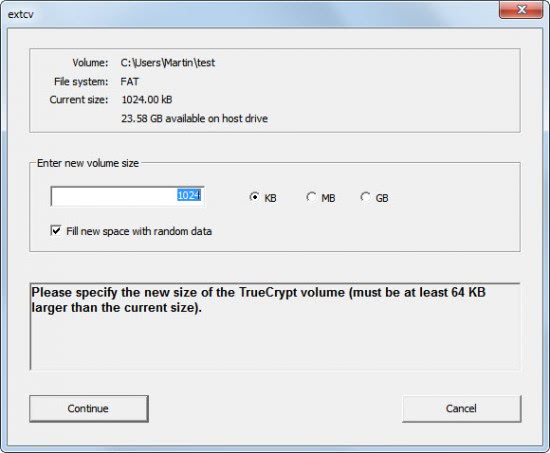
The new size of the TrueCrypt volume has to be selected in the next step.
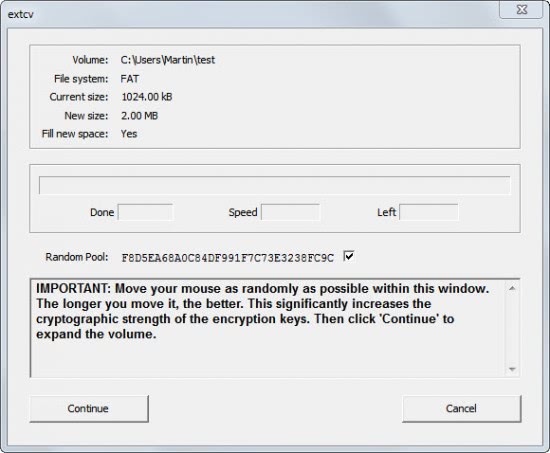
Next up is the generation of random numbers which completes the process.
Extcv, which is only available for Windows operating systems, is a great tool for TrueCrypt users. The free open source tool makes the resizing of TrueCrypt volumes a breeze. TrueCrypt users can download the latest version from the Sourceforge project page (via Caschy)
Advertisement


















Using the referenced, updated extcv (https://bitbucket.org/j0s3f/extcv/downloads/extcv-0.7-bin.zip) which works with TrueCrypt 7.1a, I was able to expand a non-system encrypted disk (extended) partition.
Schlimmchen’s guide was helpful. To add to his steps:
– Rather than getting out of Windows to expand the TrueCrypt partition, extend the partition using Disk Management
1. Right-click Computer and select Manage.
2. Double-click Storage.
3. Double-click Disk Management.
4. In the list, right-click the partition to expand and select Extend Volume.
5. Follow the prompts to resize the partition and click Finish.
The partition item in the Disk Management pane displays its new size.
6. Close the Computer Management window
(Steps above from http://pubs.vmware.com/fusion-5/index.jsp?topic=%2Fcom.vmware.fusion.help.doc%2FGUID-CFBFC91E-C682-4C04-9202-359A67C53300.html)
Rerunning extcv, it detected there was free space to expand the encrypted volume. Before extending the volume, it claimed there was not enough free space.
EXTCV appears targetted at and will check for a particular version of the truecrypt driver. That is, as of today, March 2012, it works with Truecrypt v7.0a, and not v7.1.
It gives a quite precise error message about this.
Check out https://bitbucket.org/j0s3f/extcv/downloads for an updated version of EXTCV which is compatible with Truecrypt 7.1a.
Consider this bug for in-place encrypted partition hosted volumes: http://sourceforge.net/tracker/?func=detail&aid=3542687&group_id=276110&atid=1172872
If you are actually interested in resizing Truecrypt volumes (which is not officially supported at all) you might want to have a look at this detailed guide: http://wiki.schlimmchen.de/doku.php?id=public:resizing_and_moving_truecrypt_volumes as well.
Now this is really welcome. I have a TrueCrypt volume which had been set exaggeratedly wide in consideration of future need to expand it. Had I known this Extcv application that I would have spared unused space. Nice and great idea!