
How to uninstall Windows Live Messenger

Usually there should not be any need for a guide on how to uninstall Windows Live Messenger, Microsoft's instant messenger, as it can be uninstalled just like any other software in Windows. Users who want to uninstall Windows Live Messenger can do so the following (standard) way.
Click the start orb in the Windows taskbar and type in programs and features in the search form, or click on Control Panel and then Programs and Features. This displays a list of installed programs. Locate Windows Live Essentials, right-click it and selected Uninstall / Change from the program list.
Why Windows Live Essentials (or the recent Windows Live Essentials 2011 which is currently the latest iteration of the messenger) and not Windows Live Messenger? Because Windows Live Messenger is part of Live Essentials.
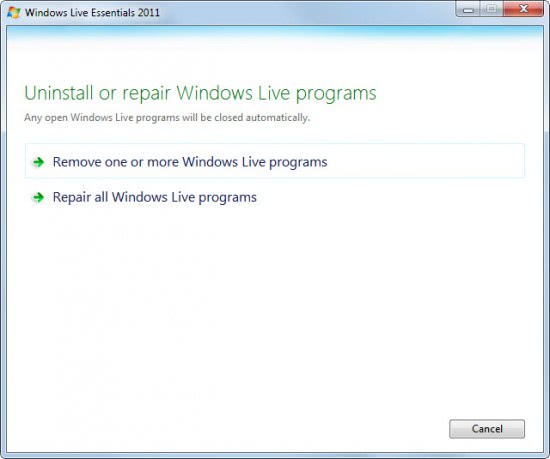
The click on Uninstall / Remove spawns the uninstall or repair Windows Live programs window. Select remove one or more Windows Live programs.
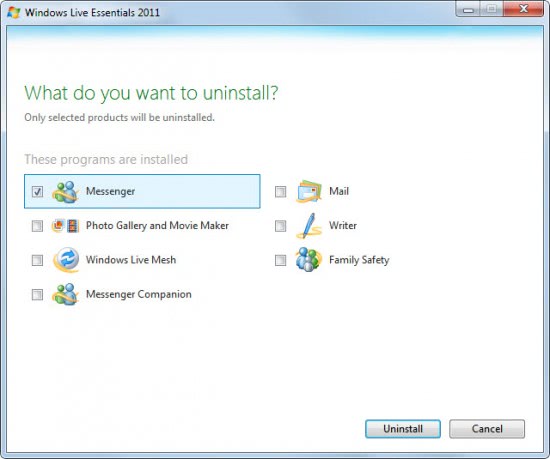
This displays a list of all Windows Live programs that are installed on the computer system. Place a checkmark in Messenger, which is Windows live Messenger and click the Uninstall button afterwards.
This displays a uninstalling programs progress window. Press close once the operation is finished. This should have removed Windows Live Messenger from the system.
There are however cases where users report that they cannot uninstall Windows Live Messenger using the Windows Live uninstaller.
Those users can download the free program WLMUninstaller to try and remove Windows Live Messenger or MSN Messenger from a computer. The program has not been updated for a while, and it may be that it does not work anymore with Windows Live Messenger 2011. This should therefor only be used as a last resort if the standard uninstallation of Windows Live Messenger does not complete successfully.
Advertisement


















mine just uninstalled the whole program did not give me the option to choose
Even i have faced the same issue and after that i have gone through the lots of solution to solve this issue but nothing helped me to solve mine issue and finally i have gone through the below link and i have solved mine issue. To Uninstall Windows Live Messenger Completely go through the below link:
http://forums.techarena.in/guides-tutorials/1443836.htm
This is no longer possible with the recent version. They have put something in there that prohibits you from uninstalling and installing an older version. I think they are trying to get the webcam feature off their servers from what I can tell. I have tried everything short of reformatting my computer which I’m not going to do. I wish someone would come out with some kind of fix for this. On another computer I finally had to unplug my internet when installing version 14.0.8089.726 because if you dont it downloads something that blocks you from connecting to the internet. This is so crazy!
Hoi Martin, is it not possible to uninstall Microsoft Live messenger with programs like, Zsoft or Revo uninstaller (and do you get with Revo also to uninstall all the registry leftovers?) ? And if so possible is this not the (much) better way of uninstalling?