
Automatically save my Conversation History In Windows Live Messenger

Depending on how you use Windows Live Messenger, it may be beneficial to save the chat conversation history automatically as a backup in order to access it whenever information from the chat need to be retrieved again. That's for instance essential for businesses, and business related chat, but can also make sense at home when chatting with friends or relatives.
Windows Live Messenger offers to save the conversation history. The setting is however disabled by default, and users need to activate it to have it saved automatically to the local PC.
Open Windows Live Messenger, click on your name and then on More Options in the menu that pops up.
Switch to History in the let sidebar and locate the Conversations group in the History settings.
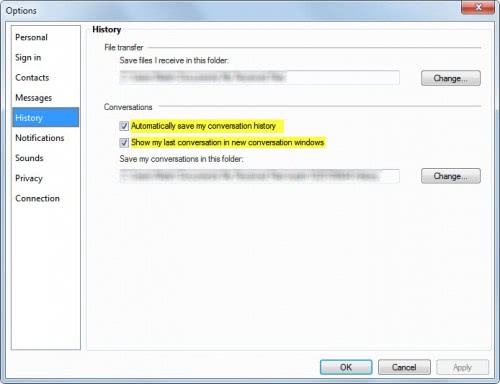
Check "Automatically save my conversation history" to save the chat history automatically to the local PC. You may also want to check "Show my last conversation in new conversation windows" to see the messages from the last chat session.
The directory where the conversation history is saved to is in the My Documents folder by default. This can be changed to any other location on the system.
Storing the conversation history unprotected on the system may have privacy implications, as any user with access to the PC may access those chats. Options to avoid this from happening are to store the conversations in encrypted containers (using True-Crypt for instance.
The only downside to this option is that you need to mount the encrypted container every time you want to use the Messenger application to chat with contacts. While you may configure True Crypt to automatically mount the container, it would make the security it offers ineffective as everyone else would again be able to access the messenger log files on your computer.
Advertisement














yr information is rocking
If you do not have windows live installed and you just chat using the online interface (when logged into Hotmail) can you save and view old conversations ?
Great guide to a common question for Windows Live Messenger users!
While it is a good idea to periodically delete these histories to save space, this can be a very helpful feature to recall information.
Cheers,
Kyler
Windows Outreach Team