
How To Remove Windows Live Messenger From Startup

Windows Live Messenger can be installed as a separate application or as part of Microsoft's Windows Live Essentials software suite. The popular instant messenger has a lot going for it, from high definition video chats to mobile application access and sharing files.
A friend contacted me recently asking for help. He was frustrated that Windows Live Messenger started with Windows, and that he was not able to find a way to disable the program from doing so.
Experienced computer users know how to remove applications from starting up with Windows. Inexperienced users on the other hand usually do not, especially since Windows offers more than one location to place links to programs that should be started with Windows.
It was rather easy to determine for Windows Messenger. The excellent software Autoruns displayed Windows Live Messenger in the Logon tab. It is possible to remove it from system startup by unchecking the checkbox of msnmsgr there. Be aware that the program requires elevated rights to make changes to the system, and that it will request a restart with those rights if it is started with standard user rights.
But there is another option to remove Windows live Messenger from Windows startup, one that may be better suitable for most users as it requires no additional program.
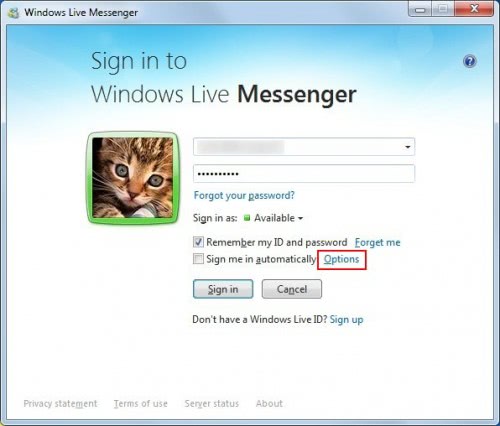
A setting to enable or disable startup with Windows is available directly in Windows Live Messenger. To configure it click the Options link in the sign in to Windows Live Messenger window.
The sign in options open in a new window automatically. Locate the setting Start Messenger when I log on to my computer and uncheck it.
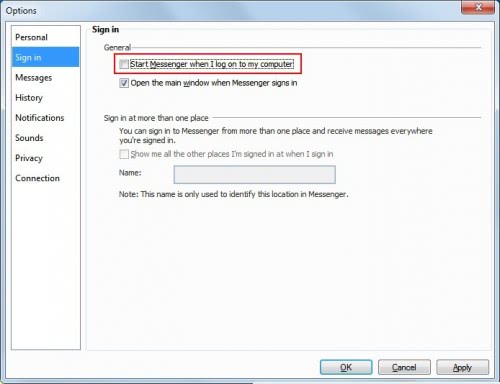
Once the option is removed from the sign in options Windows Live Messenger will no longer start up with the Windows operating system.
Advertisement















What a top rated article – followed the latter part for disabling messenger on start up and just soooooo easy! MS don’t want you to know about it obviously!
Thanks. Thanks and thanks yet again.
Thank you!
i want my old windows live messenger back but i don’t like new one
i has some plm with that
thank you