
How To Use 3TB Hard Drives On Windows XP

All hard drive manufacturers have announced the first wave of 3TB (that's 3 Terabytes) hard drives in the first half of 2010, and first 3TB hard drives like the Western Digital Caviar Green WD30EZRSDTL 3TB are now available.
These high capacity hard drives will work fine for users running Windows Vista, Windows 7 or a Windows Server 2008 operating system. Windows XP users will however notice that they cannot use all of the space of the hard drive. Why? Because the operating system cannot address disk space beyond the 2 Terabyte limit. That's roughly one third of space that cannot be used.
An alternative is an advanced partitioning scheme like GUID Partition Table (GPT) which can support 3TB volumes. The problem however is that GPT is not supported by Windows XP.
Paragon however came up with a solution. They basically create a specially signed driver to make Windows XP compatible with the GPT partitioning scheme. With this in place, Windows XP users can utilize the full storage of 3TB hard drives.
There are a few limitations though, but the solution nevertheless is the only available one to use all 3 Terabytes of hard drive space on Windows XP. The major limitation of this method is that the 3TB hard drive cannot be the system partition. The full 3 Terabytes are only available if the hard drive is installed as a secondary drive. Other limitations include incompatibility with RAID setups and external 3TB hard drives.
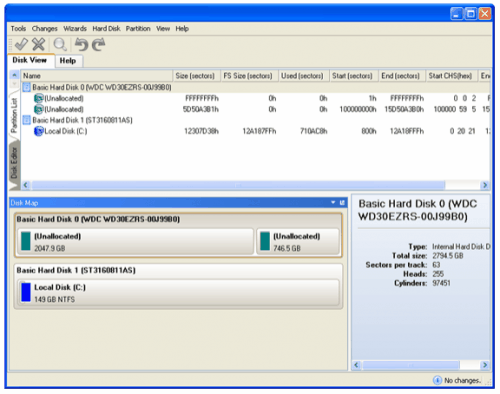
After installation and reboot of the system the GPT partitioning scheme needs to be created on the 3 Terabyte drive. This is done by clicking on Hard Disk in the menubar and selecting Convert to GPT hard disk from the context menu.
Full access to all 3 Terabytes is provided afterwards. It is then possible to use Windows tools to manage the hard drive, or the Paragon GPT Disk Manager. The disk manager offers options to partition the hard drive among other features.
Paragon GPT Loader Download and Compatibility
Paragon GTP Loader is currently available free of charge as part of Paragon's Early Adopter program. The program has been developed for Windows XP, and users of other Microsoft operating systems have no benefit of running the software (as their systems support 3TB drives). The Paragon GTP Loader download link will be sent to the email address used in the registration for the early adopters program. The same email contains a link to the product guide in pdf format.
Advertisement


















With the Paragon HD Manager S/W, the GPT to MBR conversion only works for SATA drives mounted internally, unless you can find an eSata work around. We purchased the Paragon HD software for two reasons, to image our Windows XP SP3 legacy development system and to find the means to partition WD 3TB “external” hard drives so they could be seen by Windows XP. Granted only 2TB will be seen by XP, the drives are still cheaper to purchase. Speaking with Paragon’s tech, I wasn’t feeling good about the making the external 3TBs so they can be seen by XP. Any thoughts? Anyone, anyone, anyone, Ferris???
Your links to western digital’s program are broken and I can’t search for the program because you didn’t include the name of it. Please update this article.
Thank you.
Using WD My Passport Ultra 4TB drive on XP sp3 x86 (this is a portable drive, usb powered):
DL and run “WD Quick Formatter.exe” (WD_Quick_Formatter_Win_1_2_0_10.zip) This results an MBR single partition NTFS drive 3.63TB.
I also then reformatted to exFAT using FORMAT.COM (the updated version for exFAT) as I don’t like NTFS on external drives (too much constant drive activity).
Seems to work perfect except I have some trepidation about 4K alignment. Also msinfo32.exe makes some arithmetic errors in calculation in the number of 4K sectors on the drive, it does however report that the sectors are indeed 4096 bytes each.
WD gives a warning about SOME old programs:
Configuring the drive:
XP Compatible-If you are running Windows XP and connect a WD
external drive that is larger than 2TB, it will not be
recognized by your system until you select the XP compatible
option to configure it and change the block size. After
running the application using the XP Compatible option, the
drive will be recognized and can be used on Windows XP,
Windows Vista, and Windows 7.
Most Compatible-(Vista or Later Required)-If your WD
external drive (larger than 2TB) has been configured to
change the block size using the XP Compatible option, you
might have problems with some applications. If this happens,
run the Quick Drive Format application again and select the
Most Compatible option to return to the manufacturer’s
default block size settings.
IMPORTANT: Applications that do not support drives
configured with the XP Compatible option (larger block size)
can fail in several ways. For example, an error can occur,
or the drive can crash or corrupt data without warning.
Please review your application documentation carefully to
make sure that it supports the larger block size
configuration before running the application. If your WD
external drive is larger than 2TB and you select the Most
Compatible setting, it will not be recognized by Windows XP.
Which link are you referring to?
i have hdd 4 terabyte western digital
my operating system win xp sp3 32bit
how can i use the full space of hdd
Hi Angela Lab, to make probably new things a little easier, I will paste some appropriate torrent-hashes for proper and working versions of the tools that I described. You can just put these in a search-engine to find your way 7BA9F5C301312635F86FCE86F251F672623144BF + bd6de78e80b12e35745d733445e97db799180f47 + A5CC90571D77EAA8CB20B6112F6B7C9398626776 and download them. But I realise also my versions are little old by now, so you may try/need to find other/newer ones. I think this is a good and clean search-engine for this purpose; http://metasearch.torrentproject.com/ Also I forgot to say that it might be useful to keep woking with two inner harddisks; one for your OS+APPS, the other for your (audio-)files. Option is then also to install another OS on the second disk, so you can choose which one to boot and use. Maybe you want to try something else or newer? In that case split the new inner disk in 2 or more partions also, to keep things separate, controllable and changeable.
Hi Angela Lab, I find it still a bit hard to get your way of thinking/describing. But bluntly; yes, cloning might be another trick to ‘format’ your external 3TB. But then still you need the extra driver to access/read/write it with WinXP 32bit. Most easy would be to visit a friend with Win7/8/10 PC. With that PC you could properly format your drive GPT style with the maximum size. Then you should buy (or find and download via a torrent) this program ‘Paragon HFS+ for Windows’, which will enable GPT for your WinXP. Then you can either copy or move out YOUR recordings to the 3TB. I used capitals here because I see this as ‘personal’ or UNIQUE stuff, which is different from the OS or installed programs or apps, because those are replaceable. That’s why I always keep these things apart on my main drive, by using 2 or more partitions; Window and Data. So now I recommend this to you as well. If you move out your self-created and irreplacable data, you will see/measure that the used size left over for Windows and installed programs wil probably shrink a lot. That portion you could make an image of in case the system gets damaged beyond repair. You can also use this image to copy your existing OS & APPS to a new/bigger/faster/healthier (inner) harddisk, if wished. But you have to create and write this image first somewhere (I’d say your preformatted 3TB). Migration to a new OS+APPS disk you can also do by cloning, but then you usually have to physically swap the old and new drive next. You can’t do that with an external harddisk with USB controller. But still it might be true that a modern version of for instance Acronis True Image is able to clone (full sector to sector copy, or more like only plain 0’s & 1’s instead of a file based approach) to your 3TB. In this process you may find the option to enlarge the copy of the existing partition on the new disk, if it has more space to offer. But as long as you try to do this from within an OS without access to the disk it won’t work. You first have to create a so called boot-cd with it, to operate apart from the unable OS. The result could be your drive is totally NTFS formatted in GPT style, but you’ll never be able to actually boot it because of the USB device instead of the old IDE or newer SATA for the internal harddisk. You normally just can’t boot WinXP from USB without heavy tricks. Also you still can not get access to this harddisk from WinXP 32bit without the needed Paragon driver. So get that one first and install it. Maybe it’s even possible that after this you can format your 3TB GPT style from within Diskmanagement; just watch carefully to change the usual MBR optionally to GPT. If not, get for instance EASUS or Acronis Disk Director and see what those can do. Once your system can handle GPT, read and write the 3TB, you can copy or move out your data. Then you clean out and defrag your C: drive with OS+APPS and make an image of this with for instance Acronis True Image, which you can have written to your 3TB as well. But I tell you all these actions will work way faster if you choose to build in a 2TB and work on that. The 3TB you can still use for extra safety. If you are lucky your PC has a free PCI-E slot to build in a USB3 controller card, which enables you to use the external drive in a much faster modus than through USB2 ports. But it might be that your PC offers only the longer white old PCI expansion slots, which can’t handle a USB3 extension. I hope you get the bigger picture now? What I still can add, is that it might be wise but also probably time-consuming to first let checkdisk control and fix your existing harddrive partition(s) first. After that I would advise to let Perfect Disk defrag your drive so that it becomes neatly ordred and fast again. This program is way bettter than the simple one build in XP and it can also do ‘Offline Defrag at Boottime’, which is good to get your Metadata also properly ordered. You have to do multiple runs; it will show you the results in the form of colored blocks as well through text-reports. The main point of this extra and time-consuming (nightly?) work is that the other operations you need to do will work way smoother/faster if properly prepared. Well, I’m gonna make another coffee now and wish you and your machine all the best & good luck!
I once installed another Paragon program, HFS+ for Windows, on my Windows XP Desktop PC to read a Mac disk. Today -and because of this article- (‘advertising’ the brand Paragon) I realised this other piece of Paragon software is also a really good solution for GPT support on my good old beloved WinXP, because of the quietly unmentioned ‘side-effect’ that it was not only designed to read Mac’s HFS+, but of course -one step before that- to also find and access their GPT formatted partition(s). This realisation started happening when I plugged in my 4TB external harddrive in the USB2-port of my 2005 Windows XP Laptop, but could not access the disk…? How could it be that this was no problem on my Desktop? When I bought it new & blank, I knew about the size-limitation in XP, so formatted it with a Windows 7 machine. After that it gave me no problem to read and write it with my XP Desktop, so I expected this also for XP on my Laptop. I had to think a while about the possible difference between these machines. Once I started searching ‘enable gpt win xp’ I found this article, read ‘Paragon’ and then I kew it…; I already had their driver installed on my desktop! :-) And I got it for free too…! ;-)
I have windows xp pro 32 bit. I recently, without thinking, and the sales person said it would work, have been trying to backup to a 3TB EXTERNAL hard drive. I see paragon says it works only if it is an internal drive. Does this mean I need a ghosting program to copy everything on my computer in case it crashes? I do have the Windows xp disc, so I will not have to back that up, but I have a lot of audio recording programs set up and would like to copy in case it crashes so all I have to do is restore. I tried backing up but always says there is not enough space!!! WHAT??? Should be. I have reformatted and reformatted the external drive and can never get it to back u everything. I have till November and my warranty is up. So how would I do this? I get different feedback all the time. My guess is carbon copy program? Would that take care of I?
One other question….the external drive says for USB2 or USB3 hookup. I have USB2 on my tower. Is the cord that came with my lacie 3TB external drive ok? Or do I need to get a USB 2 cord?
Thank you!
Paragon says “internal drive” because it is not a true GPT driver. From what I understand, any HDD you use with their software is tied to this driver. You can’t install the GPT driver on another computer and use the same 3TB HDD with the other computer. Well, you can use the HDD, but the data won’t be on it.
In my opinion, the Paragon GPT driver is some pseudo driver, and if you value your data, I would avoid it. It’s kind of like those Western Digital external drives with hardware encryption. If the enclosure dies, then so does your data because you won’t be able to decrypt the drive to retrieve it.
As for XP x86 users just getting a 2TB… Where I am, 3TB costs only $10 more, so I get the 3TB and only 2TB of it, gambling that the drive will still work when I eventually migrate from XP to something newer. It’s a personal choice.
If you have problems partitioning the 3TB in XP, I suggest: 1) update the SATA driver; 2) use MiniTool Partition Manager (there’s a free version for personal use). Someone mentioned Acronis here. I have had problems with some Acronis imaging software leaving crapware behind that is difficult to get rid of (ie. involves registry editing), so I avoid any Acronis product unless it is a live CD/USB (ie. does not involve installing in Windows).
Hi Angie, you’re total story sounds not real clear, but as far I seem to understand now: you have XP with a lot of audio programs set up in it and want to back this up to your external 3TB, right? But XP cannot format a 3TB drive, so the sales person lied to you in the first place! I would say; go back, complain about this, demand a 2TB instead and/or some money back! This seems the easiest way for you. Despite my other comments, I choose this approach now, because by reading your post a few times I feel it maybe too much trouble for you to fix this yourself. Forgive me if I have it wrong or put you down; that’s not what I aim for. It’s just my impression from what you wrote. I wish you a good fix and I think you just would be better off if you could return the 3TB (it’s quite new and ain’t used much, right? The shop could resell it for cheaper). An external 2TB would work out-of-the-box for you. Or get the shop built in an even cheaper 2TB in your tower, if there’s a free connection and it fits (cost them like 15 min). That way the large backups will also be way faster than via USB 2.0. You didn’t mentioning anything about the amount of space and the kind of backup program, but I advise to check it’s settings to keep control. I always use one partition for my OS incl. programs, besides another one for my personal data. This way my system stays faster and I can back this up on the separate data-partition and/or both also externally, in case the disk physically dies. You may be well off having your old harddisk cloned to your to your probably much bigger newer one and start to create this situation.
Hi Tor Rent
I was wondering if a cloning program would work to put my apps and files on the 3 tb external hard drive from wi xp? I do not have anything personal on this computer, just strictly audio recordings and the programs. I bought it over a year go, tried formatting, all the different ways, in fact I remember now I did download paragon, but I still couldn’t get it to work. Always saying not enough space no matter how I formatted, partitioned or enlarged it. So it sits next to the computer doing nothing! It has been over a year, so I know I would not be able to take it back. I think I might just go buy a 2tb and try to sell the 3tb.
Ubuntool: it absolutely works, i have multiple 3TB drives now connected to my XP64 machine. I format them (sinds the AFD) on a win7 laptop to ensure the correct alignment and the fun part at the first time: on the win7 machine i only saw 700GB while on the XP64 i saw the whole 3TB (actually 2.7TB) – it turns out the USB2-SATA adapter on the Win7 machine was the problem, the USB3-SATA adapter from my XP64 machine worked, but imagine my supprised face!
http://roadbiker.student.utwente.nl/3tb_xp64.PNG
Lots of drives in that image…! Are you the guy uploading all these free Linux ISO-images with the fast server at Twenthe University?
I’m sure XP 64 bit works
http://www.terabyteunlimited.com/ucf/viewtopic.php?f=2&t=1170&sid=0b789e6660e2a9c2e0ca7b3a04324f0f&start=10
That guy demonstrated using modern hardware and GIUD partition to see 3TB
I have a dual boot Win XP (32 bit) and Windwows 7 (64 Bit) system. I used the Paragon utility on the Windows XP side and it works great, but on the Windows 7 side, I cannot see the hard drive. It was my understanding that I did not need to install any drivers on Windows 7. Any ideas?
You better had formatted on 7 first and then added Paragon to XP. Buy another one and try again?
if you used paragon on windows xp, you should use it on windows 7 too since paragon is not the native windows support
I believe that if you manage to use the whole dik capactity on windows xp using paragon loader or any other utility (like disk wizard provided by seagate), then you have to adopt the same approach on all others OS and computer
it is like when you connect a new device, its drivers have to be installed on every computer you plug to
I suspect that for users of XP and 3TB drives, the Paragon GPT loader software is the only solution . If I was to make the purchase again I would have kept things simpler and bought the 2TB version which is what I would advise others to do.
Yes, I’ve got the drives working to full capacity now using GPT loader. However I wanted to RAID 1 the pair that I bought, but with Asus P7P55d and XP pro, using the RAID or AHCI options in bios just results in a blue screen of death that’s too quick to read, so I’m left with what is probably less than optimal performance.
Also the WD align tool that’s recommended for use with Advanced format drives does not recognise the partitions, so another issue.
Using XP ? Buy 2TB drives or less !
I guess when you want to set your bios to raid to create a 1 and get a blue screen, your already existing installation (on the same chipset or controller?) probably can’t handle the sudden change, because it misses the appropriate and different driver that is needed. I think you may have better luck disconnecting your old disk first, then set your bios to raid to start a new installation. Probably you have to add the other driver with F6 key during installation. I once fiddled something on an older asus board; first installed the other driver, made an image and after setting the raid-option in bios, wrote back that image on the raid-set. This was quite tricky and experimental, but it worked, although I can’t remember clearly if I stayed on the chipset-controller or moved to the 2nd, dedicated other-brand controller. Now I would advise you Acronis True Image, with Plus Pack. This will give you the option to write the image from your single-disk back to your double-disk, but without the drivers, so no blue screen, I guess. But then you still have to build and format your raid-setup first, with just an initial overwrite/throw-away-installation.
HI Paul, I had the same issue Bought my 3TB drive Nov 2014 and tried to backup my files to it and no go, I tried over and over, renaming, repartitioning, but it still only has so much space, and not enough for what I have!! Like you said, if I would have known this, and I asked the people who sell it which said oh ya it will work, I would have also bought a 2TB. I also though if the usb cord that came with it is only usb 3, but it states it would wok with usb 2. I noticed someone else asked that question.
So the Paragon GPT loader works then? Is it free download or purchase?
I was going to buy ghosting (copying) software to do this…would that work also?
If this paragon doesn’t work then I will try the copying app. If that doesn’t work I am selling it and getting a different one. Although I hooked it up to my laptop with win 10 and got the same result?
Maybe I am doing something wrong????? Its a lacie 3tb external drive.
Awaiting to hear from you and thanks for the input I have been waiting for a response on this topic for a little while now.
It seems windows would post a site to let you know how to do this, instead of being so difficult and a secret!!!
Thanks,
Angela Lab
Hi Angela, seems we’ve got about the same timing on this page! I already wrote my own post as last one (by now) and also a few -late- reactions. I guess those can be helpful for you understanding more of the whole thing. I guess what’s best for you is to copy what you have on your only partially formatted disk to another one first, to be sure. After that you can try to convert your disk-layout from MBR-scheme to GPT-scheme. I think Windows 10 may be able to do that via diskmanagement, but I’m not sure; you may just try, once you have a backup of your files…! Otherwise just delete the original small partition and create a new one, with all the size on the 3TB. Win10 is forced to use the proper GPT-scheme then. USB3 should be compatible with USB2, so I guess your cord is usable, as long as it fits the port properly. BTW you may look out for other tools as well; EASUS is free I think, but I like Acronis Disk Director a lot better.
i need softwer for use my 3 tb sata hardisk driver in normal xp
Dear Martin,
thank you for this article.
Do you know a free software that works like the one from Paragon?
I bought a 3 TB internal drive not knowing about the problems it will have with my Windows xp.
I want to use the disk as an external data storage.
Greetings from Germany,
anna
I just bought a 3TB WD Green drive. I wanted to install on my Win XP 32 bit system as a data drive. I read and re read then downloaded Paragon Migrate to UEFI files. It keeps talking about Win 7 64 bit. I tried to install anyway and it tells me it will not work with this OS (Win XP 32). What am I doing wrong?
Thank you
Doug
Doug, Paragon since then has removed the program from the Early Adopters page. It is now a commercial program, the web page is here: http://www.paragon-software.com/technologies/components/gpt-loader/
will, did you create the partitions using GPT?
according to this XP64 does support datadisks using GPT
http://en.wikipedia.org/wiki/GUID_Partition_Table#Windows_x64_64-bit_versions
faq about gpt:
http://msdn.microsoft.com/en-us/windows/hardware/gg463525
how to create gpt partitions:
http://www.microsoft.com/resources/documentation/windows/xp/all/proddocs/en-us/guid_partition_table.mspx?mfr=true
I have Win XP 64 bit Professional
Just bought 3TB WD Caviar Green,
Only shows 2 Partitions at first. Tried to play with test and make work,.
now I only have
1 Part = 48 GB
2 Part = 1999 GB
3 Part = 768 GB
The third no matter what I do, I can’t delete,
can’t partitiion, can’t shrink / resize, only remains 768 unallocated space.
And ye it is
AMD x2 Athlon
SATA 3 Controller Pci card
ASUS Motherboard A8N VM-CSM
4gb Ram
Other WD Drives
160 BLue
2 1TB Caviar Black
and still no fix.
I deletedall Partitions and trie to recreate from unallocated space, no results.
Best I can do is 48gb and 1,999gb.
So obviously it is not native to XP 64 bit Professional.
Any help?
I also tried under Win 7 64 Ultimate. same thing.
Sounds like you still choose the MBR partitioning-scheme and reached it’s size limit. Try to choose GPT first. I guess if you would decide for just one-big-all-partition to begin with, you would force XP 64bit to do a GPT layout.
@Cutarescu
see in the given page the following Q/A:
Q: How big can a GPT disk be?
A:
-> Windows XP and the original release of Windows Server 2003 have a limit of 2TB per physical disk
===> thus 32 bit does not support >2TB natively and the paragon driver is needed
-> Windows Server 2003 SP1, Windows XP x64 edition, and later versions, the maximum raw partition of 18 exabytes can be supported. (Windows file systems currently are limited to 256 terabytes each.)
===> thus 64 bit supports >2TB natively and no additional driver is needed
are you sure you have 64bit version of XP? if not then the/an additional driver is needed
@ A Mulder:
are you sure the driver’s for Win XP 32 bit? I cannot find it in the link indicated by you, just countless questions and answers about how to make it work in 64bit operating systems.
I just purchased a WD Caviar Green 2.5TB in my the intention to use it as a secondary drive.
I use Win XP SP3 and the HDD is detected but only as 280GB…
I really need a fix… if there is any available.
This driver is only is needed on XP 32-bit, as XP64 supports drives larger than 2TB natively:
http://msdn.microsoft.com/en-us/windows/hardware/gg463525.aspx
Does it mean there is not hardware limitation on using 3Tb on olders pc running xp. I mean if I split 3Tb into 2 logical disks, it can be used (also bootable) on windows xp?
With plain XP 32bit without the Paragon driver/software you just can see the disk in Computer/Diskmanagement, but not do anything with it. You may split it up in two or more partitions on for instance Windows 7, but my guess is you won’t escape the use of GPT partitioning scheme if you want to use full capacity, because of the 2,2GB(?) limit of the older 32bit supported MBR scheme.
With the GPT partitioning scheme written on the hard drive, will it be possible to access files on the drive using Vista or Windows 7?
Vista and later seem to support this natively, see http://www.microsoft.com/whdc/device/storage/gpt_faq.mspx
With regards to the statement, “…but the solution nevertheless is the only available one to use all 3 Terabytes of hard drive space on Windows XP.”:
According to Microsoft Corporation ( http://www.microsoft.com/whdc/device/storage/gpt-on-x64.mspx ) Windows Server 2003 with Service Pack 1 should have support for GPT disks.
Such support is probably not a unique feature of the Windows Server 2003 with Service Pack 1 kernel, and such feature is likely applicable to Windows XP Service Pack 2 (possibly also Windows XP with Service Pack 1) through manual or script installation or integration into the Windows XP setup. Any related Windows Server 2003 drivers would probably be unsigned on Windows XP.
X64 version of Windows XP is essentially a 64-bit WS2003.