Auto HD For YouTube

Many videos on the popular video hosting site YouTube are available in multiple video qualities. Why is that you may ask? The video quality depends largely on the source video that gets uploaded to YouTube by the user.
The source video defines to which different quality levels the video can be encoded to which happens automatically in the backend once the video has been fully uploaded to the video hosting website.
Why different qualities and not just one? To provide an optimal experience for all users who visit the site, no matter if they access YouTube on mobile devices, desktop PCs or televisions.
Internet users with a slow Internet connection may prefer to view videos in lower resolutions to avoid buffering pauses during playback as the size of the video is lower if the video resolution is low. Users with high speed Internet, and users with big screens may want to view the videos in the best available quality instead so that it displays in crisp clear quality on the screen.
Auto HD for YouTube is a Google Chrome extension that offers to load YouTube videos automatically in predefined qualities. Your can define up to four different quality settings and prioritize them.
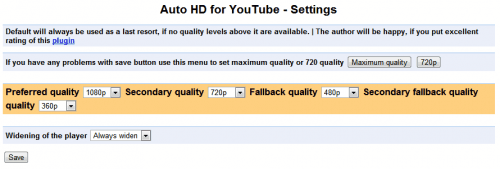
The extension will always try to load the YouTube video in the preferred quality, and use the remaining quality settings as fallbacks in case the video is not available in that quality.
The quality selection on YouTube happens in the background without user interaction. Available video qualities are 1080p, 720p, 480p, 360p and default which equals 240p. Small screen and slow connection users may want to configure the extension for a lower quality setting, while high speed users may opt for 1080p whenever available.
The only other option offered by Auto HD for YouTube is the ability to configure whether the video player should automatically be widened or reduced in size on YouTube.
Chrome users who would like to configure the video quality settings on YouTube find the extension at the official Google Chrome Extensions gallery.
Mozilla Firefox users who want a similar option in their browser can take a closer look at the Greasemonkey script YouTube HD Suite which adds the capabilities to the browser.

It adds the highest video quality available to each video that is displayed on YouTube as a visual indicator.
Update: The Google Chrome extension has been discontinued. Chrome users can download and use the Youtube HD Suite just like Firefox users can.
Advertisement