
Block Updates from friends Showing Up In The Facebook News Feed

The news feed display updates and new posts made by Facebook friends and groups / pages that you like.
The page updates a lot if your friend count goes up and also if your friend's like to post a lot. Important updates sometimes get pushed down because of the amount of updates.
There is however a simply solution for that: Block updates from Facebook friends that do not post anything special or that you do not care about.
Most Facebook users have friends who spam the news feed with silly game and application updates or other unimportant updates. Facebook has implemented options to block specific single updates or all updates from a user or application.
Lets take a closer look at how you can block these updates from appearing in the Facebook News Feed. For this, I have taken a post from Ghacks writer Mike Halsey as an example, and I hope he does not mind.
Update: The feature changed in recent time. you need to click on the down arrow on the right side of the post now to display the options. There you need to select "I don't want to see this" instead. Update End
When you move the mouse in the area of the news feed update, you will notice an x in the upper right corner of the update. If you left-click on the x three options appear:
- Hide this post: Hides the selected post from the news feed, but will allow all other posts by the friend to appear in the news feed.
- Hide all by (username): Hides all posts from the user immediately. This means all posts of the friend are removed from the news feed, and no new posts will be posted on the feed in the future.
- Mark as spam: If a post is spam, i.e. advertisement, you can mark it as spam.
Update: The unhide option has changed as well. You need to visit your friend's profile now, click on the friends button there and then on "Get notifications" so that updates are displayed on your feed again.
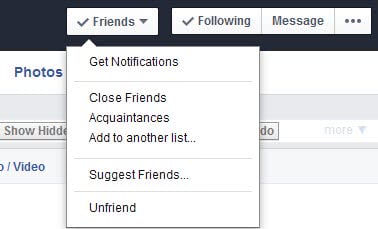
There may come a time where you want to display a Facebook friend's post again. To do this you need to scroll to the bottom of the news feed page on Facebook, and click the Edit Options link there.
This opens an overlay with a list of all friends that are currently hidden in the news feed.

You can use the add to news feed button to add their posts to the news feed again. There is also an option to enable hidden applications from appearing in the news feed again.
















Has Facebook changed since you posted the directions to hide and un-hide posts from a friend? I followed your directions and hid a friend’s posts, but there is no EDIT OPTIONS link at the bottom of my news feed page. So I hesitate to do this with anyone else in case I want to change my mind.
Interesting.
FB Purity. =)
http://www.fbpurity.com/
Does all of this and more.