
Lingoes, Multi-Language Dictionary And Text Translation Software

I sometimes have to look up words in a dictionary if the meaning is not completely clear to me. For that purpose, I can use a dictionary that i have at home, or use one of the various online dictionaries. The same is true when I do not know a word in a foreign language that I speak. I can look it up at home or get translations online.
Lingoes is a free dictionary and text translation software for the Windows operating system. The application offers an incredible feature set for a free program, more about that later in the review.
The program ships with an English dictionary and integration of multiple online translation services. Free dictionary files for additional languages are offered at the developer website. They need to be downloaded, unpacked and then loaded into the application.
All dictionaries are accessible at the same time. Words or phrases can be looked up by entering them in the search form on top of the program. Lingoes will automatically display the best match, and adjacent words in its interface.
The word definitions and phonetic form are displayed on the results page, along with the dictionary it has been found in. Phrases can also be picked with the mouse directly in the sidebar. Lingoes tries to automatically match the phrase to one of the installed dictionaries. It is possible to select a specific dictionary instead if the user wants to look up a phrase in one of the available dictionaries. Otherwise, the first matching dictionary will be used for the definition.
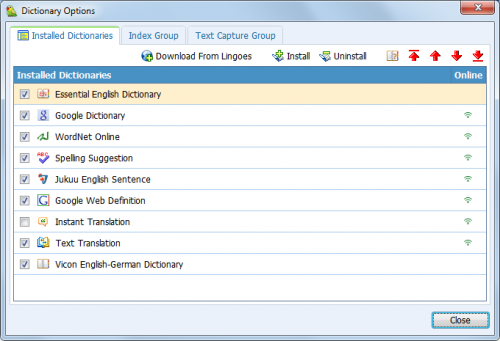
Dictionaries are added in the dictionary options menu. Here it is possible to install or uninstall dictionaries
A right-click on a word or phrase opens a context menu with several options, including possibilities to let the program pronounce the selected text, and search or print it.
A click on text translation in the main menu opens a small text input form in the program. Text entered into the form can be translated using one out of 13 different translation services ranging from Google Translate to Baidu Translation and Yahoo Babelfish.
The translated text is directly displayed in the program interface.
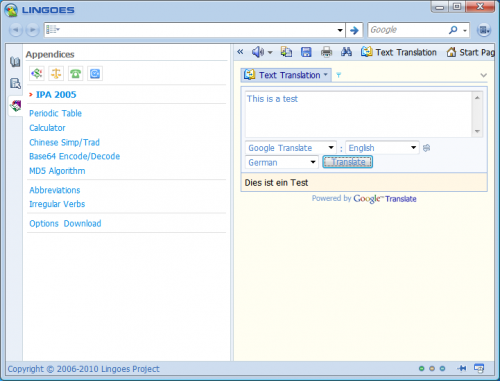
Text translation and dictionary look ups are the two main features of Lingoes. Hotkeys are available to use the program's functionality on a system wide level.
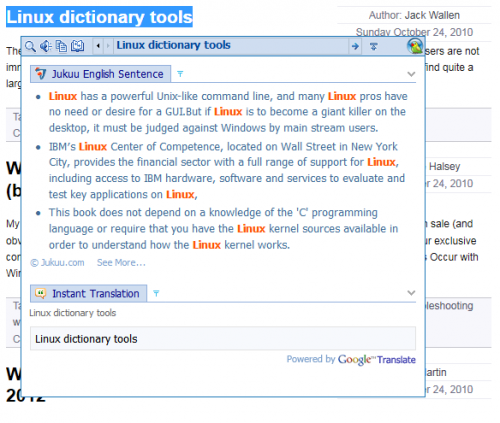
This feature worked nicely in all tested programs, from Firefox over Thunderbird to Microsoft Office. The program hotkeys are defined in the program configuration. Here are the most important standard hotkeys:
- Alt-P: Pronounce
- Ctrl-F12: Speak selected text
- Ctrl-Alt-F12: Stop speaking
- Alt-G: Enable / Disable capture word on screen
- Alt-Z: Enable / Disable translate selected text
The speech functionality uses build in text to speech capabilities of the operating system, with an option to download the free Natural Voice engine pack from the developer website.
Lingoes is an excellent program for users who need dictionary and / or text translation functionality on a regular basis. The program is available as a portable version or installer, and can be extended to work with more than 80 different languages.
Advertisement


















Why didn’t you get the dictionaries? Lingoes is pretty much useless, except generically without all those choice dictionaries. We can’t find them. You should have gotten them. This is one download that is a waste
Only for Windows, not Linux operating systems. What a shame.
an empty space
Lingoes is the best and powfull !!!
Indeed excellent program :)