
Facebook Disconnect, Block Communication Between Websites And Facebook

Whenever you visit a website, it may happen that the website connects to other sites. By doing so, it may reveal information about you to the sites it connects to. A popular example is Facebook Connect, which leaks information to Facebook whenever you visit a website that is powered by it.
In short, whenever you visit a page that uses Facebook Connect, Facebook knows about it. The same is true for other sites and services, and if you see sharing buttons such as Facebook Like on a website, information about your visit to it are available to Facebook.
Brian Kennish decided to create a Google Chrome extension to block the stop Facebook from tracking the web pages a user visits. Brian mentioned privacy leaks in the past that made him create the extension.
It is not clear how Facebook processes the data. Privacy conscious users may want to eliminate the possibility that their connection data leaks to other parties.
Facebook Disconnect works more or less like NoScript for Firefox, with the exception that it blocks connections to Facebook only on third party sites.
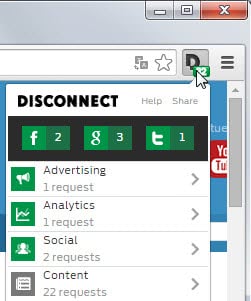
All is working on Facebook.com, only third party sites that display information like xx,xxx people like this site are affected as the elements are simply blocked and not shown on those sites.
The blocking of Facebook on third party websites should not affect Facebook users at all. Some users have reported problems with viewing photos that are sent directly to them. The developer will continue to work on the extension, and users who experience issues can visit the Google Code page to add the issues that they encounter to the list so that they get fixed in future versions.
The next version will indicate blocked contents on third party websites, which is currently not the case. The location where the Facebook Connect content would be remains white currently, which in itself can be an indicator depending on the placement on the website. Facebook Disconnect is available on the Google Chrome extensions gallery.
Update: Facebook Disconnect is now also available for Firefox.
Update 2: Some users reported issues when using the extension as it does not block connections to Facebook anymore on their end. I was able to confirm this using the Chrome extension. The Facebook social widget was still displayed on the page even with the extension installed.
A working alternative is the Disconnect extension which is available for Chrome and Firefox.
Disconnect blocks social media connections by default so that widgets are not displayed on sites that you visit. You can however enable this for select sites if you want to in the extension options.















my fabook not working i try to used my email but still why?
Isn’t blocking 3rd party cookies is enough?
Also, if you log-out of facebook, the facebook connect doesn’t work.
I just patched the Photos bug mentioned in the post (v1.0.2).
I just blocked Facebook.com in my HOSTS file, so it is blocked from any browser or any application.
Habe auch de.facebook.com und http://www.facebook.com in meinen hostfile
mit 127.0.0.1 eingetragen. Wenn ich meine logs anschaue die connection zu facebook wird noch immer durchgeführt. Sch..se.
Auch bei ads auf yahoo.com nutzen die ip Einträge der adfirmen im hostfile nix . Wieso ?
@ilev thanks güzel yorum sağol