
Bookmarks Backup, Web Browser Backup Tool

It is always a good idea to create regular backups of important programs and most computer users include Internet browsers in today's online centric world.
There are different options to backup web browsers, from using full backup suites like Paragon Drive Backup to individual applications like the Firefox Environment Backup Extension that only backup a specific browser.
And there are many tools in between, with Bookmarks Backup being one of them.
Update: The backup program has not been updated since 2010. While it may still work with some browsers, it won't work with others. We suggest you try the other backup options mentioned in this review.
The application supports the five popular web browsers Internet Explorer, Mozilla Firefox, Google Chrome, Opera and Safari and offers to backup bookmarks and other data from one or multiple browsers at once.
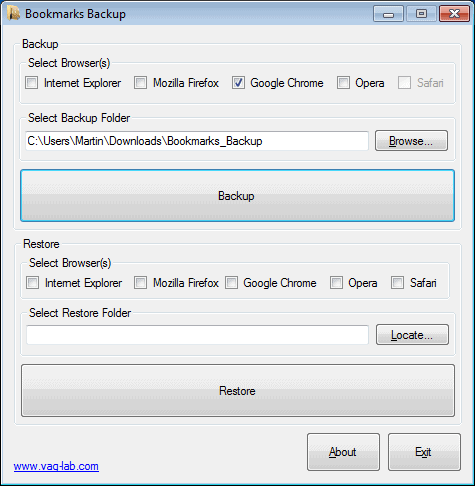
Browsers can be selected to be included in the backup at the top of the single program window. The only other element that you need to specify is the backup folder location on the local computer system.
A click on Backup starts to process the selected browsers. The program recommends to close all browsers before proceeding as the backup process may be blocked or halted if they are running.
Bookmarks Backup, as mentioned earlier will not only backup bookmarks but also other data. For Firefox, Opera and Chrome, the whole profile folder is backed up and stored in the backup location.
For Internet Explorer only the favorites are saved. Safari was not installed and I was not able to test it, but I assume that the backup will include the full profile as well.
Backups can be restored using the same interface. It is basically a reverse of the process. It begins by selecting the browsers and the restore folder location. A click on Restore restores the selected backup to all browsers that have been selected in the interface.
Bookmarks Backup offers an easy way of backing up data of web browsers. It could use some additional options, like letting you decide what to backup or the scheduling of backups. But as it stands, it is one of the most convenient ways of backing up multiple web browser profiles at once.
How does it compare to Fav Backup, another browser backup tool? The main advantage of Bookmarks Backup is that multiple browsers can be selected at once for backup. In FavBackup, only one browser can be selected for backup at a time. Then again, FavBackup offers better customization of the backup by offering to only backup items that have been selected by the user. FavBackup offers additional advantages, it is a portable application for instance and can backup the default web browser profile or all profiles.
Still, Bookmarks Backup could be an interesting alternative for users who run multiple web browsers on their computer system. The software is available at the developers website.
Update: The website is no longer available. We have uploaded the latest working version of Bookmarks Backup to our own server. You can download it with a click on the following link: (Download Removed)
Please note that we don't support the program in any way.



















The link just leads to godaddy with the domain for sale.
Paul thank you for the info. I have removed the link and uploaded the latest working version to our own server.
maybe I didn’t wait for it to finish;
I tried running it using the portable version;
but this application gave me an idea though;
write a simple batch to backup all my browser’s bookmarks
@sulasno: It works perfectly and is tested with latest version of all browsers.
@Author: Bookmarks Backup is portable also. As for the competitor apps, Bookmarks Backup it points on simplicity.
doesn’t work with IE (since I moved the folder to another location)
also not working with Chrome, Opera and Safari
I wonder what’s the point of saving Firefox’s profile