
CD DVD Data Recovery Software Overview

Blank CDs and DVDs have been around for quite some time now and their limited life span means that many users will eventually run into accessibility problems. With age come problems to read files from the CDs or DVDs. The only option in this case is to make use of data recovery software to save those files to storage device before they become completely unrecoverable.
Why can files become unreadable on optical media? Burned CDs and DVDs suffer from material degradation. And most disks also suffer from oxidation, not to mention scratches and other forms of physical contacts. The average lifespan of such disks is said to be ten years.
This overview looks at free solutions to recover files from CDs and DVDs.
It should be obvious that data that is not there anymore physically cannot be read by even the best DVD or CD recovery software. Sometimes though files can not be read by the user in Windows, while they are largely recoverable on the byte level. Basically, data recovery software copies every readable byte of the optical disks to another storage device.
What the developer says:
It supports all optical disc formats and all common optical disc file-systems. Start up IsoBuster, Insert a disc, select the drive (if not selected already) and let IsoBuster mount the media. IsoBuster immediately shows you all the tracks and sessions located on the media, combined with all file-systems that are present. This way you get easy access, just like explorer, to all the files and folders per file-system. Instead of being limited to one file-system that the OS picks for you, you have access to "the complete picture". Access data from older sessions, access data that your OS (e.g. Windows) does not see or hides from you etc.
IsoBuster is available as a free and professional edition. The free version has several limitations, largely lack of HD DVD, Blu-Ray and file format support.
The program tries to install a toolbar during installation, make sure to cancel that before continuing. The program is simple to use. It will automatically recognize a CD or DVD that has been inserted into the drive. The sessions, tracks folders and files are displayed in the program interface.
Here it is possible to navigate the menu structure, and extract individual files or files from folders from the disk. IsoBuster displays a Save As dialog and extracts the data to the selected disk.
Several recovery options can be configured in the preferences. This includes the maximum number of retries, sorting criteria, file system specific settings or image files handlings. IsoBuster can load CD and DVD images as well, which is the recommended way of handling recoveries.
What the developer says:
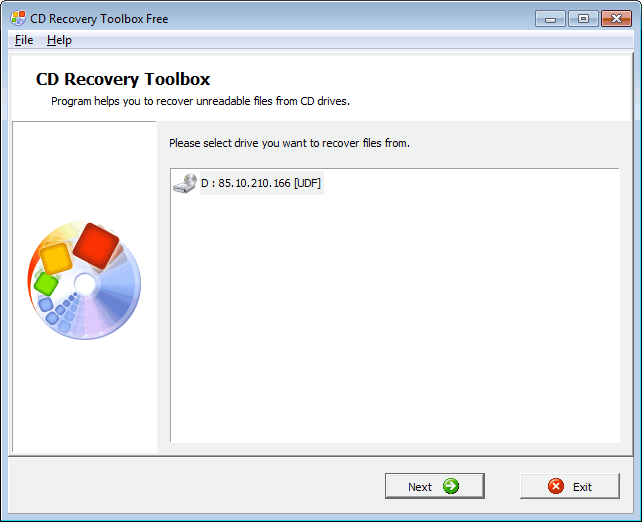
CD Recovery Toolbox Free - repair damaged CD disks
CD Recovery Toolbox tool was developed for recovering damaged files from different disk types: CD, DVD,HD DVD, Blu-Ray, etc. You can use it to restore information lost as a result of some mechanical damage of the disk (scratches, chips, different spots on thesurface) or as a result of incorrect recording.
This program is very easy to use. CD Recovery Toolbox supports recovery of CD, DVD,HD DVD and Blu-Ray disks. It begins with the selection of the drive, and the output directory. The program then reads the files from the disk and displays them in a file browser.
Here it is possible to select the root folder, or one of the subfolders of the disk for recovery. A click on Save reads the data from the disk and saves it on the selected storage device.
What the developer says:
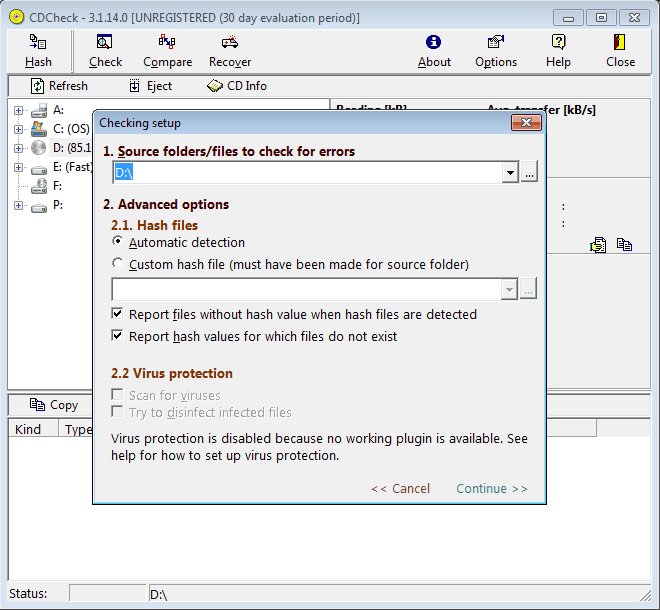
As your CD and DVD collection grows, there are two important problems you face - do your CDs and DVDs still work? What can you do when a CD or DVD starts to have problems? These are crucial questions since the discs are used to store valuable files like email, home movies, photographs, business/tax records and music. The solution is to use a free program like CDCheck. It can scan most CDs in a few minutes to tell you if the data is OK - this way, you don't have to find out the hard way that there is a problem. Plus you can use the time it takes for a scan to complete as indicator of the CD or DVDs overall health - even though files may not be recorded as damaged, slower results normally indicate a CD that is on the way out (expect longer times if there are more files on the CD).
If a CD or DVD is showing files with damage or you can no longer read a file in a drive, CDCheck can be switched to recovery mode and make a full sweep of the CD or DVD, recovering lost files along the way. When parts of a file can't be fully recovered, the program will still recover any salvageable fragments. Many file formats such as Zip, TIFF and JPEG can still be used if incomplete (success of this technique varies, depending on the damage). Most zip tools have a 'repair archive' function, and a standard graphics editor can help repair damage to photographs caused by missing fragments.
CD Check is a software that needs to be registered on the developer's homepage before it is free to use for a lifetime. The program can check a disk for read errors, which the other programs in this overview cannot. The time of each check depends on the disk and the speed of the drive.
The other options are to compare directories, for instance a directory on the CD or DVD with a local directory, and to recover files from the disk. For comparison purposes, hashes are generated.
What the developer says:
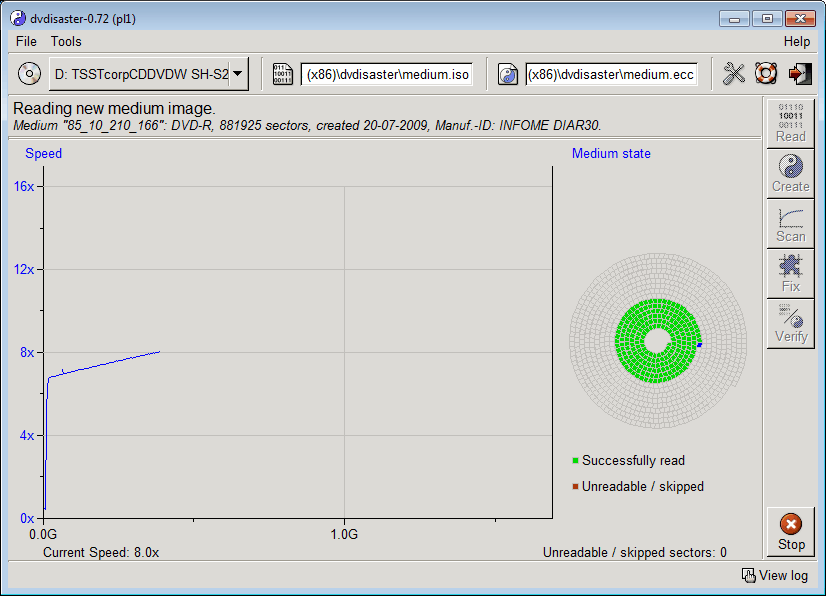
CD, DVD and BD media keep their data only for a finite time (typically for many years). After that time, data loss develops slowly with read errors growing from the outer media region towards the inside.
Archival with data loss protection
dvdisaster stores data on CD/DVD/BD (supported media) in a way that it is fully recoverable even after some read errors have developed. This enables you to rescue the complete data to a new medium.
Data loss is prevented by using error correcting codes. Error correction data is either added to the medium or kept in separate error correction files. dvdisaster works at the image level so that the recovery does not depend on the file system of the medium. The maximum error correction capacity is user-selectable.
DVD Disaster is not a typical data recovery software, as it can be used to prevent data recovery by adding error correction codes to optical disks. To create error correction codes a disk image is required. The program is able to create those disk images and create the codes. Those codes can then later be used to recover files from a disk.
What the developer says:
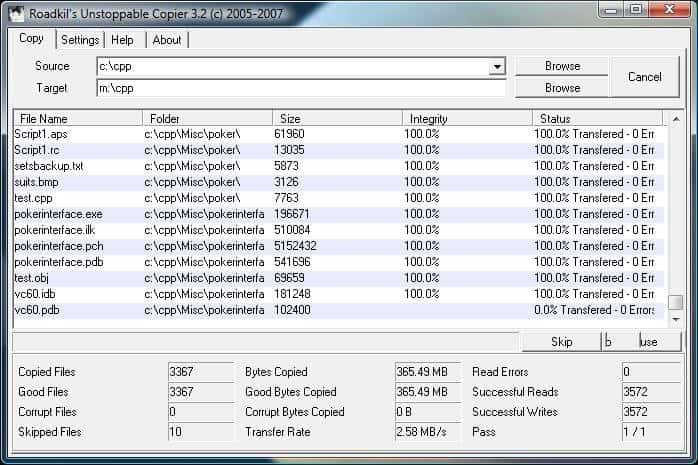
Recovers files from disks with physical damage. Allows you to copy files from disks with problems such as bad sectors, scratches or that just give errors when reading data. The program will attempt to recover every readable piece of a file and put the pieces together. Using this method most types of files can be made useable even if some parts of the file were not recoverable in the end.
The program can be used as a daily backup system using its batch mode functions. A list of transfers can be saved to a file and then run from the command line to perform the same batch of transfers on a regular basis without having to use the GUI interface. The program supports command line parameters which allow the application to be run from schedulers or scripts so it can be fully integrated into daily server tasks.
Roadkill's Unstoppable Copier can read data from any kind of disk. It tries to recovery files on a byte level, and can copy files partially because of this. This often means that files can still be accessed, especially if they are not binary.
What the developer says:
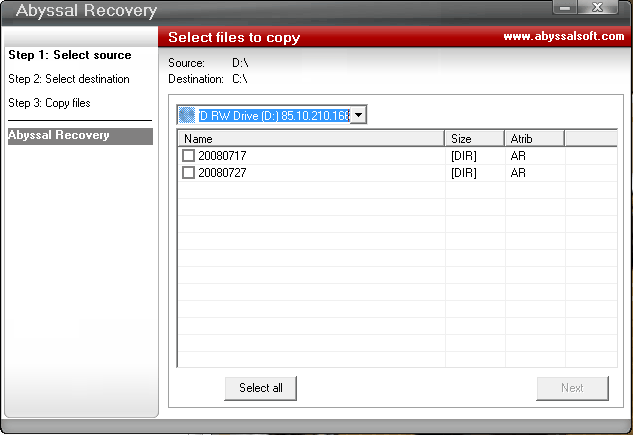
Abyssal Recovery can rescue corrupted or lost data from damaged, scratched, or defective CD and DVD discs. Abyssal Recovery can copy the files to another destination on your hard drive. Abyssal Recovery will skip the bytes which are not readable from file and copy all other bytes to extract maximum data. You can set the program to copy byte with byte to minimize the losses, or you can set a higher number of bytes to be copied once for a faster recovery.
Abyssal Recovery is a basic CD and DVD data recovery software that tries to rescue data from partially unreadable disks by copying all readable bytes to another storage device. It does not offer an advanced feature set as several of the other recovery solutions in this guide.
Data Miner (local download: (Download Removed))
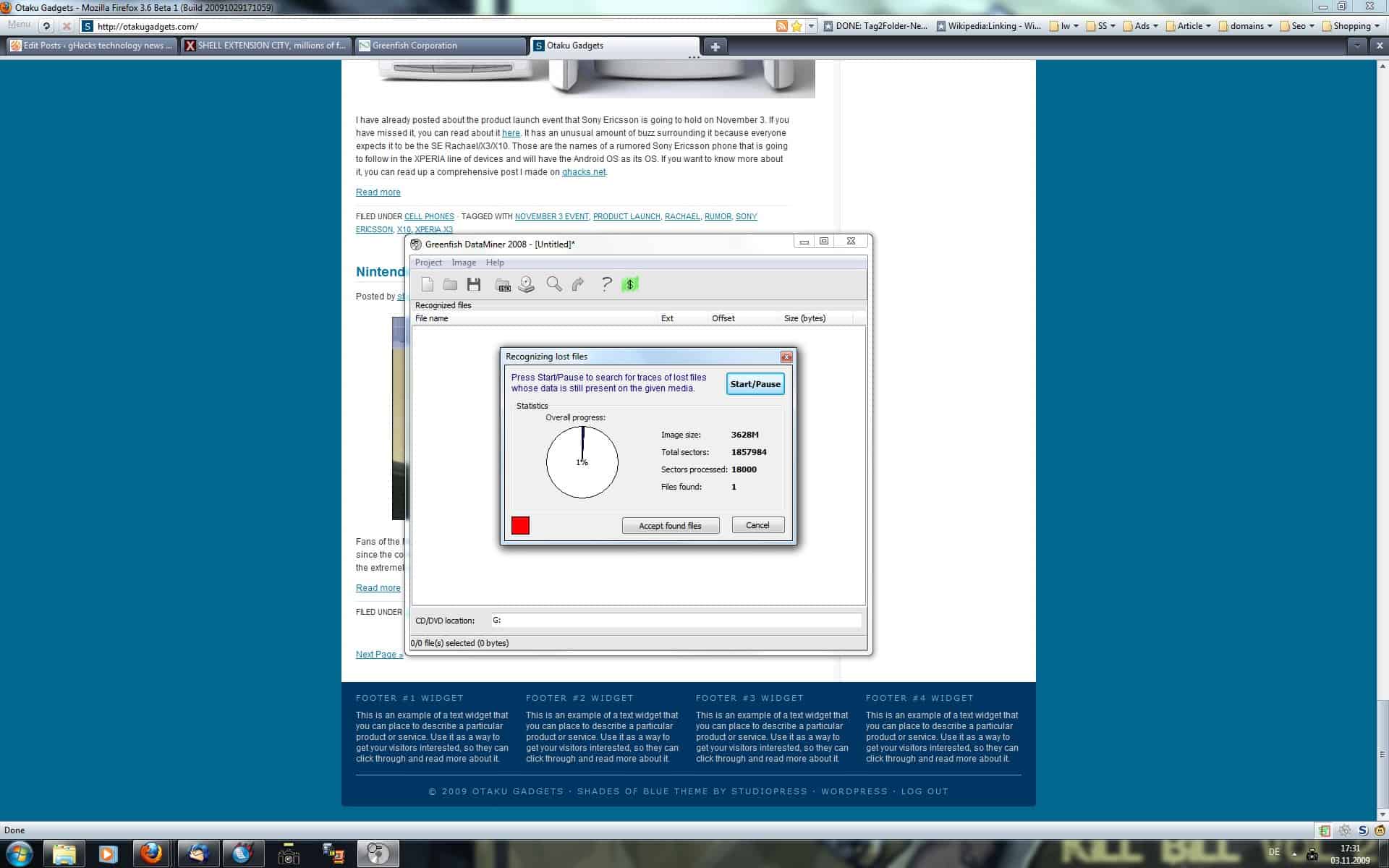
DataMiner is a portable software program for the Windows operating system that can be used to recover data from optical media such as CD or DVD.
The program analyzes data on the disc using heuristic detection algorithms. The analysis of the data on the disc is highly influenced by the type of disc, the data and the type of error that is encountered when trying to access the data.
Dataminer analyzes the whole disc, a process that can be terminated at any point. The files that have been found up to this point are then displayed in the interface. The display is basic as it will only list the file name (if it was discovered), the size, type and offset of the file on the disc.
It is possible to extract selected files or files of a certain file extension to a local storage device. Other options include a basic search to find a specific file name and saving project related information to continue working on the project at a later time. the CD and DVD data recovery software can also create and load images of physical discs which is obviously the safer way to go as it is then possible to analyze the disc image instead of the disc itself which will reduce the chance to further damage the disc.
ISO Puzzle (local download (Download Removed) )
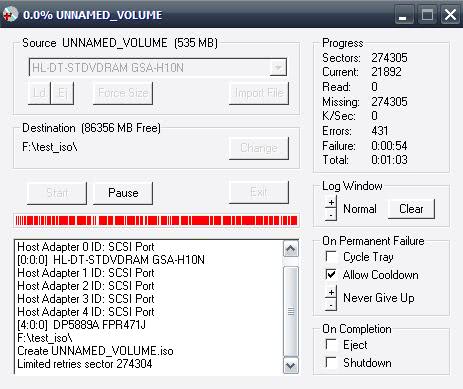
Iso Puzzle creates an ISO image of a selected CD or DVD flagging good and bad sectors at the end of the process to give the user an overview of the situation. It will also create a file on the local disk detailing the bad sectors that could not be read. The unique solution by this software program is to utilize different CD or DVD drives to read those bad sectors as error correction differs widely among drives.
Verdict
Two of the tools in this review can be used to prevent data loss. Both CD Check and DVD Disaster offer the means to check data on disks regularly to ensure 100% readability of the data. DVD Disaster even offers a solution if data becomes unreadable.
For disks with corrupt data, IsoBuster is probably the prime choice. Even though it may make sense to use several tools for best recovery results.
Have you encountered unreadable disks in the past? If so, what have you done to recover the data on them?
















Nice article Martin, very helpful, thanks. I still use Powerquest Lost ‘n Found v1.06 but it’s well old now as it’s never been updated, unfortunately. Still, I’ve recovered working data etc, from anything that spins, with it – even this year from a crashed, partly reformatted Vista drive so it still works [can take days to run though, it’s not fast but is thorough]. Not tried CDs/DVDs but will now you’ve drawn attention to their shocking half-life!
Your “fact” is not true. It is possible to recover usable data from files that contain missing sections, and it is often possible to extract lower resolution jpg images from damaged raw image files. Missing from this article is the tip that recovery of data from cd/dvd discs is often dependant on the physical reader you use. Firstly, always try it with the actual writer that wrote the data to the disc in the first place. If the problem is with a CD, try it on a cd-only reader – not a combined cd/dvd reader. If it is a dvd, try reading the disk on as many different dvd readers as possible. What is unreadable on one dvd reader might be readable on another – or at least readable enough for data recovery software to work on it.
There is no way to recover datas that are or have been damaged on a cd or dvd.
These people who make these softwares are there to make money from your suffer.
This is the fact.
Nice post. Thank for sharing!
I am grateful that I have identified this blog. As a final point one thing not a crap, which we examine incredibly usually. The weblog is lovingly operated and updated. So it need to be, thank you for this welcome transform.
Nice article Martin, very helpful, thanks. I still use Powerquest Lost ‘n Found v1.06 but it’s well old now as it’s never been updated, unfortunately. Still, I’ve recovered working data etc, from anything that spins, with it – even this year from a crashed, partly reformatted Vista drive so it still works [can take days to run though, it’s not fast but is thorough]. Not tried CDs/DVDs but will now you’ve drawn attention to their shocking half-life!
Connaissez-vous la relation entre les deux yeux? Ils clignotent ensemble, ils se déplacent ensemble, ils pleurent ensemble, ils voient les choses ensemble et ils couchent ensemble – mais ils ne voient jamais l’autre. C’est ce qu’on appelle l’amitié. L’aspiration est votre motivation, votre motivation est la foi, la foi est le reste de votre heureux, heureux que la paix est ce que votre destination, la destination est votre paradis. La vie des amis dévoués. «La Semaine des amis.” Envoyer à tous vos amis et recevez chaque mois toi.Chuc paisible Noël et une heureuse nouvelle année!
Hello friends,
I want to add a forum to my site predicted to grow the number of visitors. How do I add a forum to my site using frontpage or should I use Dreamweaver? I tried using the discussion groups but I was confused about how it works and stuff. If you can help me with that, I would be very grateful. Other than a web page that you can customize your forum? And then it creates a html code for you?
This is one my favorite data recovery software. You explained it very well. thanks for sharing.
yes this blog is very helpful and good. Currently I am using most of time stellar phoenix data recovery software from stellar information.
i used DVD Disaster ever since it quite a monster.
This is really a life saving tool.
Thanks
In the past I used Unstoppable Copier for Floppy disk :) I don’t know if they also provide for DVD version. Thanks for the info
Thanks for sharing this Information About Recover data.
Great Info, Thanks a lot………
I want to add a forum to my site predicted to grow the number of visitors. How do I add a forum to my site using frontpage or should I use Dreamweaver? I tried using the discussion groups but I was confused about how it works and stuff. If you can help me with that, I would be very grateful. Other than a web page that you can customize your forum? And then it creates a html code for you?
Nice post. Thank a lot…
Great post. I very need your information!
“One of the biggest complaints and annoyances I hear from people who copy DVD movies is that the copied DVD movie doesn’t play well. It is either choppy; the video and audio drops out; the quality is poor; or that it doesn’t play at all.
It is very easy to blame the DVD copy application one uses. It could be. However, you you are using a top-of- the-line DVD movie copy application such as 1Click DVD Copy, DVD Cloner, or DVD neXt COPY and they all produce the same discrepancy, odds are the DVD copy application is not the culprit; your problem lies elsewhere.
Thanks for sharing.Stellar has variety of recovery software to save and reover your all important data because I used in the past.
yes this blog is very helpful and good. Currently I am using most of time stellar phoenix data recovery software from stellar information. First I download the software for trial version and see all the features for this software. Stellar has variety of recovery software to save and reover your all important data because I used in the past.
thanks for share, i am need it
As all we used blank CD’s and DVD’s for data storage. In this blog the complete data recovery techniques are defines. This blog has given the whole process of data recovery step wise with snap shots related to data recovery process. Really very good blog for troubleshooting.
Yeah, already ran into this “limited life span” thingie with CD’s. Lost several “unique” videos already. Now I have it backed up on harddrives and BD-RE’s. That free Windows SyncToy sure comes in handy.
This is really a life saving tool.
Thanks for sharing.
That’s a nice list martin. Will use it in future.
Forgot, ISO Puzzle is another option https://www.ghacks.net/2008/01/25/recover-scratched-discs-with-iso-puzzle/