
GPEX, Graphical Passwords For Firefox

Secure passwords have one big disadvantage: they are hard and sometimes even impossible to remember, especially if unique secure passwords are created for each web and local service.
We all know some basic rules for secure passwords, like making sure that they do not contain dictionary words or words that have a special meaning to the user, have a minimum length that is considered to be secure these days and use a selection of all available characters.
Password managers have been created to provide computer users with tools to generate and store passwords so that in the end only one master password needs to be remembered.
That's probably the best option right now when it comes to password use on the Internet.
So called graphical passwords, that is passwords that are created by clicking on positions in images, are an alternative to conventional text based passwords.
Most browsers, programs and operating systems on the other hand do not support these by default.
The Firefox add-on GPEX is a first attempt to bring graphical passwords to the browser. The system that has been implemented has been streamlined for ease of use.
The add-on supports custom images and icon sets. Passwords are created or entered by clicking on specific locations in the image or icon set.
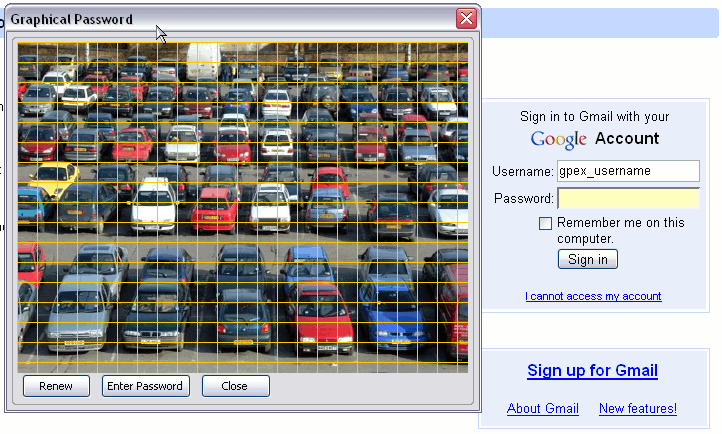
A password strength meter indicates the strength of the password to the user. The general idea is that graphical passwords provide better security and memorability at the same time. The add-on itself converts the graphical password into a character based password, as the services on the Internet only support these kinds of passwords.
The extension can be an asset for users who do not use password managers. It is however a nice demonstration regardless of whether you are going to use it or not.
Users who want to try the graphical password manager can install it from the official Firefox add-on repository.
Update: The Firefox add-on has been discontinued, and there is unfortunately no comparable add-on available in the Mozilla Firefox add-on repository.




















Thanks for sharing but your link is dead. https://addons.mozilla.org/tr/firefox/addon/gpex/
Thanks, I have replaced the link.