
Show File Size Adds File Size Information To Firefox Save As Downloads

The size of a download is not always visible before initiating the download. Many websites, especially download portals, display file size and extension information on their download pages while others may not display any information about the download on the download page.
This leaves the user guessing and sometimes even surprised at the size of the download.
The file size in those cases is only displayed after the download has been started. That may not be a huge problem for users with 10 or more MBit and a Internet flatrate so that they don't pay by the Megabyte, but users who have to pay per Megabyte downloaded may prefer to know the exact size of the download before it starts.
The same may be true for users with slow Internet connections. Instead of downloading a file at the limit for some time they might prefer to postpone the download to times where it can be downloaded without interrupting work.
Show File Size is a basic, but very helpful Firefox extension. The add-on integrates new information into the save download windows of the browser. Here it displays the file size and type in a new row.
This works well for many different file downloads. There may be situations where it cannot display the file size but we have not encountered any during our tests.
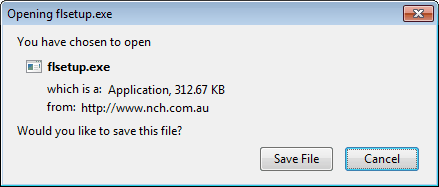
With the additional information provided, the user can make the decision to download the file or cancel it completely or for the time being.
Show File size is compatible with Firefox 3.6 to Firefox 4 versions. It is available for download at the official Mozilla Firefox Add-on repository.
Update: Show File Size has been discontinued. It is not available anymore. An alternative is the add-on Show File Size 2 which can return the size of a remote file in the Firefox web browser.



















“Extended Link Properties +” ( https://addons.mozilla.org/en-US/firefox/addon/14228/ ) together with “Element Properties” ( https://addons.mozilla.org/en-US/firefox/addon/14228/ , needed because of changes in 3.6.x) does the same, shows more info and readds the “Properties” option to the right-click-menu.
Will take a look, thanks a lot.