
Services Suite, Better Windows Services Management

Most Windows users who manage the services of their operating system do that either in MSConfig or in the Services management console. The latter offers descriptions and additional information that the System Configuration tool does not offer. Still, both applications lump all services together in one big list, which makes the configuration process tedious.
The free Windows software Services Suite offers a in many aspects better solution. The program lists the services based on their state. Services are sorted in the three columns automatic, manual and deactivated which aids in the identification process.
Even better is the option to change a startup state by simply dragging and dropping a service into another column. No more right-clicking or double-clicking to perform that operation.
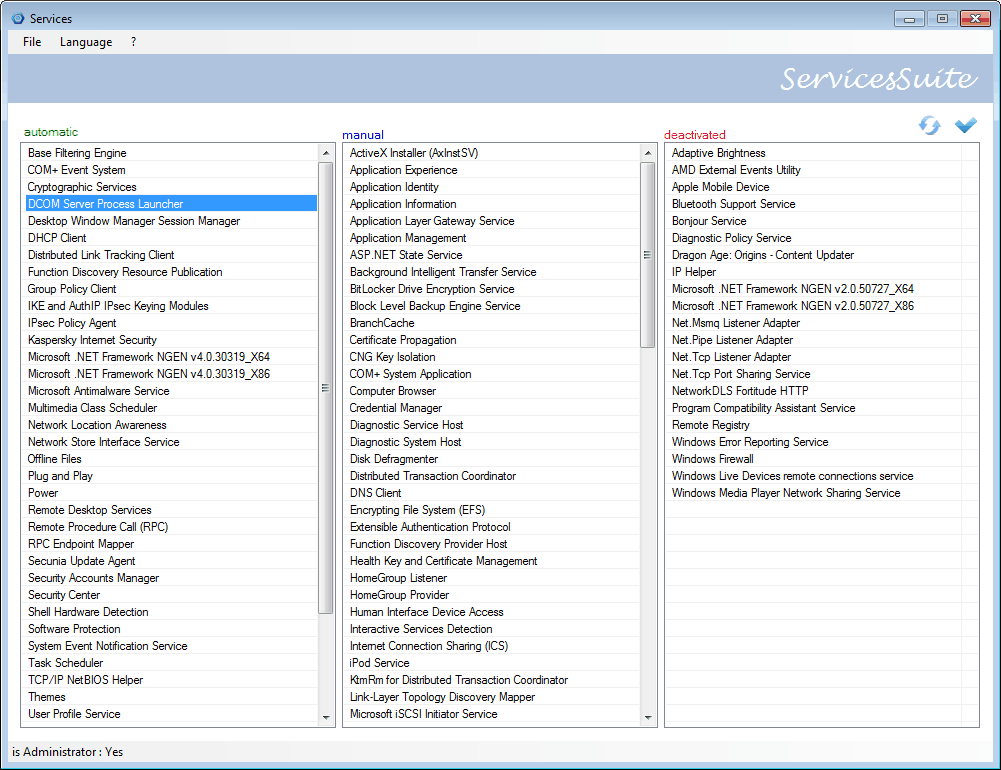
A right-click on a service offers options to open its Registry key, and to start or stop it. This is however only possible of the service is set to manual or automatic. Deactivated services cannot be started, unless their state is changed to manual or automatic first.
One interesting feature of Services Suite is the option to import and export XML configurations. It is for instance possible to configure a system properly and export the services configuration in the end to apply it to another Windows system, or keep it as a backup copy for future use.
The developer has added two XML configuration files to the software which can be used to optimize the system based on BlackViper's services optimization tips. One XML file is optimized for XP operating systems and one for Windows 7. Both are optimized without WLAN support.
The portable program requires the Microsoft .net Framework 2.0, which most Windows users should have installed these days.
The 60 Kilobyte tool is available for download at the developer's German website. The software itself is available in English and German.
It is recommended to create a system restore point before using the software, to be able to restore the system if changes have been made that make the system unstable or unbootable. (via Webdomination)
Services Suite is an excellent program, both for users who like a better overview when configuring services on one system, and for users who have to make changes to multiple systems. The only negative aspect of the program is that no service descriptions are offered in the program interface.
Advertisement


















made an Update to 1.0.0.8
new stuff:
– see changes you made by highlighting the changed Services
– export individual Lists : auto/manual/deactivated/full
– added an option to turn on Descriptions (slow)
in Win7 Service Description and some Service names are not written into Registry anymore and
the Service API has no property “Description†therefore i need to do it via WMI which is slow as hell. Therefore i made it optional
hope you like it
GC
Nice, thanks for letting everyone know about it.
Please don’t flame on this forum, it’s just bad behaviour. I said that this app’s install is sneaky, and to be careful. I didn’t say the tool doesn’t work. Does that deserve a flame? My comments still stand, the app’s install is quite sneaky. Perhaps your technical knowledge isn’t sufficient to even understand my comment. Would you please re-install it, and look for what I indicated bothered me?
The Tool doesn’t need to be installed its portable so maybe the source you have it from is crap ….
go to the developers page and download there … dont make any false accusations
WARNING!!
This app is full of crapware! It’s especially sneaky, in that the system changes it wants to make are shown in the tiniest font imaginable–many users won’t eve be able to see them.
Warning
the user above me is full of crapware …
tool is fine dont know what you are talking about
Why nobody makes service profiling application?
I want to switch running services by profile selection “on the fly”
Well, i guess i will make such application in the end of this month.
I hope you will like it when it will be done
I made a lot of services changes to my XP system because its a stand alone. It made a huge difference in performance. I still dig around in there looking for things to shut down. I’m going to download this app. Thanks for the post.
This is my list of MANUAL services. I wonder if some of them should be automatic? (I have SQL Server set to manual because it uses a lot of resources and I don’t have anything that is currently using MS SQL Server).
manual
.NET Runtime Optimization Service v2.0.50727_X86
Application Layer Gateway Service
Application Management
ASP.NET State Service
Background Intelligent Transfer Service
COM+ Event System
COM+ System Application
Distributed Transaction Coordinator
E4M service
Extensible Authentication Protocol Service
Fast User Switching Compatibility
Health Key and Certificate Management Service
HTTP SSL
IMAPI CD-Burning COM Service
Indexing Service
InstallDriver Table Manager
Intuit Update Service
Logical Disk Manager Administrative Service
Microsoft Office Diagnostics Service
MS Software Shadow Copy Provider
Net Logon
NetMeeting Remote Desktop Sharing
Network Access Protection Agent
Network Connections
Network Location Awareness (NLA)
Network Provisioning Service
NT LM Security Support Provider
Office Source Engine
Performance Logs and Alerts
Portable Media Serial Number Service
QoS RSVP
Remote Access Auto Connection Manager
Remote Access Connection Manager
Remote Desktop Help Session Manager
Remote Packet Capture Protocol v.0 (experimental)
Remote Procedure Call (RPC) Locator
Removable Storage
Smart Card
SQL Server (SQLEXPRESS)
SQL Server Browser
Telephony
Terminal Services
Uninterruptible Power Supply
Volume Shadow Copy
Windows CardSpace
Windows Driver Foundation – User-mode Driver Framework
Windows Installer
Windows Management Instrumentation Driver Extensions
Windows Media Player Network Sharing Service
Windows Presentation Foundation Font Cache 4.0.0.0
Wired AutoConfig
WMI Performance Adapter
As a rule of thumb, if the computer is working as intended then you do not need to make changes. Then again, you may want to double-check http://www.blackviper.com/Windows_7/servicecfg.htm
OK, works fine.
1. Download is a .RAR file.
2. Wish he would provide a LIST export of the individual columns (automatic, manual, deactivated).
3. Nice that you can jump right to the registry entry for the item. But wish he would open up the standard UI for Services also.
Amazing ! , I’ve been looking for a program which does that for a long time . Thanks a lot , I’ll try it out right away !
Wow. This looks cool. Going to download it right now.