
Comment Blocker, Block Comments In Firefox

User comments are an integral part of modern websites. They come in different forms, direct comments on blogs for instance, YouTube video comments or as messages on a Facebook profile page.
Some Internet users think that user comments add to the clutter of the web, while others believe that they can add value to a website.
It depends on several factors like the target audience of the website or the level of spam control. Some users may prefer to disable comments on the web to only enable them if necessary.
That's what Comment Blocker for the Firefox web browser does. The add-on hides comments automatically on websites, with the option to display them immediately if desired.
The compatibility is astonishing. Comment Blocker works on many different types of sites, from YouTube over WordPress blogs to Facebook, Blogspot and Digg. There will be some sites where the comments won't be blocked automatically, but we had a hard time finding any where it did not. The add-on appears to be unable to block comments on secure sites, like the Mozilla website.
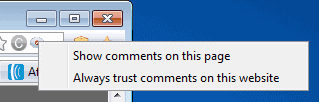
Comment Blocker indicates blocked comments in the Firefox address bar. Moving the mouse cursor over the icon displays if comments have been blocked. A left-click on the icon in the address bar opens a menu to enable comments on the page. There is also a second option to whitelist the domain so that comments will always be displayed directly.
Comment Blocker provides Firefox users with an efficient tool to block almost any comment section on the web. The whitelist of domains is a handy feature that adds to the value of the add-on. An option to enable comments with a hotkey would be welcome, as would an option to enable them directly near the comment section, and not only from the address bar of the browser.
You manage the whitelist in the options. There you also find settings to define how the button behaves on left- right- and scroll-clicks, and where there add-on's icon should be displayed in Firefox.
Comment Blocker is compatible with all Firefox versions. It can be downloaded from the official add-on repository.



















i am desperately looking for an app to block comments of nicknames that i identified as trolls. (so that i can end up with a “clean” comment section on my favourite sites, not stumbling repeatedly into the comments of people i decided to ignore.) but what is the use of blocking indiscriminately ALL comments on a website? id rather not even look at the comments section if i am not interested in vewing any of them, that does not need a blocker program to accomplish!
We identify the best technologies to fit in your goal and budget, we then make sure that they work well into the future. We are into E-Learning, Web development, 2D Animation, 3D Animation, Software development, Application development, Graphic works, Architectural designs 3D, 3D walk through for architects, Corporate profiles flash, Flash animations & corporate intros.
I am BHARAT KATTULA, working as a WEB DESIGNER. I have done my course in India’s no1 Institute DILSUKHNAGAR ARENA ANIMATION HYDERABAD. Where as my Creative and Professional skills developed We are undertaking freelancing projects with my friends. We have done an excellent of professional Team work.
Great find Martin, The first time it was a bit looking for where the comment adviser was (in the url when there are comments otherwise not).