
ClipUpload, Semi-Automates Uploading Clipboard Data

ClipUpload is a free program for Microsoft Windows devices to upload whatever is stored in the clipboard to various services or servers.
The main intention of posting data to the clipboard is to have it in reach to process it further at a later point in time. This includes copying someone's email address and pasting it into an email application, creating a screenshot and uploading it to a server on the Internet, copying and pasting text to quote that text, or copying download locations of files to process them in a download manager.
The Windows clipboard supports only one storage slot and will erase any item that is stored by it when you copy another item to the clipboard.
ClipUpload

ClipUpload is an unobtrusive program for the Windows operating system to semi-automate some uploading tasks.
The clipboard software can be used to upload images, text and files from the clipboard to the Internet or a local area network.
You customize the program's functionality during installation. The installation dialog provides you with options to enable or disable functionality such as uploading data to ftp or sftp servers, to self-hosted sites, or to various cloud hosting providers.
The program options are displayed on first start. Here it is possible to set a custom ftp server, or use public file hosting sites to store clipboard data on. Nothing is enabled by default, and it is up to you to enable a feature you are interested in.
The following services are supported by ClipUpload if you keep the default installation preferences.: Dropbox, Facebook, FTP, SFTP, Imgur, Pastebin and Zippyshare.
Once you have enabled one of the available options, you may need to configure it by right-clicking it again and select settings from the context menu that opens.
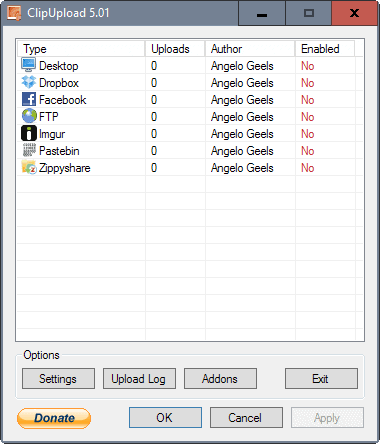
Configuration options depend largely on what you enable. For FTP, you need to enter a server address, username and password, but may add other options on top of that. You may furthermore define custom shortcuts to trigger functionality without interacting with the system tray icon.
Everything else after this initial configuration is handled either with a right-click on the program's system tray icon, or by using one of the available shortcuts. This opens the data uploader which operates depending on the data in the clipboard.
Images for instance are immediately uploaded to Imgur, with the data in the clipboard being automatically replaced with the url of the image uploaded to the image hosting service.
Other contents on the other hand may not be uploaded directly.
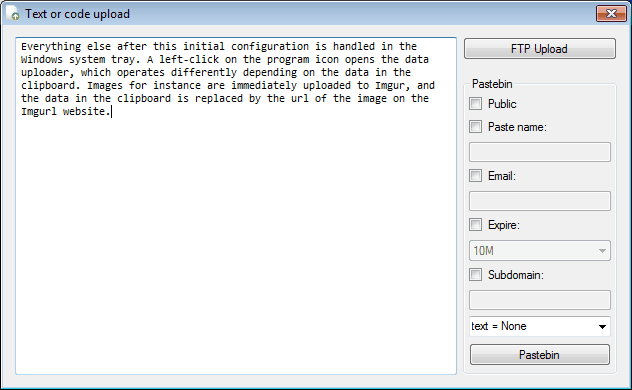

ClipUpload can be a helpful program for users who regularly upload Clipboard data to ftp servers or public file hosting websites. The program could use a set of keyboard shortcuts to automate the process further.
The program requires the Microsoft .net Framework 4.0. ClipUpload should work on most Windows operating systems, downloads available at the developer website.
The program has not been updated in 2 years, but it works just fine even on Windows 10. Some functionality may stop working eventually if supported services start changing things around, but for now that does not seem to be the case.





















well how the hell do you download it??
Thanks for featuring my application. :) I will work on your suggestion about keyboard shortcuts.
Be careful with the above link (“Binfer”….).
Google throws up a “Malware Warning” screen.