
Using Two Skype Accounts At The Same Time

There are usually two environments where users may want to run another instance of Skype to use multiple Skype accounts at the same time. The first is a business environment where a Skype user wants to separate a business Skype account from a private one. The second a home environment where family members have their own separate Skype account.
Skype users who are running Skype 4.0 or later can use the /secondary startup parameter to start another instance of Skype.
- Click Start > Run, or press Windows-R on the keyboard to display the run window
- Enter the following command including the quotes and hit enter: ""c:\Program Files\Skype\Phone\skype.exe" /secondary
- This launches another instance of Skype, so that it is possible to log in with another Skype account at the same time.
- If you get an error message make sure that the path to the Skype executable is correct.
While it is not an issue to start a second instance of Skype this way, many users may find it comfortable to create a shortcut instead to optimize the process. A new Skype instance can then be started by double-clicking on the program icon.
- Locate the Skype executable, it is usually in c:\Program Files\Skype\Phone\skype.exe
- Right-click skype.exe and select create shortcut from the context menu
- Right-click the shortcut, and select properties from the menu.
- Locate the target field, and add /secondary to the end, the full target field should now be: "c:\Program Files (x86)\Skype\Phone\skype.exe" /secondary
- Please note that the path may be different depending on the location of skype.exe on the computer system.
- Click ok to save the changes. Now move the Skype shortcut to another location, e.g. the desktop, taskbar or start menu.
A click on the shortcut will from then on create a new Skype instance.
Fiddling around with shortcuts and startup parameters is not to everyone's liking. An alternative to configuring multiple Skype instances manually is the portable software Calimero Skype Launcher.
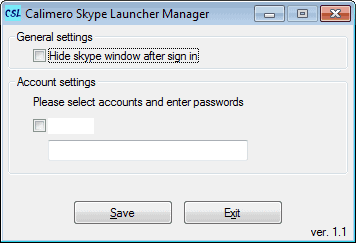
Then again, some users may not be comfortable to enter their Skype username and password into the program interface.
Security conscious users may prefer to use the shortcut to launch multiple Skype instances at the same time.
Advertisement


















