
Mozilla Changes Visual Add-on Indicators, Adds Version Check

Update: Please note that the design of the Firefox add-on repository has changed again in recent time and that some of the information below are not valid anymore because of this.
When you visited the Mozilla add-on repository for Firefox, Thunderbird or any other Mozilla project in the past, only non-experimental add-ons were displayed by default on the page so that you had to enable these add-ons separately on the repository before they were displayed as well.
Experimental add-ons are add-ons that had not been reviewed by the Mozilla team and could have a negative impact on a computer's performance and security.The term Experimental on the other hand did not highlight well that these add-ons were not reviewed by Mozilla which is the core reason why Mozilla made the decision to replace the term experimental with unreviewed instead.
If you visit the add-on repository you will only find one optional checkbox on the site instead of three that were displayed on it before.
The remaining option is to "show unreviewed add-ons" which will add all experimental add-ons (those not reviewed yet) to the listing.
The Add To Firefox button next to each add-on has also been changed to highlight information about the add-on.
Unreviewed add-ons are displayed with a yellow button and a "Not Reviewed" text beneath them while reviewed add-ons are still shown with a green button and no additional text.
The extension repositories have changed in another, important manner. A user visiting the Mozilla website with a supported product, e.g. the Firefox web browser, will now see in the general add-on listings if the add-on supports the installed version of the product.

Add-ons that are not available for the Mozilla product are shown in a lighter yellow color with a red icon and the text Not available for "product name" underneath.
Visual indicators have also been added when you click on unreviewed or unavailable products. A click on an unreviewed add-on displays an overlay with the text "Caution: This add-on has not been reviewed by Mozilla. Be careful when installing third-party software that might harm your computer."

A click on the Add To Firefox button displayed underneath the message installs the add-on nevertheless.
An add-on that is not available for the software version installed on the user's system displays the warning "This add-on has not been updated to work with your version of Firefox." with the option to install anyway.

A combination of the two visual reminders is also possible (for unreveiwed and unavailable add-ons). While we are at it, the add-on listings can also display the two white boxes Add to Firefox and Continue to Download.
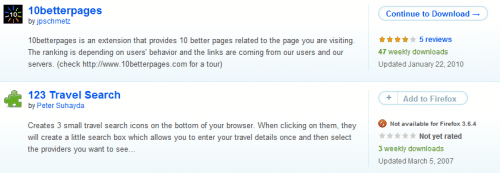
The white Add to box basically indicates an incompatible add-on while the continue to download box indicates that an End-User License Agreement has to be accepted before the add-on can be downloaded and installed.
What's your take on the changes introduced?
Advertisement

















The new system that doesn’t require user to be logged in for installing not-reviewed add-ons is step forward – I didn’t like to log in every time.
Also it’s good that they don’t forbid user from doing non-updated add-on install, just warn.
So, I think that new system is good.
They reverted the changes on some parts of the site the day I wrote that story, that was strange, thought I had written it for nothing. I do like the new system as well, it is much clearer and less confusing.