
Process Lasso Pro Review

Process Lasso Pro is offered for free today at the giveaway of the day website. We have reviewed the free version of the process management software Process Lasso back in 2008 and liked it despite its limitations.
Process Lasso can be best described as a software that will automatically adjust process priorities based on a computer's condition. Bitsum, the Process Lasso developers, call the feature ProBalance. ProBalance adjusts process priorities so that running processes will not impact the responsiveness of the PC.
The main Process Lasso Pro screen looks like an advanced version of the Windows Task Manager. The application displays a graph at the top informing the user about processor use, system responsiveness, process restraint and memory load.
The processes are listed in the middle with the possibility to switch between all processes and only active processes. Each process is listed with its name, user, application name, priority class, cpu affinity and several additional parameters.
The lower half of the screen contains a log and the status bar which lists the total number of processes, cpu utilization, responsiveness, memory load and system uptime.
Process Lasso works out of the box but there are lots of configuration settings and features available to optimize the computer system.
Differences between Process Lasso and Process Lasso Pro
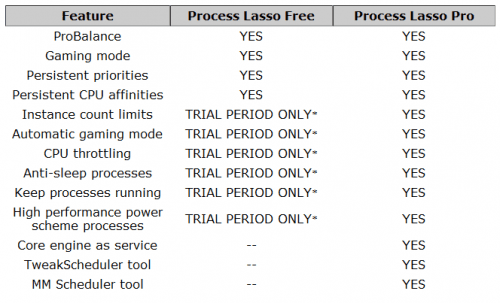
The free version of Process Lasso includes ProBalance, the process management component of the program, a gaming mode and the ability to set persistent cpu affinities and process priorities.
The pro version adds a number of features to that including automatic gaming mode, cpu throttling, anti-sleep processes, high performance power scheme processes, running the core engine as a service and schedulers.
A right-click on any process in the Process Lasso window opens a context menu with lots of options to configure that process.
Among these options is the ability to set a priority class, cpu affinities, throttle levels, default process priority, cpu affinity and throttle level, limit the number of program instances, auto restart the process if it is terminated, always terminate a process whenever it is started or to restart the process.
Experienced users can tweak lots and lots of settings that are offered in Process Lasso. Those are not needed for the core functionality on the other hand.
Registration
Process Lasso Pro displays a window during installation where a license key needs to be entered. A button in the same window will lead to the developer website where a license can be requested by entering an email address. The license key is displayed on the next page without email verification.
Verdict
Process Lasso Pro is a helpful software program especially for users who experience system slowdowns regularly due to processes that are maxing out the cpu or computer memory.
The program is offered as a 32-bit and 64-bit edition which can be freely downloaded today at the Giveaway of the Day website. The developers website can be accessed here. It contains additional information and the documentation.
Advertisement


















Works great, I have an FX 8350 & this program really helps in lots of games.
It used to be hard to alt tab out of a game then adjust it in Task Manager.
With Process Lasso you do not have to adjust stuff every time u use it.
Set up the prioritys for each app & Process Lasso automatically goes into hi perf. mode, then u play &
when u exit it goes back to Balanced power state.
I am gonna get a lifetime setup.
It really helps on my Dads AMD 2.5 gig AM2 dual core, much much smoother & much less waiting around.
Thank you Jay! Ghacks.net is a long-time favorite site of mine, so I monitor it, and appreciate the positive word :). And I have to say – you have not seen the best yet, we are moving to a new level at Bitsum.
ProcessLasso, and maybe you wanne create a new review? The old one just touches the surface of the program (and seriously, compared to all those crappy “task managers” / “optimizers” (lol), then ProcessLasso actually works)
Just bought the Pro today… Interesting software… thanks author… :)
@Ismo: Although your comment is two years old, I’d like to defend my software, as the author. Process Lasso is above all an automation tool. You can set sticky/default/persistent CPU and I/O priorities and CPU affinities, restart a process if it consumes too many resources, disallow processes from running, etc… As for ProBalance, there is a graphical demonstration we provide on our web site you can run on your own PC. This demo is so simple you can recreate it with a BATCH File, as all it does is eat up every CPU cycle it can get at NORMAL priority. Try for yourself, see what happens with or without Process Lasso, using our test CPU Eater, or your own.
Process Lasso Pro version has many benefits over the free build.
Same old snake oil in modern OS’s.
No, this is not at all. I hate that con-men have done this to our genre. Setting aside all the clear and obvious utility of automation of all kinds, our ProBalance algorithm is actually demonstrable. See https://bitsum.com/how-probalance-works/ .
Further (I) am a an engineer, these con-men are marketing companies. Important distinction.
Thanks,