
How To Import Gmail Contacts Into Thunderbird

One of the problems that users encounter when they work with different email clients is that the information between the clients is not synchronized automatically.
But automatic syncing might not always be ideal as it usually requires to run a software program or add-on to sync the data regularly.
The alternative is to manually import the data. This article describes a way to manually import Gmail Contact information into the Mozilla Thunderbird email client.
Thunderbird users who want to automatically sync Gmail contacts instead can follow the link instead.
Manual importing and exporting contacts is usually done with csv (comma separated values) files or vCard files.
Import Gmail Contacts Into Thunderbird
Open the Gmail website and click on the contacts link that appears when you click on the small down arrow next to Gmail in the top left corner.
This should open the Gmail Contacts window that lists all contacts and groups in the email client.
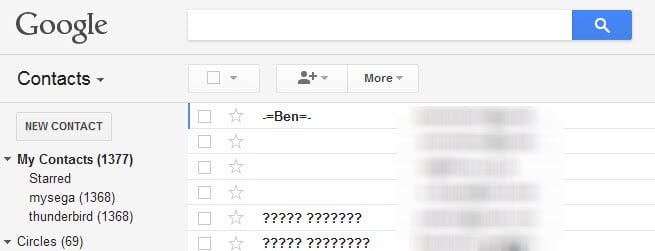
Locate the Export link by clicking on the more button at the top and selecting it from the context menu that opens up.
You can now export all contacts or only specific groups of contacts which is handy if contacts have been sorted into custom groups.
Select Export as Outlook CSV which ensures the best compatibility for importing operations. You can alternatively select vCard format to import this into Thunderbird instead as the email client supports both formats and some users have suggested that vCard may work better.
I suggest you try one format, and see if that brought the desired results. If not, try the other format instead.
A click on the Export button in the menu opens a Save File dialog to save the contacts.csv or contacts.vcf file to the local computer system.
Now that we have the Gmail contacts information we need to import them into the Thunderbird email client. Open Thunderbird and click on Tools > Address Book or press Ctrl-Shift-B.
Locate the Tools menu again in the Address Book of Thunderbird and select the Import link there.

Make sure you select Address Books before continuing. Now select Text File (LDIF, .tab, .csv, .txt) from the next screen if you have exported the Gmail contacts to a csv text file, or vCard file if you have exported it as a vcf file.
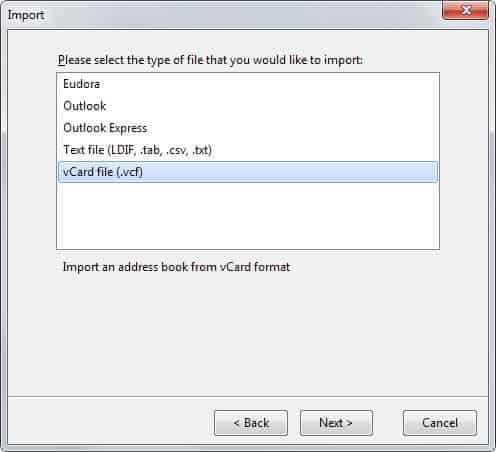
A file browser opens. Browse to the Gmail contacts file that you have exported earlier. You may need to change the filtering type in the file browser so that all files and not only LDIF files are shown.
The import address book window opens afterwards. You can use this window to check that the exported contact information match with the information in Thunderbird.
It is possible to go through all contacts and switch information if necessary. You should make sure that primary email and e-mail address as well as last name and name match in this window before you continue.
Here you can also disable fields that you don't want imported.

A click on the OK button imports the Gmail contact information into a new Thunderbird address book so that they become available in the email client from that moment on.





















Shoot! I did exactly what you told me, but got only one field – Name, in the address book. :-( How do I fix this? I also need email, home phone, & cell phone. Please advise.
I strongly suggest you to export Gmail contacts in vCard format, as this provides better compatibility with Thunderbirds adress book.
Good point. When the guide was written, vCard was not supported by Thunderbird.