
Google Chrome DNS Fetching

The Google Chrome web browser makes use of a feature called DNS fetching (sometimes also called DNS pre-resolving, or preloading) to improve the user experience while using the browser. The idea behind prefetching is that Chrome runs DNS queries to look up IP addresses of links found on the active web page, and that it may also preload certain content on linked resources.
The computer needs to resolve every domain name to an IP address to make a connection to that location (and all other elements that are linked on that page). It takes an average of about 250 ms to retrieve those information from websites that are accessed for the first time.
DNS Fetching retrieves the information prior to the user's click on a link on an already loaded page. This speeds up the loading of said resource by about 250ms according to Google, but that is only of use if users click on the link to load its resources.
That's one of the reasons why page loads feel faster in the Google Chrome web browser. DNS Prefetching is enabled in the Google Chrome browser by default.
DNS Prefetching

Google changed prefetch related settings again in Chrome 73. Users who could disable the prediction service in previous versions of Chrome may notice that the option is not available anymore.
It seems that Google changed the name of the preference in the browser. You may want to do the following to disable preloading:
- Load chrome://settings/ in the browser's address bar.
- Scroll down to the end of the page and activate the Advanced link that is listed there.
- Locate the privacy and security section, and find "Preload pages for faster browsing and searching".
- If you set this to off, preloading is disabled. If you set this to on, it is enabled.
Chrome will look up IP addresses of page links and may even load the ones that have the highest probability of being followed. Downside to this is that websites and services that Chrome preloads may set cookies and read their own cookies, even if you never visit these sites.
Privacy issue:
Chrome will resolve all domain names on a loaded page even those that the user has no intention on clicking on.
Some users might want to prevent this as the preloading allows linked sites or resources to write cookies and read their own cookies which may be used for tracking.
The prefetched DNS records are also stored in the web browser and clearing the browsing data in the browser will not clear the prefetched data.
The data is however only stored per session meaning that it will automatically be deleted once the user closes the browser.
Page loading problems:
It happens that a web page does not load in Google Chrome displaying a "Oops! This link appears to be broken." message instead. Reloading the page does not seem to resolve the issue and clearing the browsing data does not resolve it as well. Other web browsers on the other hand load the website just fine.
This is an indication that DNS Prefetching may be the problem here. Google Chrome cannot load a website correctly if prefetching fails (for instance by resolving the wrong IP address). Closing and reopening the browser should resolve the issue. Users who experience broken links regularly might want to consider turning off the DNS prefetching feature to resolve the issue.
Old information
When you type about:dns in the address bar a list of pre-fechted DNS records is shown to you.
We have identified three problems with DNS Prefetching that we would like to address below:

You can disable DNS prefetching in Google Chrome in the following way:
- Load chrome://settings/ in the browser's address bar, and click on the "show advanced settings" link at the bottom of the page that opens.
- Locate "Use a prediction service to load pages more quickly" under Privacy, and remove the checkmark from the preference.
The following information apply only to outdated versions of Google Chrome.
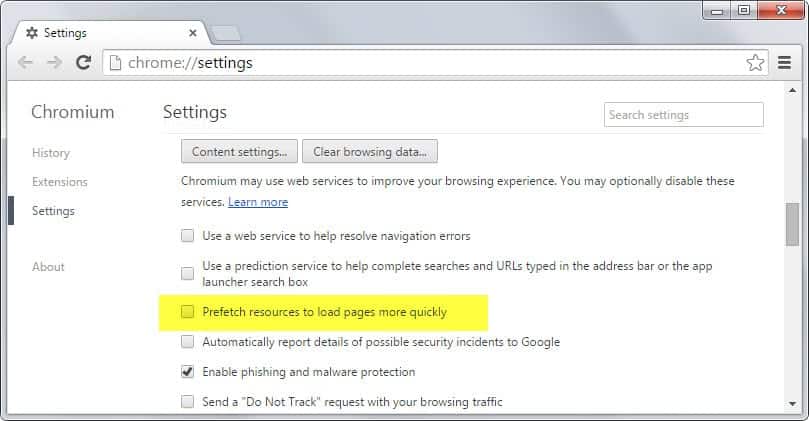
The way pre-fetching can be disabled has changed. Load chrome://settings/ in the browser, click on show advanced settings at the bottom and uncheck the "prefetch resources to load pages more quickly" option there.
DNS Prefetching can be configured in the Options of the Google Chrome browser. A click on the Tool icon in the address bar and the selection of Options from the context menu will open the Options window.
Switch to the Under The Hood tab and look for the "Use DNS pre-fetching to improve page load performance" entry.

Should you keep the feature turned on?
That really depends. If you are experiencing page loading errors regularly you might want to consider turning it off.
If you think it is a privacy issue you should also turn it off. Everyone else benefits from the speed gains on the other hand (you might want to benchmark those).
If you are a Chrome user: Are you using DNS Prefetching? What is your experience with it?


















Nope the new versions of Srware Iron no longer allow you to turn DNS prefetch off as the predict network actions tick box is missing in version 31 and this is a big mistake if you value your privacy and use VPN’s or something like the Tor Network.
Firefox is in bed with Google and Adobe, IE is so integrated that you need a re-boot just to move the location of temp files and MS uses index.dat files to record your every move in super hidden folders and all over the bloated registry and now Sware Iron is taking the pi$$ to so just what browser should we use that’s not controlled by big brother.
DNS Prefetching is nice for the average user, but in the case of developers, I think it’s a bad idea. In my case, the DEV environment may is not public facing, so intermittent issues occur when Google tries to override local cache info with it’s prefetch info and/or dies on the redirect. (I typically get err: 101 and err 105 in many cases)
Just my two pennies.
I’ve never got a single problem with DNS prefetching and I don’t think its a privacy issue, so it’s DNS prefetching is turned ON :)
If Google’s privacy is a concern I would recommend SRWare Iron. Main differences are described here http://www.srware.net/en/software_srware_iron_chrome_vs_iron.php and the latest version is here
http://www.srware.net/forum/viewtopic.php?f=18&t=1280&sid=cbf981eae25fea51fe9d468d734bd14a
Also, there’s adblock.ini file for srware here http://fanboy.co.nz/adblock/iron/
Regards,
Ivan K.
Great…i am impress with this thoughts,Google this new idea will be very helpful for us,DNS prefetching automatically is amazing.but i little confuse that is its a stagy of Google to know more about People work on Internet.
Firefox has extension SpeedDNS that does DNS prefetching. I have not find any visual change in loading webpages comparing to normal state ,so I uninstalled it.
As of 3.5, FF does DNS prefetching by default:
https://developer.mozilla.org/En/Controlling_DNS_prefetching
I love DNS prefetching, but what really helps is DNS caching in the OS. DNS caching is one of the first things that I enable on a new Ubuntu install.
There are many privacy issues with Chrome, you can read about them online in many places. That’s why I use the latest Chromium build:
(http://build.chromium.org/buildbot/snapshots/chromium-rel-xp/ for Windows XP users)
If you are very concerned about privacy I would use Chromium instead and uncheck all those options (as all send data back to Google, AFAIK) as well as changing the default search provider from Google to something else.
Thanks for the post!
I’ve been running into numerous problems with prefetching, I’d say the page loading errors popped up 3-4 times a day with relatively high usage.
At the same time, as the article says, loading is much faster with this feature turned on.
What’s your take on the google public dns?
I do not use it at all. Don’t think the speed gain is significant enough.