
YouTube Search For Google Chrome

If you want to search for videos on Youtube you can either go directly to the site and hack your search phrase into the search form offered there, use a search engine like the excellent Bing Video search instead to find what you are looking for or use a browser extension to search YouTube directly without leaving the page you are currently on.
Fast YouTube Search is a web browser extension for Google Chrome that allows a user to perform a search on YouTube directly in the Chrome browser.
The extension places an icon in the Chrome address bar after installation that you can click on to search for YouTube videos directly from it.
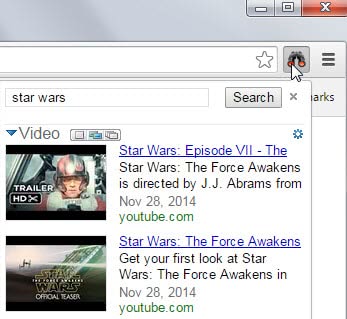
Search results are displayed as soon as you start typing and updated whenever you modify the query.
Each result is displayed with a thumbnail screenshot, its title, a couple of words taken from its description and its upload date.
A click on one of the videos opens it directly on YouTube where it starts to play automatically. The three icons next to video change the number of videos displayed on result pages. The leftmost icon displays one result, the middle icon four with options to load more, and the rightmost icon eight also with options to load more.
The settings icon allows you to change the sort algorithm to date instead of popularity.
The extension basically reduces the steps that need to be performed to search on Youtube. Google Chrome currently does not support keyword searches which are an alternative to installing an extension to search Youtube. Firefox or Opera users can for instance define a keyword for Youtube to perform the search right away. And Youtube search can also be added to browsers that include a search module.
Fast Youtube Search can be downloaded from the Chrome extensions gallery.
As Chris points out in the comments there is another way to achieve basically the same effect without installation the extension.
Right click omnibox and click "edit search engines"
Name it youtube, give it keyword y, and put http://www.youtube.com/results?search_query=%s&page={startPage?}
as the url.
Once done it is possible to search Youtube by typing in "y search term" in the address bar (without the "").
Update: The original Chrome extension is no longer available, but there is an alternative available on the Chrome Web Store. YouTube Live Search can be downloaded from the official store. It works in pretty much the same way as the original extension released back in 2010.





















absolutely useless. I have youtube as a search engine with keyword ‘y’, anytime i want to search youtube, i type in ‘ y searchterm ‘ There is no reason why you should waste screen space for the button or the memory that the extension uses as its own process. clearly the author of this article has no idea what he is talking about:
– right click omnibox and click ‘edit search engines’
– name it youtube, give it keyword y, and put http://www.youtube.com/results?search_query=%s&page={startPage?}&utm_source=opensear
as the url.
No other browser does searches more efficiently.
You can do this with opera as well.