
Geolocation Added To Google Chrome 5

The latest development release of Google Chrome 5 that was released a few hours ago introduces a geolocation feature to the web browser.
Google Chrome 5 version 5.0.342.1 and later now include an early version of the geolocation api which can be enabled by starting the web browser with the --enable-geolocation startup parameter.
Geolocation has been added so that the browser and web services may make use of the user's location when providing services to the user. This feature can be integrated into websites and browser extensions as well.
The user's privacy is guaranteed since a confirmation prompt is displayed whenever a service tries to access the geolocation feature to detect the user's location. Basically, you need to give your okay for the service to detect your location.
The geolocation feature is for instance used by Google Maps to locate you on the world map. It is likely that new applications will eventually be released that make use of this feature as well.
Possibilities include displaying nearby stores, restaurants or other locations, redirect the user to a site that matches the user's location, looking up weather information for the user's location, and many other services that could benefit from location access.
Internet users who want to test the new geolocation feature need to download the latest version of the Google Chrome dev release to do so and start the browser with the parameter mentioned above.
It should also be noted that permissions are not persistent, and that wifi based location is currently only supported on Windows and Mac (but not OSX 10.6).
Configure Geolocation in Chrome
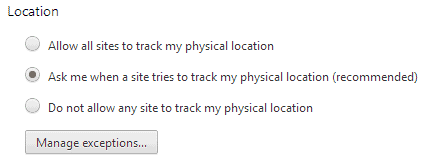
Update: Geolocation is now a native feature of the Google Chrome web browser. There is no need anymore to enable the geolocation API using the startup parameter.
The feature is now called Location Sharing and is one of the permissions that you need to explicitly allow before sites can make use of it.
You can also disable the feature completely:
- Click on the Chrome menu button and select Settings from the menu that opens up.
- Click on the "Show advanced settings" button at the bottom.
- Click on "Content settings".
- Scroll down until you find Location there.
- Here you have three options:
- "Allow all sites to track my physical location" to enable it for all websites and services automatically.
- "Ask me when a site tries to track my physical location" to have Chrome display a prompt whenever websites want to use the location feature. This is the default setting.
- "Do not allow any site to track my physical location" to block any attempt to use the location sharing feature.
- There is also an option to manage the list of exceptions. This allows you to block certain sites and allow others, and will override whatever you have set the location permissions to.
You may speed up the process by loading chrome://settings/content directly in Chrome. Continue from step 4 above afterwards.

















Anyone have instructions for trying this on Samsung ChromeBook?
Only had the device for a couple of hours, and I’ve lost my way in the real world … trying to find out where I am :-)
That what I’m waiting for. Before I thought why on earth I have to switch to Firefox for to retrieve my geolocation. I’ll check to update my chrome.
After the Buzz thing, I’m surprised Google didn’t just enable geolocation by default.
Is there anyone left that Google doesn’t have strings tied to?
I don’t know. Maybe my grandma.