
SPlayer A New Windows Media Player

SPlayer, yes you read SPlayer not SMPlayer, is a new contender for the Windows media playback throne.
Depending on your media player of choice, you are either stuck with installing codecs to get certain video formats to work, or enjoy a media player that comes with binary codecs for video formats. The latter allows you to play media without having to hunt down missing codecs or - god forbid - install a video codec pack which sometimes does more harm than good to the system.
SPlayer uses binary codecs just like VLC Media Player or SMPlayer do. The player played all formats that we threw at it during tests, including video formats such as avi, mpg, mkv but also audio formats like mp3.
Even better is the fact that it can also play movies from DVD, Blu-Ray or remote locations.
SPlayer
The player uses a basic interface much like the new Windows Media Player lite does in Windows 7. The controls only become visible if the user moves the mouse cursor on the interface. It is then possible to load movies or music, configure and control playback settings, and use various other options.
We had to use Google Translate to translate the Chinese information on the developer's homepage into English (update: an English version of the homepage is available by now).
The homepage does contain a table comparing SPlayer to various other media players including KPlayer and Real Player (but unfortunately not Windows Media Player, Quicktime, VLC or a MPlayer variant).
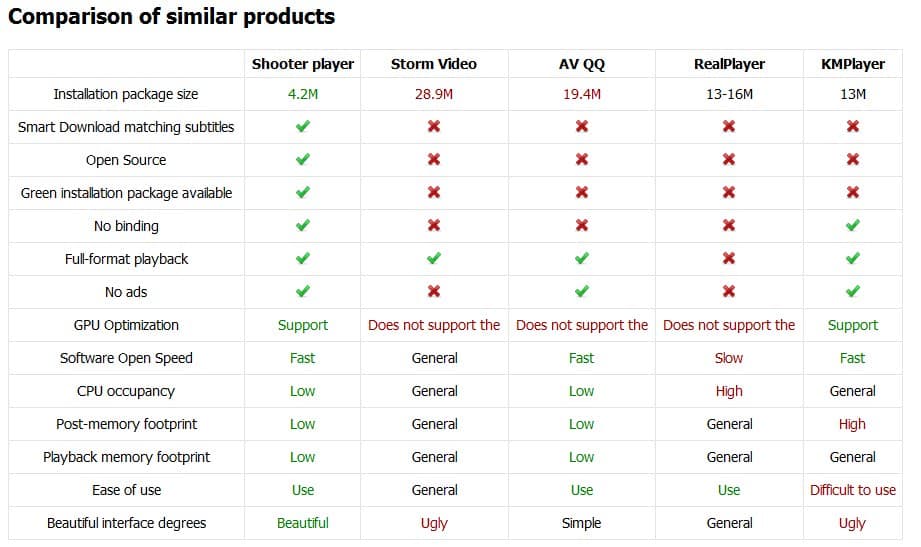
Some of the features that speak for SPlayer are that it is Open Source, uses GPU acceleration, has a low installation size, rather low memory and cpu footprint, and that it uses binary codecs to playback videos. The only problem could be the non-English homepage which could make it difficult to get support or questions answered.
The player works pretty much as you'd expect it to work. Drag and drop a media file, e.g. a video or music file, on to the interface to play it. You can make the player the default playback device so that any media file that gets loaded on the system is loaded in SPlayer, or use the open controls instead.
Update: Splayer development seems to have stopped. The last release dates back to 2013. While the program works fine in that release version, it is suggested that you run media players that are still in development instead.
We suggest you check out VLC Media Player or SMPlayer instead.
SPlayer is available from the developer's website. It worked fine in Windows 7 Professional and is likely to work in other Windows operating systems as well.





















Very nice player. Just what I am looking for. Hotkeys are simple enough and the interface is just perfect. It still needs some work on the user interface of the configuration portion. Use tabs instead of clicking to work through the menus. There are also some Chinese instructions in the menu that needs to be cleaned out. Otherwise, it is just perfect. Low CPU and memory load and small footprint.
splayer’s english home page: http://splayer.org/index.en.html
I believe this is what I had been looking for; it is effective, minimal, and frees you of any hassle of decoding settings. I also like the GPU acceleration which relieves my cpu quite a bit.
Very nice player, easy to use and plays everything. It still needs some fixes, but it has been updated almost everyday.
I think GOMPlayer needs to be mentioned aswel.
Hi there,
Would anyone recommend this as a (better) replacement to KMPlayer?
Thanks in advance.
Seems to be just a nicely skinned version of Media Player Classic – Home Cinema with lots of text badly mangled into Engrish. I did like the option for Quick Lunch on installing though!
When i go to the help page its in Chinese. Do you know how to get the help page in English, Martin, Matt, Dave or somebody else?
Paulus use Google Translate.
the website has a language drop down in the top right. no need to use google to translate it.
FYI: English homepage can be reached directly via http://www.splayer.org/index.en.html. No need for Google translate…
~Dave
Dave and Matt, thanks for mentioning this. I did not see that drop down due to the NoScript add-on in Firefox. It does seem however that the drop down is also using Google Translate.
I’m chinese from China, just found this article introduce SPlayer. I may add something, it’s originally contributed by a chinese subtitle website http://us.shooter.cn/, so the name has a “S”, and one of the major function is searching and download proper subtile for the video, I think not from opensubtitle.org, form their own site.
and yes, it contain coreavc, so you should know, and also can play real video, you know what i am trying to say…