
Windows Firewall Control review

Windows Firewall Control is a program for Microsoft Windows devices to add better built-in firewall controls to the operating system.
The firewall in Windows 7, Windows 8 and newer versions of Windows is a solid software firewall. It is by far not as advanced as third-party firewalls, but it does a good job at protecting a computer system running Windows.
The functionality of the firewall has been improved ever since Microsoft starting shipping Windows XP versions with an initial -- basic -- version of it.
It does lack several features that most third-party firewalls offer including usability enhancements like displaying prompts whenever an unknown application tries to create a connection to a private or public network.
Windows Firewall will block the connection if the application is unknown (not listed in the control panel of the software). The configuration can be difficult, especially in the beginning right after the first start of the operating system as you may have to deal with several cases where programs don't work correctly because they are blocked by the firewall.
While it should work fine most of the time without user interaction, as it has been designed for that, you may want better control over the process. Control in this regard means information about programs trying to access the Internet, and options to either allow or deny those request temporarily or permanently.
Windows Firewall Control
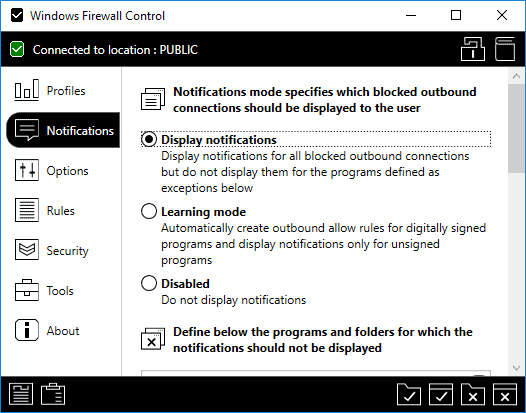

That's where Windows Firewall Control comes in. The program is compatible with Windows 10, but also older versions of the Windows operating system including Windows 8, Windows 7, and Windows Server 2012 and Windows Server 2016.
Update: The program is now free. You can check out our Windows Firewall Control 6.0 review here.
The software adds application connection prompts to all recent versions of Windows. It displays a prompt whenever an unknown application tries to connect to the Internet so that you know what is happening and can react on the information.
The prompt provides you with options to block the connection attempt, or allow the process to connect to the network or Internet. If you want, you can allow only incoming or outgoing traffic as well, and make that setting temporary or permanent.
You could block a connection attempt for 5 minutes for example, or block it entirely so that the firewall refuses connection attempts by the program without further user interaction.
You can configure Windows Firewall Control to monitor outbound, inbound, or both connection directions.
The prompt displays various information on the application, including its path and executable, company information, and program version.
The edit prompt lists other options that you may find useful. First, you may disable a variety of events, including event notifications by Windows Firewall Control. Besides that, there are also options to run a Google Search for the application, apply zone permissions, or create a specific zone and apply the new policy. The program does ship with more than 30 predefined zones that you can make use of. These zones can be modified if needed.
The selected setting will be stored in the program's main interface only. This is one weakness of the program as it does not sync the settings with the Windows Firewall.
This is problematic as it means that configured settings will be gone if Windows Firewall Control is uninstalled or gets corrupted somehow.
The reason for not syncing is that Windows Firewall Control works independently from Windows Firewall. It does grab the configuration at startup but does not communicate with the firewall after that.
You can even disable Windows Firewall completely when Windows Firewall Control is running and won't notice any issues doing so.
Windows Firewall Control supports desktop programs and Windows apps introduced in Windows 8 by Microsoft.
All core features, including application events, notifications and connection monitoring are supported by it as well.
Settings and interface

The main program interface lists various options to control the application's behavior:
- Profiles -- defines the strength of the filtering. The application recommends medium filtering but you may switch it to low, no, or high filtering instead. Medium filtering blocks outbound connections that have no rule and will allow connections only by programs with allow rules. High blocks even more while low less.
- Notifications -- turn on the notifications feature. It displays prompts to you whenever events happen for which no rules exist. Gives you full control over the system's connections. Supported options are "display notifications", "learning mode" to create automatic rules for digitally signed applications, or disabled. Options to create exceptions are provided as well.
- Options -- Controls program behavior such as autostart, global hotkeys, or shell integration.
- Rules -- Specifies rules directions (inbound, outbound, or both), and to which locations rules are applied to.
- Security -- Controls security enhancing features such as setting high filtering automatically at system shut down or adding extra protection to the Windows Firewall state.
- Tools -- Links to internal Windows tools and online tools, e.g. Event Viewer, Resource Monitor, and IP checkers.
Tip: The program displays links to the connection log and Windows Firewall rules in the lower left corner of the interface.
You can add rules using the notifications system, or by selecting processes manually that you want to create rules for.

The rules listing is quite interesting as it lists new all rules created by the application or the user. You can search rules, use filtering options, and delete or change any rule right from the interface.
Tip: Check out our Windows Firewall Control tips collection for detailed instructions to get the most out of the application.
Closing Words
Windows Firewall Control is an excellent program that improves the manageability of the Windows Firewall. It gives users full control over connections on the system and works well on all supported versions of the operating system.

















I have recently installed Windows Firewall Control on a Windows 10 computer. The program is very useful as it permits me to monitor and control outgoing traffic (using medium filtering mode). However, I have noticed that users that do not have admin privileges are now permitted to disable the firewall, because they can access the WFC application, too. I think this is a severe security problem. Also, if a user can do that, any malware program could do that, too. I was wondering, how WFC prevents malware from just switching off the Windows Firewall by simply accessing the WFC control GUI?
I initially thought that the “Lock” feature may be a way to prevent this, but there is a loop hole. In your users guide you describe a procedure to unlock WFC, if the password was forgotten. This procedure is unsafe (pressing some keys and entering a default master password) and can be executed by anyone.
Shouldn’t WFC enforce the same security policy that the normal Windows firewall has i.e. Firewall rules and state can only be changed by users with Admin rights?
If I’m not mistaken, there are 2 apps with almost identical names. One by Binisoft and the other by Sphinx.
The screenshot for this article is for the Sphinx app, but the link is for the Binisoft app.
Lol. Landing page is not correct. You mentioned binisoft by mistake.
LOL! That was 8.5 years ago :)
It’s still Binisoft but the landing page is a bit deeper : http://www.binisoft.org/wfc.php
No Tom, you are mistaken. There are two different apps by two different authors.
Why does the link where it says “A pro version of Windows Firewall Control is available ” take you to a different program vendor to what you are writing about?
Is this topic about Binisoft or Sphinx software??
Ran WFC for about a year across several family computers. The good was that it was rather simple for them to use. The bad was 1) it would bork every once in a while (stuck on black – all closed), that required an uninstall and reinstall (along with other steps that are not obvious); 2) it would impede the operation of some not-uncommon programs (e.g. Sonos Desktop Manager), and there were no obvious solutions (adding the program to WFC was insufficient).
Ran Sandboxie for a much longer time – free version (no longer available). There were some operational issues that caused it to misbehave. The biggest issue was recent Win 7 updates had caused it to quit working.
Had a hard drive crash, so re-examined using these tools vs alternatives, with an eye to soon migrating from Win7 to 10.
Settled on Comodo Internet Security. CIS is free, has a firewall, anti-malware, AND a sandbox. Like Sandboxie, shortcuts for browsers can be set up; unlike it, exiting the browser cannot be set up to automatically clear the sandbox – one must go into CIS itself, and navigate to the right section to click on a “reset” button; also unlike Sandboxie (paid version), can only have one sandbox instance.
This article needs definitely a bump, the software was heavy updated and works quite well under Windows Vista/7/8/10.
Since there is only one version now, everyone can activate it with a license and get some notification feature (needs DNS service enabled).
Together with TinyWall (free) the best two Firewall GUI’s I know. Simply and effective.
Chef, I’m not sure I can follow you. When I check the download page on the developer website, multiple free and paid versions are listed. Am I missing something?
I agree that the article needs an update though and will get right on it.
Free version is nagware. FTL
im new to this windows and your guide is a great help. Thanks!