
ghacks Technology News

Create Wireless Hotspots With Connectify And Windows 7


connectifyVirtual WiFi, one of the features that Microsoft introduced in their new operating system Windows 7, did not get that much attention until now. Virtual WiFi makes it possible to use the wireless networking adapter of a computer system running Windows 7 as a wireless hotspot for additional systems. That’s definitely an interesting feature for some Windows 7 users. Long Zheng described the Virtual Wifi technology and its possible uses in detail in a blog post earlier this year:

You might be wondering why anyone would ever need multiple WLAN adapters on the same PC, well to be honest, you don’t need but its sometimes good to have. In any case where you’re connected to an existing wireless access point and want to connect to another network whether that be a separate access point or even set up an ad-hoc connection, Virtual WiFi will allow you to do just that. But perhaps the scenario that is more appealing is the idea of a mesh network. In a mesh network, every client becomes a repeater, growing the network organically as more clients connect. Virtual WiFi enables this, since every client can become an access point too.

Connectify is a first beta software program that makes use of the Virtual Wifi capabilities of Windows 7. Windows 7 users can use the Connectify software to share the Internet connection of their computer system through a secure WPA2 encrypted hotspot. Other computer devices with wireless capabilities can connect to the hotspot to make use of that connection.
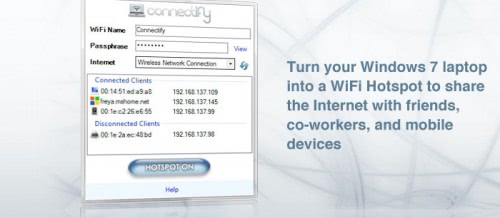
wireless hotspots

The program is currently provided as a beta version after registration on the Connectify homepage. Configuration of the service requires the following steps:

To get started, click on the Connectify logo in the Notification Tray.

1. Select the Internet connection you wish to share
2. Choose a name for your new wireless network
3. Choose a wireless passphrase
4. Press the Internet Sharing button to turn on your wireless network
5. Now, from your other devices, you can see your wireless network. Choose to join it, and enter the wireless passphrase to connect.

It is expected that the public release version will turn commercial with the likely probability that free software alternatives will be released eventually. Connectify is only compatibly with Windows 7 at this point. The software can be downloaded from the Connectify homepage.


Tags: , , , ,
Categories: Windows, software


Read Related Posts


17 Responses to “Create Wireless Hotspots With Connectify And Windows 7”

  1. kyith says:

    This software does not work very well. tried it on many colleagues win 7 pc and really had a hard time getting even one connected

    alternatively, you might be interested to know that many smartphones can tether their 3G connection to wifi through software. They are available for Pre,Android,Windows Mobile,Symbian and MIFI

    http://www.productiveorganizer.com/mobile-productivity/how-to-turn-your-androidsymbianwindows-mobile-phone-into-a-portable-wireless-router/

  2. Thilak says:

    Reminds me of JoikSpot Light for Symbian Devices. Does the same thing for S60!

  3. Bas Idzenga says:

    Turn Your Windows 7 Laptops Into Wi-Fi Hotspots http://su.pr/1Xjxkh (via @rajupp) #Windows7 #Win7 (via @flipbooks)

    [Reply]

    This comment was originally posted on Technically Personal!

  4. Ian Campbell says:

    RT @Flipbooks: Turn Your Windows 7 Laptops Into Wi-Fi Hotspots http://su.pr/1Xjxkh (via @rajupp) #Windows7 #Win7

    [Reply]

    This comment was originally posted on Technically Personal!

  5. RT @Flipbooks: Turn Your Windows 7 Laptops Into Wi-Fi Hotspots http://su.pr/1Xjxkh (via @rajupp) #Windows7 #Win7

    [Reply]

    This comment was originally posted on Technically Personal!

  6. Oh! This is something most network admins would try to avoid like the plague: http://bit.ly/30VqrJ

    [Reply]

    This comment was originally posted on Technically Personal!

  7. Carbono says:

    RT @basidzenga: Turn Your Windows 7 Laptops Into Wi-Fi Hotspots http://su.pr/1Xjxkh //Vamos ver se funciona mesmo.

    [Reply]

    This comment was originally posted on Technically Personal!

  8. rootwoman123 says:

    Reading w/great interest @TechnicallyPersonal: "Turn Your Windows 7 Laptops Into Wi-Fi Hotspots" http://bit.ly/2QXSCq

    [Reply]

    This comment was originally posted on Technically Personal!

  9. Andy Sowards says:

    RT @rajupp Turn Your Windows 7 Laptops Into Wi-Fi Hotspots http://su.pr/1Xjxkh #windows7

    [Reply]

    This comment was originally posted on Technically Personal!

  10. RT @andysowards: RT @rajupp Turn Your Windows 7 Laptops Into Wi-Fi Hotspots http://su.pr/1Xjxkh #windows7

    [Reply]

    This comment was originally posted on Technically Personal!

  11. Raju says:

    Turn Your Windows 7 Laptops Into Wi-Fi Hotspots – http://bit.ly/24KObF

    [Reply]

    This comment was originally posted on Technically Personal!

  12. if any of you guys using laptop with windows 7. http://tinyurl.com/y8ndpqk

    [Reply]

    This comment was originally posted on Technically Personal!

  13. Nihar says:

    Great find raju.

    Definitely need to check this.

    [Reply]

    This comment was originally posted on Technically Personal!

  14. pilot says:

    There is a software that upgrades all existing laptops to hotspots, without the need for cumbersom password. It also allows to connect in global wifi network for free. try http://www.bzeek.com

Trackbacks/Pingbacks

  1. [...] such potential was tapped by a Philadelphia developer to make Connectify – a free beta application which uses Virtual [...]

  2. [...] Connectify was the first downloadable application that used the virtual Wifi capabilities of Microsoft’s Windows 7 operating system to turn the computer system into a Wifi hotspot. The developers offered the program as a beta version that could be freely downloaded. Their intention on the other hand was to sell the software program once they managed to compile a retail version of the virtual Wifi software. [...]

Leave a Reply   Follow Ghacks   Subscribe To Comment Rss

© 2005-2009 Ghacks.net. All Rights Reserved. Privacy Policy - About Us


















