
Completely Remove Windows Live Messenger From The Computer System

There are situations where users are stuck with a version of Windows Live Messenger on their computer system that they cannot uninstall or update. This might have been caused by data corruption, a computer virus or other malicious software or the deletion of files or configuration entries. Manual removal is usually a solution but it requires lots of time with the danger of deleting data that is still needed on the system.
There are a few programs that can completely remove Windows Live Messenger from a computer system. These programs work in a similar fashion like the antivirus software removers that remove files and Registry entries from installed antivirus solutions from the computers system.
Here are the programs that can completely remove Windows Live Messenger:

Zap Messenger is a portable software program for the Windows operating system. It can not only uninstall Windows Live Messenger but also MSN Messenger and Windows Messenger 5.x. Zap Messenger requires the Microsoft .net Framework 2.0.
With all this in mind, I developed ZapMessenger – the one step tool to completely remove Windows Live Messenger, MSN Messenger and Windows Messenger 5.x. The first thing ZapMessenger will do is attempt to cleanly uninstall Messenger normally and if that fails for any reason, it will forcibly remove Messenger from the Windows Installer engine allowing you to reinstall at your leisure without hindrance.
Windows Live Messenger Uninstaller
Windows Live Messenger Uninstaller is another software program to remove Windows Live Messenger from the computer system. The portable program supports Windows Live Messenger and MSN Messenger installations which it can uninstall from the system.
Windows Live Messenger Deep Clean
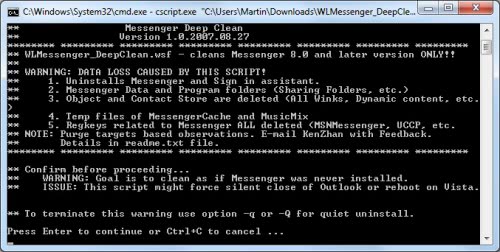
The third program that can remove Windows Live Messenger is a tiny script which can be downloaded from Rapidshare. It will uninstall Windows Live Messenger and the Sign In Assistant including data and program folders, objects, contact store data, temp files and Registry keys.
Update: Third program is no longer available, we have removed the link pointing to its download location.
Advertisement


















but remove WL messenger and can’t remover WL mail , how can’t i completely remove WL mail?
Another alternative that should remove any version of WLM. If you try it, I would appreciate a little feedback.
http://blog.eddsn.com/2009/12/windows-live-messenger-uninstaller-v0-01/
Can I really trust this.
Thank You For This WonDerFul PosT It WOrks 100 % …………
Indeed a very useful software, just what I was looking for getting rid of the mess that Microsoft has built among the various messenger versions.
But which of those cleaners is the most suitable?
Thanks so much! I tried to uninstall live messenger program through control panel/add remove program but it was not removed completely. I have downloaded this ZapMessenger software and it let me remove it.