
GoogleCrashHandler.exe Removal

If you have Google software installed on your computer system chance is that you may see GoogleCrashHandler.exe running on the system if you open up the task manager. GoogleCrashHandler.exe is one of the two Google processes - the other is GoogleUpdate.exe - that may be running on PC.
GoogleCrashHandler.exe will send anonymous usage data and crash reports to Google. It is an opt in service during installation of Google software products.
Your best bet to avoid its installations is to pay attention to the installation dialog when you install Google products on your system.
To find out if it is running in Windows press Ctrl-Shift-Esc on your keyboard to open the Windows Task Manager. According to Google GoogleCrashHandler.exe has the following characteristics:
GoogleCrashHandler.exe runs continuously on your computer if you've selected to send anonymous usage statistics and crash reports to Google for certain Google software, like Google Chrome. It helps send crash details to Google when your Google software unexpectedly shuts down. We use this data to help determine how to prevent these errors from happening in the future.
The process can be turned off in the installed Google program. That could be a bit of a problem if several Google applications are installed on the computer system. In Google Chrome - Google's web browser - you have to go to into the Options, switch to the Under The Hood tab and remove the checkmark in front of "Help make Google Chrome better by automatically sending usage statistics and crash reports to Google".
Update:
Google has revamped the Chrome preferences. In the new preferences, you have to click on show advanced settings and make sure that "automatically send usage statistics and crash reports to Google" is unchecked here.
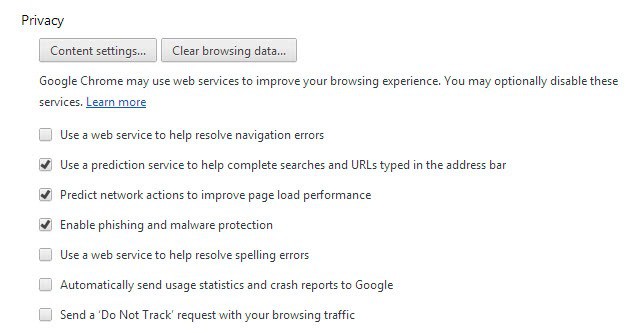
Other Google applications have similar options. If more than one Google app is installed you need to go through all of them to turn off the crash reporting in all of them.
Once that is done GoogleCrashHandler.exe will not be running on the computer system anymore starting with the next start of the system (restart or kill the process for immediate effect).
Troubleshooting
If you have uninstalled all Google products and notice that the process is still running on your system, do the following to correct it:
- Kill the process in the Windows Task Manager so that it is not running anymore.
- Search your computer (all drives) for googlecrashhandler.exe.
- Delete all files that are returned as results. Since you are not using any Google products anymore, there is no harm in doing so.
- Search for Google and delete folders that may be leftovers from previous installations.


















Great thanks!
The People Searching for : IE working but Google Chrome or Mozilla not working can apply this thing. Really Useful ! IT solved my problem ,was facing from 1 month !
i dont use anything google because of this crash handler i cant get rid of. its still there. every 10 minutes it comes back if i dare to shut it off. so! i will deal with it…but let it be known google is NOT going to be used for any purpose ever on my machine
I can’t even find the setting you speak of in Chrome.
You really should be more explicit.
Besides the Google Chrome browser, Google Earth is another software example where you must uncheck the send usage statistics box.
Not working for me.I use chrome portable and i try the method as you mention above
then restarting my pc.But no luck and the program still running.Please help.
I uninstalled Chrome but GoogleCrashHandler (both x86 and x64) are still running in the background!
en c:\windows\prefetch eliminé los archivos google*.pf y se acabó el problema
Did you reboot the computer afterwards?
Yes, I rebooted the computer
I don’t have ANY google software installed. Used msconfig to make sure googlecrashhandler is NOT started. Still the services are running as soon as windows is started.
GoogleCrashHandler runs on your system even if you do not use google software running and have (if you did) turned off ‘anonymous usage data’.
AntiVirus software should consider this a virus and stop it if people choose it to be permanently stopped. F! Google.
Can you tell me how to remove it from Chrome Frame of IE8?
Thank you.
Great article. I was trying to figure out how to get rid of this service under task manager. Since I really only use Chrome to check websites compatibilities.
Thanks! Great site too!
May this decrease the performance of the system?