
Microsoft Photo Story


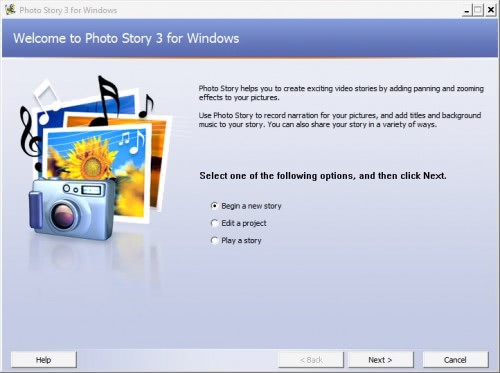
The program itself is easy to use. Each photo story is saved as a project. New projects begin by adding digital camera photos from the hard drive of the computer system to the application. These photos are immediately shown in the interface of Photo Story 3.
The Microsoft Photo Story start screen:
The selected photo is shown in the preview window and photo thumbnails of every other photo that has been added are shown in the thumbnail bar. Basic photo editing options are available to rotate the photo, remove the red eye effect, correct color levels or crop it.
Various effects can be added to the photos after they have been added and edited by the user. This screen does contain the additional option to add text to the photos.
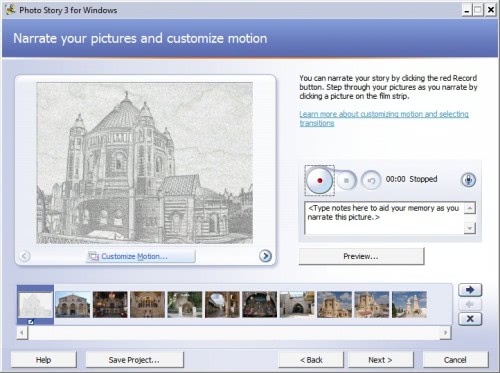
A story can be narrated in the next step. The recording can be started with a click on the red record button. The same configuration screen contains options to customize the motion of each photo in the video.
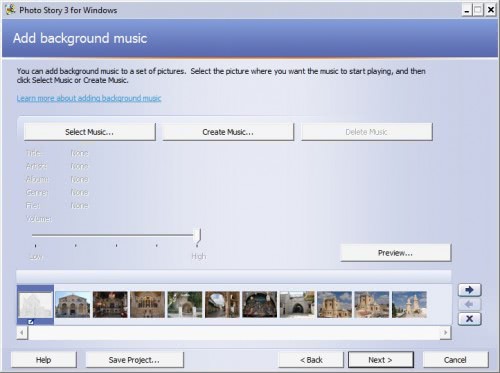
Music can be added to a set of photos in the last step before the save options become available.
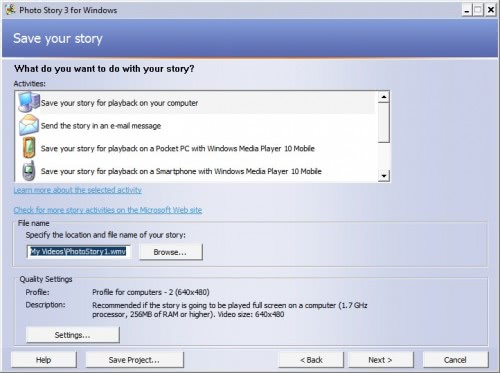
The video can be saved in various formats including. The settings in this step contain profiles for various computer resolutions, but also DVD and Video CD formats, email and Pocket PC and smartphone resolutions that support Media Player 10 Mobile.
Microsoft Photo Story 3 is a free download available from Microsoft (with Genuine Advantage verification). It is a great easy to use software to turn digital camera photos into a video.
Advertisement

















I have had Photo Story 3 for a long time and just recently upgraded media player to 11 and now i can not save the story as a wma with any new music. It appears to be a compatibility issue with media 11 and photo story 3. anyone else having this issue?
I tried rolling back to media 10 and it won’t allow me says it is not compatable with my system.
I have 14 years of phots in a story with music and don’t want to lose this or have to redo the whole thing in another program. Any Advice?
soooooooooooo good!
Only works if you have Windows Media Player v10 – if you have v11, this won’t instal.
I dnt have window
That’s strange. I do have Windows Media Player 11 installed and Microsoft Photo Story installed just fine.
Me too… I have Vista Home Premium with MP11. Photo Story installer just won’t play. Insists I need MP10.