
Music Manager The Godfather

The Godfather is a feature rich music manager that supports extensive tagging, audio format converting, playlist management and renaming options that has a slightly higher learning curve than many other music managers. The learning curve can be fully attributed to the program's interface with it's incredible amount of tabs, switches and options.
The interface is divided into two main levels. The left sidebar offers a folder browser with some filtering options at the bottom. It is for example possible to filter for specific audio formats or file names. The confusion can be attributed to the right main window. This window is divided into a main tab with buttons to rename, tag, edit, organize, retrieve online information and play. The two lower menus change depending on the main tab that is selected by the user.
The rename tab for example contains buttons to scan, open or save playlists, open the rename options, execute scripts and handle changes (like undo or ignoring files. More confusing than that are main options like the organize or online tabs where the choice in the second menu level changes the third menu.
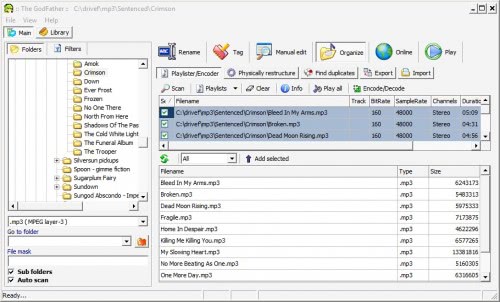
Here are some of the highlights of the music manager:
- Batch rename of files using Tag/Filename/Folder name/Audio file information.
- Batch Tag update.
- Manual / single file editor.
- Album/filename rename & update using freedb.org or www.allmusic.com, Amazon, and custom sites
- Powerful library.
- Encode/decode your files with LAME,Ogg Vorbis or mpcenc. (trans code with out losing tag information from one format to the other)
- Restructure the files on your hard disk ( copy,move or even create shortcuts ) in new user defined location based on Tag field information.
- mp3, ogg, mpc, ape, flac, aac, apl, wv, mp4, ofr, spx file support
The Godfather is available at the developer's website. It is compatible with most Windows operating systems and can be downloaded as a stable or beta version.
Advertisement


















Great program. It suits all my tagging needs.