
Redact Text In Microsoft Word 2007 Documents

Word documents can sometimes contain hidden but also visible information that has to be removed or that you may want removed before documents are shared with other users.
Tools have been developed to take care of the hidden data (Microsoft Word Metadata Scrubber is one) but until now there were not many tools to take care of visible data that needed to be removed before a document could be shared.
Most Word users are therefore replacing confidential text with blanks or single characters like xxxxx which can often times confuse readers of the edited version of the document.
Note: Visual Studio Tools for the Office system 3.0 is installed during installation.
Word 2007/2010 Redaction Tool
The Word 2007 Redaction Tool has been designed as an add-in for Microsoft Word 2007 and 2010 to redact text and images in documents before they are shared with other users. The add-in will add a Redact group to the Review tab which can be used to control the process.
To redact text, a user would select the text that should be redacted. The next step would be to click on the Mark option in the Redact group in the Word Review tab; this will mark the text by highlighting it.
It is also possible to use the Find and Mark command to automatically highlight all instances of a phrase in the Word document. It is possible to review the document at any time before redacting the highlighted text by selecting the Redact Option under the Mark group in the Review tab.
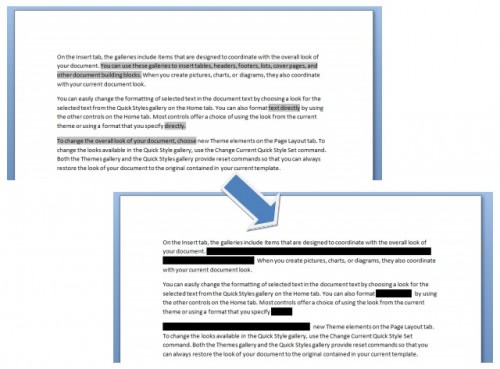
The whitespace character length of each word is altered by 10% (in either direction) to make it harder to guess the correct words. The developer recommends to inspect the metadata of the document to ensure that these do not contain information that could leak the redacted information.
The Word 2007 Redaction Tool requires the .NET Framework 3.5 Service Pack 1 and the VSTO 3.0 Runtime Service Pack 1 which will be automatically installed should they be missing on the computer system.
Update: The project has been abandoned and Codeplex, the project's host, no longer provides access to release downloads. We have uploaded the latest release version of the application to our own download server. Note that we don't support the application in any way and have done so only for archiving purposes.
You can download the Word 2007/2010 Redaction Tool with a click on the following link: (Download Removed)
Some functionality that the add-in provides won't work in newer versions of Office, e.g. Office 2016 or 2019. The text blackening does not work properly in those versions, installation works fine though.





















Although unsupported, does this work with Office 2013 and later?
It works partially only. Installs fine (tested in Office 2016), and while some features still work, text blackening does not.
Hi, I downloaded the Word 2007 Redaction Tool from the profile page at Codeplex. The zip file does not contain a *.exe file, so I am unable to open/install the app. Any suggestions as to how to install the app?
John, I have uploaded the last release version to our own server and updated the review to reflect that. You can download it with a click on the link.