
Password Protect Programs

It may be necessary to password protect programs - and other files - if other people have access to a computer system. This can be the situation if a family shares a single computer system, but also where other users may have access to the PC, for instance in an office or in dorms. The password protection ensures that certain programs or files are not executed on a computer system by unauthorized users.
Another application, besides making sure that some files cannot be opened by users, is to limit access to a program to make sure it is only used at certain times. Useful to keep children from playing World of Warcraft or other games when they should not for instance.
Desklock is a simple application for the Windows operating system that can be used to password protect programs. It places an icon in the system tray after startup which you can right-click to open a context menu. This menu displays options to configure the programs that you want to password protected. The default password to access the settings and password protected programs is 2.
Once you enter the correct access password, a list of all password protected applications is displayed in the main program window. The same password prompt will be displayed if a user tries to open a protected program or file.
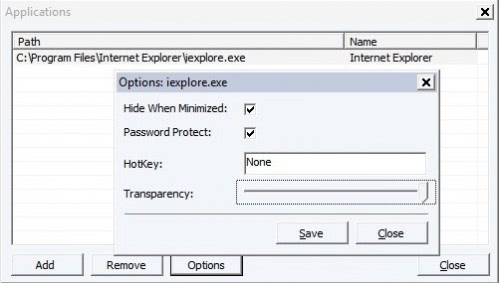
Additional options can be configured for each program including hotkeys, transparency and hiding the program icon instead of minimizing it to the system tray where users may spot it. How safe is the password protection? Desklock appears in the Windows Task Manager from where it can be killed easily with the appropriate rights. Terminating the process would enable access to all password protected files. It is therefor recommended to install this software on limited user accounts that do not have admin rights to kill processes.
Desklock is available at the developer's website.
Advertisement


















I simply added the task manager executable in system32 to the application list.
There is a Gmail user sending virus and spam to my website. I have their computer address. Whats the right way to deal with this ?
An expected error?
i can’t change the password
“There was an expected error trying to change password, pls.try again.”