
Install iTunes Without Unnecessary Software

Apple has just released iTunes 9 and the web is full of reviews that compare the new version to previous ones and outline the changes and new additions that Apple has packed into the new version of their popular music management software.
The new version does not offer that many new features but most users would probably like to update their old version of iTunes anyway. Something that has not changed is the inclusion of many additional software programs and services that many users consider unnecessary. These software programs include the Bonjour service, Apple Quicktime, MobileMe support or the iTunesHelper and iPodService startup processes.
Ajua has updated the iTunes switchless installer which will install iTunes without these programs. This is obviously only an option if you do not really on services such as Bonjour, but if you just want iTunes access without all the addons that get installed, this is the best option to make that happen.
You need to install Quicktime Alternative or Apple Quicktime separately though before this custom version of iTunes can be installed on your system The functionality remains the same for most users. Only those that require the Bonjour service (is there any Windows user who does?) or MobileMe support obviously need to install the official version provided by Apple.
The latest iTunes switchless installer can be downloaded from the developer's website. It is available in English and a multi-language version. The switchless installer was tested with Apple Quicktime installed. Some users reported that Quicktime Alternative 2.9.2. caused problems during installation which might mean that the software needs to be updated to be compatible with iTunes 9.
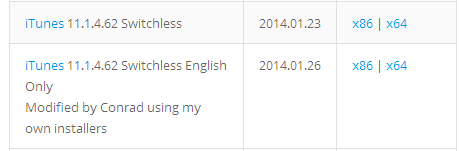
Update: Custom installers are regularly updated by their creator so that you can download the latest version of iTunes from the site without all the unnecessary applications and add-ons that get installed along the way usually. iTunes switchless installer is offered both as a 32-bit and 64-bit application on the download site. Note that the program installer will be downloaded directly from the developer website.
Advertisement


















No problem Martin. I was checking some trackbacks and a reader of my site brought that trojan false positive to my attention.
Perhaps you could update your article to mention that the newer iTunes releases don’t need QuickTime anymore. I’m bundling up the modified iTunes installer plus Application Support and Mobile Device Support so people don’t need to extract anything from the original installer unless they use iTunes for sharing their libraries over a network, which requires the installation of Bonjour.
Regards, ajua
Hi Mark,
There was something in my site’s old theme files that caused some false positives on a few security suites.
I just redesigned all the site and threw away the old theme and replace it with a new one. Feel free to visit it again without any worries.
PD: The latest iTunes versions (10.x) don’t require Quicktime anymore, but I keep making slimmed down setups without Bonjour, Apple Software Update and iTunesHelper.
Regards, ajua
Great to see you chime in Ajua, thanks for posting the information.
clarification:
Looking for iTunes Help,
ajuaonline.com just dropped a Trojan Downloader Win32/Dofoil.D on my machine.
Mark, which program did you download from the site, and which security software are you using.
just dropped a Trojan Downloader Win32/Dofoil.D on my machine.
Thanks a lot :-(
Anyone experiencing “Error 2″ for WIndows PC, ignore and download latest 8 version series. Similar as 9 apparently but works with no issues Link (32 bit although 64 is available)
http://www.oldapps.com/itunes.php?old_itunes=46
Teach these guys who upgrade software to fire their beta testers. Spent hours tring to get itune 9 and £££ on Ipod & accessories. Apple store in Southampton said “just download itunes†they don’t say latest version because clearly it is unstable!
The WInRaR, repair archive also corrupt for me anyway, for those who know what I mean.
When I tried to install iTunes Alternative, I get an error saying “This installation package is not supported by this processor type. Contact your product vendor.” And another message saying “A network error occurred while attempting to read from the file “C:\DOCUME^1\…\LOCALS^1\Temp\7ZipSfx.000\AppleApplicationSupport.msi”.
http://getsongbird.org/
And here I thought iTunes was the unnecessary software.
know what?? I am stuck at winamp 2.99
why? It plays songs. THIS is what a media player
is ought to do. Apple has gone too bad here.
Adieu!
I agree, Winamp 2.x rocks (I prefer an older version than 2.99)
But, unfortunately for a LOT of people, we need iTunes for more than just being a media player.
Syncing iPhones/iPods is what most of us are stuck using iTunes for, as much as I and many others hate to admit it, iTunes is the only decent way to sync.
For outright playing music, hands down I prefer winamp.
After I ran the Switchless installer, I also had to run “AppleApplicationSupport.msi” which is found inside Apple’s “iTunesSetup.exe”. You can open it with WinRAR. I was getting an “Error 2” until I did this.
Quicktime Alternative 2.9.2 is using Quicktime version 7.6.2, but iTunes 9 needs 7.6.4+