
MP3 Voice Recorder

The Windows operating system comes with a voice recorder that is limited and can only save the recordin as wav format files. While that may work for some users, others may find it too limiting to work with.
That's why most Windows users who want to record voice on their system are looking for a voice recording software that offers better functionality.
MP3 Voice Recorder is such a software program. It is a digital voice recording software that can save the recorded voices to several output formats including MP3, WAV, AAC, WMA, FLAC, M4A and AC3.
The basic interface of the voice recorder displays the most relevant options right on screen with the option to dive into the settings to customize the output further. All that basically needs to be done is to check if the audio source is the correct one. Other options on screen are to change the output directory, file name and quality.
The options of the voice recording software are limited to changing the output file format and bitrate of the voice recording. That's pretty basic but sufficient for most situations.
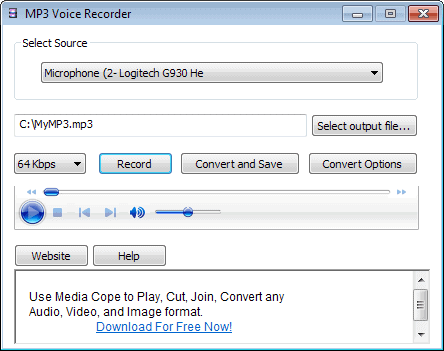
The voice recorder offers playback possibilities in its interface which can be used to play the recording. The main advantage of a software like MP3 voice recorder is its simplicity. It is practically possible to start recording right away. Users who are looking for advanced functionality might try audio editors like Audacity for the purpose.
The voice recording software displays a small survey during installation which does not have to be filled out by the user. The software can be downloaded from the developer's website.
Update: Please note that the program tries to install Relevant Knowledge software on the computer. Relevant Knowledge monitors Internet behavior and it is suggested to decline the installation during the setup. Thanks JoJo for pointing that out.
You may also get other offers during installation, make sure to decline those if they are displayed to you if you do not want to make use of them.
Update 2: You can also use the free audio recorder and editor Audacity to record your voice to mp3 format. While not as easy to use as Mp3 Voice Recorder, it offers a powerful editor to edit the recording right away, and does not ship with any adware offers.
The downside is that you will have to spend some time getting used to the program, even if you only want to use it to record your voice on your system.
Advertisement


















After install AVG reports the MP3 Voice recorder.exe as a virus!
It is likely reporting it because it includes adware.
Suggest paying attention to the prompts during install. You will see this:
In order to provide this free download, RelevantKnowledge software, provided by TMRG, Inc., a comScore, Inc. company, is included in this download. This software allows millions of participants in an online market research community to voice their opinions by allowing their online browsing and purchasing behavior to be monitored, collected, aggregated, and once anonymized, used to generate market reports which our clients use to understand Internet trends and patterns and other market research purposes. The information which is monitored and collected includes internet usage information, basic demographic information, certain hardware, software, computer configuration and application usage information about the computer on which you install RelevantKnowledge. We may use the information that we monitor, such as name and address, to better understand your household demographics; for example, we may combine the information that you provide us with additional information from consumer data brokers and other data sources in accordance with our privacy policy. We make commercially viable efforts to automatically filter confidential personally identifiable information and to purge our databases of such information about our panelists when inadvertently collected. By clicking Accept, you acknowledge that you are 18 years of age or older, an authorized user of this computer, and that you have read, agreed to, and have obtained the consent to the terms and conditions of the Privacy Statement and User License Agreement from anyone who will be using the computer on which you install this application.
You can decline it though and continue with the install.
Wow, great find JoJo. I did not spot it this time. Have updated the post accordingly.