
Create Custom Firefox And Thunderbird Installations

Silence of the foxes is a lightweight software program that can be used to create custom Firefox installations. Custom installations refers to a Firefox setup that can install custom preferences, extensions, plugins and bookmarks whenever it is installed. This can be very useful for various purposes including distribution of a custom Firefox installation to multiple computer systems.
The portable software program will unpack a Firefox setup file to the local computer system. The user then needs to add extensions, bookmarks, plugins and preferences to the paths the installation has been extracted to and pack everything in the end to create a new custom Firefox installation.
It is possible to create a custom Firefox or Thunderbird installation with the software program.
A Firefox or Thunderbird setup file needs to be specified in the next step. These files can be downloaded from the Mozilla website.
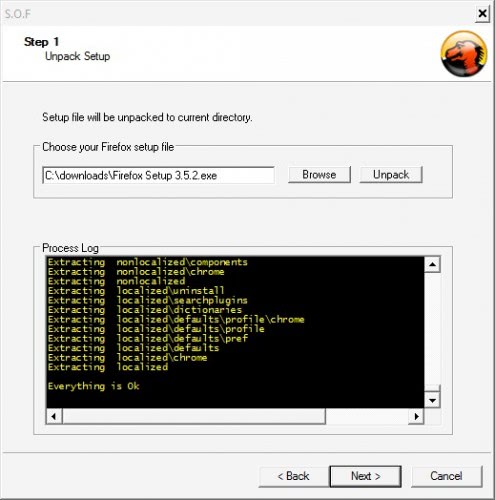
Firefox add-ons have to be downloaded and placed into the relevant project directory so that they are installed whenever the custom Firefox version is installed on a computer system.
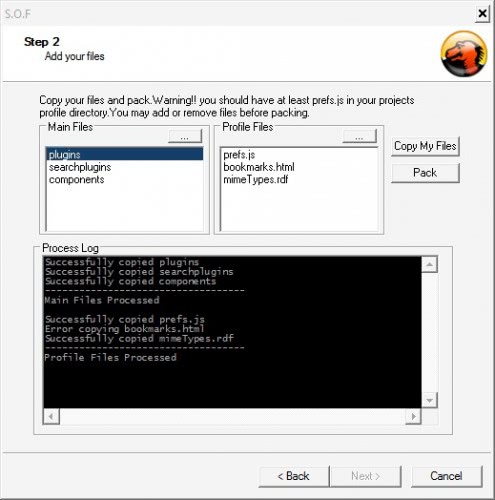
A click on copy my files and then pack will create the custom Firefox or Thunderbird installation file. This file contains all plugins, extensions, bookmarks and search plugins which will be installed during the custom Firefox setup.
You can download the program to create custom Firefox and Thunderbird setups from the MSFN forum.
Update: The program does not seem to be available anymore. The link has been removed. Firefox users can download and run Firefox Addon Maker instead which can create custom Firefox installations from existing Firefox profiles, or independently.
The extension supports the current stable version of Firefox, the beta version and the last version. It can copy all preferences, extensions and themes from an existing profile into the installer so that these become available on the target system as well.
Advertisement
















Interesting, but I’m not sure how much I would trust software from someone who can’t consistently present the word Firefox accurately.
“Profile Information
Firefox – Mozilla FireFox”
Also, “This program will try to unpack…”
That doesn’t really invoke too much confidence.
Why not just say, “There’s a 50% chance that your time won’t be wasted”?
Aw man, now I’m finding that the last update that I see on the page linked to from this posted was in 2006.
But wait, there’s more,
“SOF is updated to support ThunderBird…”
“…now it supports firefox,thunderbird…”
Damn, now I find that it’s hosted on rapidshare?
Look, I can see that you apparently didn’t have any issues with downloading and launching this app (due to the screen shots), and it may work just fine and be perfectly safe, but as long as I can help it, I’m not going to download, install, and launch any program (let alone ask others to install something generated by it) that is presented so half assed and raises so many flags.
I’m disappointed that ghacks would encourage others to do the opposite of that.
Perhaps if someone would contact the developer or team up with him to clean things up and at least use Google Code to host the project, then it would have more credibility.
And to think, I came here from a Google Alert in Thunderbird (or ThunderBird) and followed the links from this post to the forum to leave feeling like all that I’ve accomplished is sounding like a jackass.
Well, I could easily create a profile with the built-in profile manager. Or am I missing the point of this program?
Well it basically allows a user to create a firefox setup file that contains custom add-ons, plugins and bookmarks.