
Digital Photo Recovery Software PC Inspector Smart Recovery

What's the worst nightmare that can happen when you are on holiday with your digital photo camera? It's probably the thing that happened to me while walking on the walls of Jerusalem. My shiny new Casio Exilim S12 digital camera was suddenly displaying a card error making it impossible to take additional photos or to view existing ones.
The flash card was not recognized later that day after connecting the digital camera to the Acer laptop. I then remembered an article that I wrote in 2006 about the file recovery software PC Inspector. A digital photo recovery spinoff called Smart Recovery was created by the same company and I decided to give it a try to see if it was able to recover the photos on the corrupt flash card.
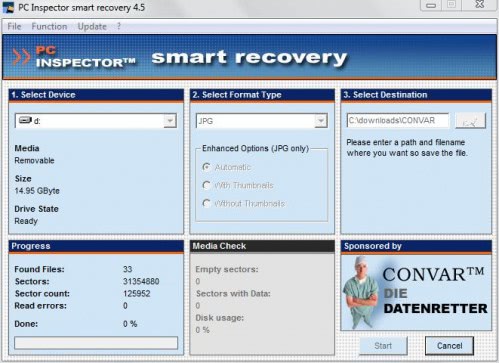
The program is pretty easy to use as it only takes three steps to configure the process and start the scan of the flash card. The digital photo camera needs to be connected to the computer system before the program is started. This should assign a new drive letter to the digital camera which has to be selected in step 1.
A file extension for the photos has to be selected in step 2. This is set to jpg by default but can be changed to several camera specific formats. A download directory has to be specified in step 3. The photo recovery software will start the scan. It can either complete the task in a quick scan or perform a deep scan depending on the severity of the corruption. The deep scan will take a longer time but is more thorough and the only chance if the level of corruption is to severe.
The digital photo recovery software PC Inspector was able to restore and save all photos that have been taken and stored on the corrupt flash card. The only things left to do were to move and tag the pictures manually as this option was not available due to the corruption and to format the flash card so that it can be used again.
Advertisement


















I have a Casio XILIM that only shows up under scanner and camera in My Computer. There is no drive letter so I can’t get this program to work. I’ve googled it but haven’t found information that addresses this specific issue. I just want to recover deleted pictures and can’t purchase a reader as someone suggested. How do you change Casio X… to a drive letter?
> What’s the worst nightmare that can happen when you are on holiday with
> your digital photo camera? It’s probably the thing that happened to me while
> walking on the walls of Jerusalem.
Spiderman is now writing for Ghacks! Enjoy your trip!