
How To Download Old Firefox And Thunderbird Releases

A Ghacks reader recently posted a comment asking whether it is possible to download old releases of Thunderbird. The situation was that he switched to Thunderbird 3 beta 3 and noticed that some of the add-ons that he had installed were not working anymore.
The official website that provide downloads of Firefox and Thunderbird only offer the latest version of the programs for all supported operating systems. This is done to protect users from downloading outdated, insecure or unstable versions of a software.
It is therefor usually not a good idea to download and install an old version. It might be different during beta testing but it is generally recommended to figure out other ways of coping with a problem.
There is however a very easy way of downloading old versions of either Thunderbird or Firefox. Just point your web browser to ftp.mozilla.org and visit the ftp repositories for either program. The ftp server not only lists the latest version but also all other releases that have been created in the past all the way from version 0.1 to the very latest version.
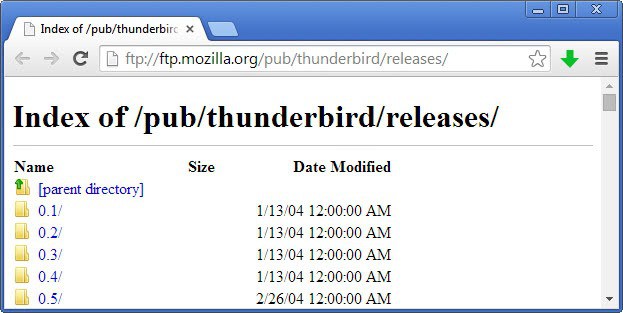
Here are the direct links:
ftp://ftp.mozilla.org/pub/thunderbird/releases/ftp://ftp.mozilla.org/pub/firefox/releases/
Update: Mozilla has changed the location of its ftp, the new locations are:
- https://archive.mozilla.org/pub/firefox/releases/
- https://archive.mozilla.org/pub/thunderbird/releases/
Again: It can be highly problematic to install old releases. Make sure you backup the data before installing an older version of Thunderbird or Firefox.
Update: The ftp links are still working properly. Users who plan to install older versions of the browser or email client should make sure that the version is still supported by Mozilla. Firefox 2 for instance is no longer supported, which means that the browser won't get security or stability updates that supported versions of the browser receive regularly.
While that may not be a big issue for local installations, it can become one once the browser is connected to the Internet.
These older versions install just like any other version of the browser. It is generally suggested to backup the browser or email profile before you install an older version. I'd also suggest you uninstall the newer version on your system before you run the old version installer.
You may also need to disable automatic updates in the client to avoid that it is being updated as soon as you are connected to the Internet while it is open on the system.
Check out our guide on restoring an older version of Firefox here. It offers all the information you need to do so, including disabling automatic updates in the web browser.


















You can also download it from http://www.oldapps.com
Thank you very much ! I’m looking for Firefox v2
Using (and installing) older versions can be problematic, as you pointed out. Instead of *installing* them, simply use the *portable* versions.
Click on the desired program (i.e., Mozilla Firefox) at this page: http://sourceforge.net/projects/portableapps/files/
If you need older version of Firefox or Thundrbird or many other popular software, you can check http://www.filehippo.com/
so useful, even 11 years later!!
Excellet piece of info. Thank you.