
Reminder Software Remind Me In

Remind Me In is a basic but lightweight reminder software program for the Windows operating system. It is compatible with most editions and versions of Microsoft Windows including Windows XP and Windows Vista. An icon will be placed in the Windows system tray after installation which can be used to configure the reminders.
A right-click on the icon of the application opens a menu that can be used to set a reminder for a specific time in the future. About a dozen different options like setting one or five minute reminders are offered as presets. If you prefer, you can alternatively set up custom reminders by entering a new value in minutes.
The only other option that is provided by Remind Me In is the ability to pick a sound file that will be played when the time is reached. Remind Me In is therefor more of an alarm clock software than a reminder software. It still can have its uses for some users, for example to remind the user to take the pizza out of the oven.
The software uses only about three Megabytes of computer memory while running. It would be excellent if the developer would add an option to add a note to the reminder. Remind Me In can be downloaded directly from the developer's website.
Update: The developer website of Remind Me In is no longer available. We have uploaded the latest version of the program to our server from where you can download it. To download the program, click on the following link: (Download Removed)
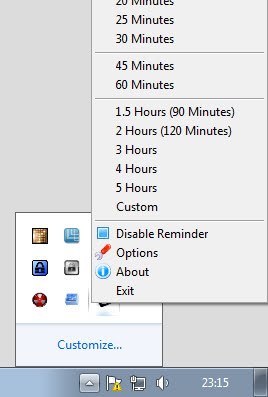
We have also tested the program under newer versions of Windows and can confirm that it works under Windows 7 and Windows 8 as well. The functionality has not changed much though. The program displays an option in the settings to start with Windows, and additional time presets that you can select for the reminder. It is unfortunately still not possible to attach a note to the reminder.
Advertisement


















You can try Memo reminder from my signature. It is a online/offline software.
Seems you had kicked that site dead… ghacksed? :)
hi,
when I try installing it, avira antivir says, “TR/Crypt.CFI.Gen – Trojan included”?! Does anyone know about that problem?
Most likely a false positive.
Hi: Try and use Kana Reminder. Superb !
Regards,