
WordPress Broken Link Checker

Broken links on websites and blogs can have several negative side effects. This includes visitor frustration as broken links waste their time and can change the perception of the website the link was posted on but also the perception of search engines, other web services and reviewers that crawl and visit the website. Google for instance states in their webmaster guidelines that webmasters should make sure to check for broken links while other services such as DMOZ mention in their guidelines that broken links do reduce the chance of a website being included in the web directory.
It is therefor essential for webmasters to regularly check the links that are posted on their websites and blogs to make sure that they are still pointing to the initial resource and do not return a 404 not found instead.
One of the best ways for WordPress webmasters is to install the WordPress plugin Broken Link Checker which will automatically check all posted links in all blog posts regularly to ensure that the links are valid. The initial lookup can take between a few minutes to several hours depending on the amount of posts and links on the blog. It took about 10 hours to find and check all links that have been posted at Ghacks.
The broken link count will be updated all the time and it is possible to deal with those links right away even if the plugin is still having links in the work queue. A click on the broken link count will open a table that displays 20 broken links per page.
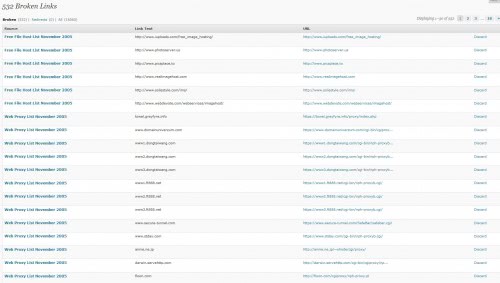
You can use the filter at the top to display broken links or redirects (links that still work but are redirected for one reason or the other). Each link is displayed with its destination url, the returned status code, the link text on your site and the source article. I usually start by opening the web address to see if the page is still returning the error or if it has recovered. Websites sometimes may go down because of technical or financial issues which can be resolved so that it becomes available again. I highly suggest you verify all links before you remove them from your site. If the link is still down and it does not look like as if would come back online, I click on the source link to edit the article.
I add information to the article that explain why the link has been removed, and try to find an alternative that I can provide the reader with. Once I did that, I remove the link using the Broken Link Checker.
The plugin will automatically line-through broken links that have not been dealt with by the webmaster to inform visitors that the links are not working. You can modify the behavior under screen options. The Broken Link Checker plugin is an excellent way of finding and removing broken links from a WordPress blog.
Advertisement














Thanks this is very nice and good post and this plugins is very helpfull for wordpress thanks again
I am deploying it and its particular doing a fairly task about my blog. We’ve fixed the alternative for mails when a expended link can be discovered. :D
Thanks for this really cool post, I must say, this will be a great help from the point of view of SEO!
Well, one must not keep their website having so many broken links, Google bots are now very clever!
Nice wordpress plugin. And a great post :)
This broken links is now considered as one of the important factor in terms of Google Panda Updates :(
Wonderful plugin. Would you consider creating an option to select ‘don’t use plugin CSS’. I’d prefer to just add the small amount of CSS to my stylesheet rather than include it in the header on each page.
A Great wordpress post, I will bookmark this in my Reddit account. Have a great day.
I am using it and its doing a pretty job on my blog. I have set the option to receive mails when a dead link is detected.
Email Alert is one of the best option that I found in WP Broken Link Checker Plugin. However I use it occasionally because it affects your hosting.
Hi Martin
It’s a pity this sort of functionality isn’t built into WordPress.
Philip
One of the best little apps I have for my blog other then NextGen gallery. This thing really lives up to its name. Now if only they could make one that checks removed videos from popular video services like YouTube and MySpace.