
How To Make Free Calls From Your Computer With Google Voice

About three weeks ago, I finally got an invite for Google Voice, the new phone-managing service from Google that I’d been itching to try out since before it was even called Google Voice (back then, it was called GrandCentral, and I still wanted it really, really badly).
Google Voice has a ton of great features, and in a lot of ways fundamentally changes the way you’ll use your phone. A lot of things suddenly become easier with Google Voice – checking your voicemail, sending text messages, and more – and they’re all best dealt with through your computer.
Update: Google Voice lets you make calls from your computer now so that you don't need to go through the lengthy process anymore listed below.
But, as of now, Google Voice doesn’t inherently let you make calls from your computer. I mean, I’ve got a microphone and speakers on my computer, as well as a fast Internet connection – why shouldn’t I be able to make calls, ideally for free?
Well, as it turns out, I can – with a little legwork. Here’s how to set it up (I did this on a Mac, so PC directions might be slightly different – the same rules will apply, though). 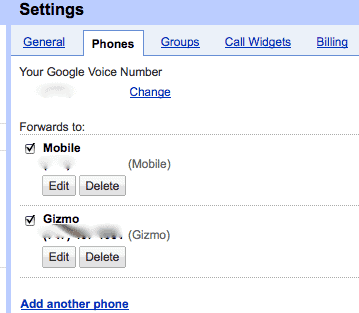
Disclaimer: This is all assuming you’ve already got a Google Voice account. They’re sending out invites at lightning-speed, so if you don’t have one, go get on the list!
- Download and Install Gizmo5 (create a free account, with no call credits – you won’t need them!).
- Open Gizmo. In the “Home†tab of the application, click “Edit My Profile.â€
- In the tab that pops up, you’ll see, filled in, a number for “SIP number.†Copy that number (everything before the @ sign).
- In Google Voice, click “Settingsâ€, and then “Phones.â€
- Click “Add Another phone†and paste the SIP number from Gizmo (again, only what’s before the @ Sign) into the box.
- Name the number “Gizmo†or whatever you want, and then Save it.
Now, to make calls:
- Open Google Voice, and click “Callâ€
- Enter the number you want to call
- Make sure the Gizmo phone (whatever you called it) is selected as the “Phone to Ringâ€
- Click “Connectâ€
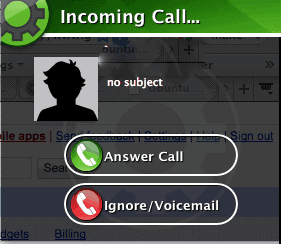
- You’ll get a pop-up from Gizmo, with your Google Voice number on the caller ID. Answer it!
- Google Voice will automatically dial and connect the other person, and you’ll be chatting from your computer!
The whole process only takes about five minutes, and doesn’t cost a nickel. Because you're using a SIP number, all the data is transmitted over your cable connection rather than your phone network. That means you'll need fast Internet to really make this work, but also means it doesn't cost a thing!
I’m not sure how long this will be around (I’m sure carriers won’t be fans), but for now it’s a fantastic solution for making calls directly from your computer.

















The only hope for 2013 is that Google voice stays free. Google hasn’t announced anything yet and everyone is eagerly waiting as to what is going to happen. I personally think it will be free, I am nost sure about your views.
I dont really like Google voice. My problem was that it sometimes didnt deliver the call or the quality of the calls were not good.
Now I use Nextivia to my Ozeki Phone System XE telephone system and the sound quality is now ok.
http://www.ozekiphone.com/pc-to-phone-calls-explained-380.html
Hey mate,
Thanks for this awesome tutorial of Google Voice but i have a problem i am in India and wants to call US my family members and Google Voice not gives me free calls to US from India, should you have any other alternative for it…
Thanks
Does the call still need to go through your cell phone or can you can you just use your computer?
pls tell me how to use gizmo for free call ,plzzzzzzz
GOOD PRO
Google voice Service is not available in my country (India). So this post is no use for me.
please tell me
how to use in india
BTW this isn’t A hack now it’s free to everybody. This A detailed walk through. log into gmail.com then log into google voice you have to set up your google voice account by phone just to activate the account. once you have activated your account go to google voice and connect through your gmail. When you place a call you have to switch to your mail and answer it from there which will then call the number you wanted to dial.
Gizmo5 is now built in to gmail this doesn’t work anymore. The way it works now is you log into google voice then log into your gmail and connect through there. It’s 100% free calling in US and Canada I use this method all the time for free calling. All other site you have to pay a monthly fee. It isn’t free if your using it through you cellphone carrier your still using your minutes. But it IS 100% free calling through your computer using a mic.
so amazing
yea i trusted this would work but it wont allow poeple to register anymore
Google voice Service is not available in my country (India). So this post is no use for me.
pls tell me how to use gizmo for free call ,plzzzzzzz
good work
if u guys really want to use free calls, see this blog to learn..there are number of ways to get a free call from pc-to-phonehttp://www.noobbook.com/2010/05/make-free-calls-worldwide.html
Awsome just like Skype but even better hahaha!
Google acquired gizmo, new accounts have been suspended for now.
I have used the Gizmo5/GV computer phone calls sucessfully in the past. However, GV now seems to be blocking my calls & not allowing the Gizmo5 call through.
GV want to “verify” my Gizmo5 number but for some reason will not/can not. Anybody else having this issue?
Is there a way around this problem?
yes i am having that problem too.
been seeking an answer online for weeks, but still no solution
Thank you! It works and its fantastic!! Woooo!!!
Hello Everybody,
This is the first time I post anything on the net. I was intrigued about the possibility of Gizmo/GV. I applaud Raju’s effort in finding ways to use software/technology in communications, however I believe there’s a catch.
The catch is that Gizmo is actually PROACTIVELY combining its service with Google Voice. Furthermore, they have more complete instructions on how to go about this (http://www.gizmovoice.com) and they even explain to NON-US RESIDENTS how to use such combination (i. e. commenter from India).
Consequently, and my only observation to Raju’s article is that he should have been more thorough (i. e. instructions) on his post and if that was not possible, to direct readers to Gizmo’s website.
This seems more of a hassle though than just using skype with an unlimited plan.
Cheers!
MexiSam
@JG
Yes, indeed, your hopes are fulfilled, JG.
I am using my landline for free calls.
In fact, I have yet to get a cell phone.
I am the last man standing on that :)
Gizmo is crap on the Mac. I get it to launch, answer a call and it crashes and won’t re-open unless I re-install. Not to mention there’s no iPhone app…
I’m hoping that Robert Palmar (prev commenter) doesn’t think making calls on his cell phone to Google voice, doesn’t require minutes. Hopefully he’s using his landline call to make “free” calls.
wait, is all this free calling strictly from your computer? i guess this is a cool competing app along with the skypes and gizmos…
I have been making free telephone calls directly on Google Voice.
I can call numbers directly from contacts. My phone rings,
I answer, and then Google Voice dials the party.
You can also use the “call” button to call
anyone else and enter their number.
You can also call free from your phone without
being online. You call your Google Voice
number and enter your voicemail.
Option 2 gives you a dial tone.
This can be simplified further by pressing the star key
as soon as you call your Google Voice number
and hear it ringing, then enter your pin
and then enter option 2.
I have pre-programmed the above steps
into my phone and I call Google Voice
and get a dialtone immediately
to make a free call.
No Gizmo required.
No microphone or
speakers required.
Well done David. I’m wondering though why calls I make drop out like a cell phone with a bad connection. It sometimes sounds like the people I’m calling sound like broken robots and they say they can’t hear me.
Awesome in theory but I need to figure out the quality issue.
This has been around for a while…even before Google Voice…so hopefully will be around for a while longer!
One tip:
I had trouble activating the number because I could not find the number pad. Turns out that the help page does not help at all. (http://support.gizmo5.com/index.php?_m=knowledgebase&_a=viewarticle&kbarticleid=75)
So, open Gizmo, go to the Dial screen, then have GV call you. You can use the dial number pad to enter numbers.
Wow! This is amazing! Nice job!
Furthermore, if you close your gizmo client out totally and go login to their webpage at gizmo5.com, you can set your Gizmo number to forward unanswered calls to skype or google talk or another phone number.
I’m forwarding to googletalk, so now i can make calls with googlevoice, choose ring to gizmo, and it rings to my gmail, how wonderful is this, free phone calls in the browser.
Joshed
http://www.syko.org/
I’ve been doing this for about a year and a half now, and it works great. I took it a step further though. Nokia’s unlocked (AT&T had a hissy fit, and removed it from the e71x)e series handsets offer internet calling (sip based) over wifi built into the handset. I set up the gizmo sip line on my phone, and whenever I’m connected to wifi, calls from google voice come over the sip line on the phone. Free calls wherever I have wifi. My next step is to go buy a MyFi hotspot, and try it out over the EVDO network. That would mean unlimited voice and EVDO data for multiple devices for $60 a month!. As it is, I have a $39.99 T-Mobile MyFaves plan that gets me unlimited incoming calls (Google Voice is set as a fave, and set to show my Google Voice number for incoming calls). 19.99 gets me unlimited edge data and text messages.
How do you do it through your laptop? it doesnt show the option phone anywhere and when i click on the Gizmo5 it just says try now -totally lost-