
A standard compliant web browser and editor: Amaya

Some web browsers don't fully respect web standards and many WYSIWYG HTML editors produce absolutely revolting code. W3C set out standards as to how HTML (and XHTML etc) should appear and whilst some choose to ignore these, some are devoted to the following of these standards.
Sticking to standards can therefore lead to issues with certain web browsers, which lack support for the latest tags or render pages wrong.
The W3C therefore has its own web browser and editor which adheres to standards more than many browsers and supports certain new technologies others don't, such as RDF annotation. This browser is Amaya, an open-source and cross-platform browser.
Amaya can handle a wide-range of open file formats, including HTML, CSS, XHTML, SVG and MathML.
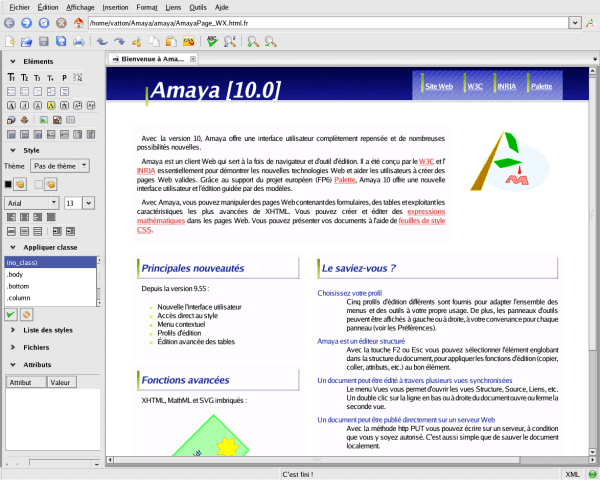
The software integrates the browser and web editor: when you go to a web page, it can be edited inside the browser. It also instantly displays syntactic errors.
It also integrates the mark-up languages. For example, in a web page, one can write formula utilising MathML or add SVG shapes inside the software.
Amaya is a reasonable WYSIWYG editor and a good web browser for developmental purposes. It is also good to produce rich web-pages, which include other pieces of mark-up than HTML.
Update: Amaya has not been updated in the last two years. While it is still possible to use the cross-platform HTML editor it needs to be noted that it does not support recent technology advancements. This includes no support for HTML5 or CSS3 in the last release.
It appears that the project has been put on ice for the time being or abandoned completely.
Windows and Linux users find in Blue Griffon a suitable alternative. Blue Griffon user however need to know HTML to work with the program, as it does not display information about elements that can be selected in the editor. Users who know their HTML elements will find it to be a suitable alternative for Amaya.














ugly logo !
Thank your for your article about Amaya. It’s a great editor under active development, and the only great and stable solution for Linux fans!
Cheers