
Change The Default Email Client In Firefox

Many Firefox users do not know that they can change the default email client in the web browser easily.
What even fewer know is that it is even possible to not only select desktop email clients but also web based email providers such as Yahoo Mail or Gmail as the default provider for all mailto links.
The mailto links in the format mailto:email@example.com are launched with the default application that has been set in the Firefox web browser.
This application may also be used when scripts or other means are used on websites that provide you with options to send emails.
To change that one needs to open the options of the web browser. Firefox users need to tap on the Alt-key on the keyboard and select Tools > Options from the menu bar that opens up after they do.
This opens the Firefox preferences. There you need to switch to the applications tab. Firefox lists all known file types link types on the page.
You can either scroll down until you find mailto listed there or enter it in the search form at the top.
The right side of the mailto content type reveals the program or service that is currently used by Firefox when these links are clicked on.
A click on the row displays a menu icon that lists other options that you can select for the content type instead.
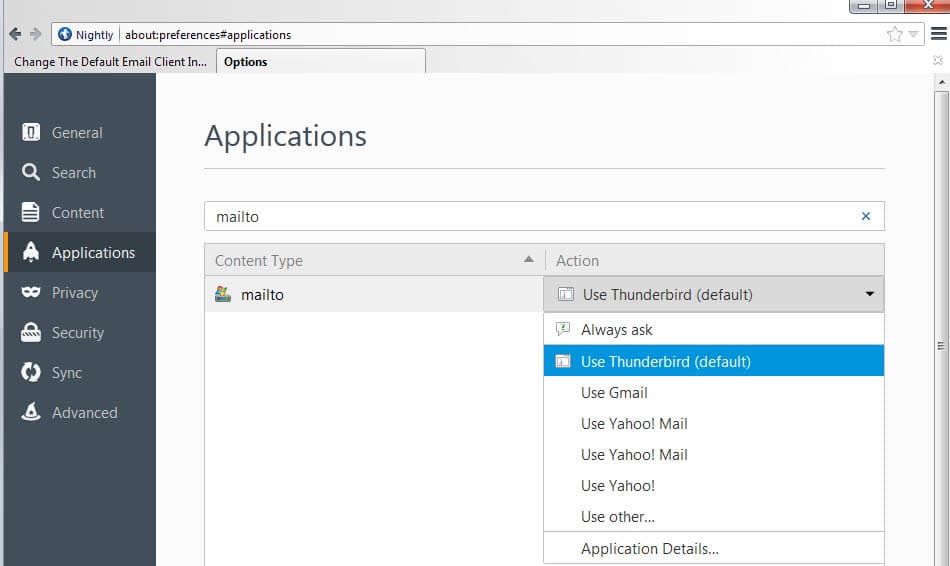
Next to the default option, a client like Thunderbird or Outlook for example, you find Gmail and Yahoo Mail listed there, an option to set the content type to always ask, and one to pick a local client from the system.If you select the last option a file browser opens up that you use to select an executable file on the system which can be useful if the email client was not detected automatically. This can be the case if you are using a portable program for example.The new action that you have selected for the content type becomes active immediately thereafter. It is highly suggested to give it a try to make sure it is working, especially if you have handpicked a local application for the job which Firefox did not list by default.




















I was in the hospital for quite some time,when I went to retrieve my email via Thunderbirdbecause it does NOT retrieve it!Instead it keeps asking me over and over for the MAIN passwoed,Argh!Is their a way of resetting it?Or do I have to delete the current Thunderbird and re download…………honestly,if it is the latter,I shall likely go with a different Email Client!!Any responses are appreciated,Thanks Sincerely Rafael Quintero
Download Hotmail. Follow the above instructions and from the drop-down menu choose “Use other”. Click “Browse”. Find and choose the Hotmail application. It is wherever the application was installed.
Seems impossible to add any other web based email other than gmail or yahoo. I created 2 new strings in ‘about:config’ , one with the name of the service & the second the address ‘mailto’ will open.
They were correctly written as I simply copied &these strings :
gecko.handlerService.schemes.mailto.1.name
Gmail
gecko.handlerService.schemes.mailto.1.uriTemplate
https://mail.google.com/mail/?extsrc=mailto&url=%s
changing ‘mailto:1’ to ‘mailto4’ & adding my own parameters but whilst these new strings were saved in the user prefererences .js file, the option doesn’t appear in the options/applications/mailto dropdown box.
Quite a shame really.
I’ve been curious about the missing Windows Live Mail myself.
This has been the case for a long time and Mozilla has to be aware.
Firefox also displays the “Although this page is encrypted warning…”
for only MSN sites with all such warnings disabled in Firefox.
Cynically side one could think this is all deliberate.
That was a good tip. I feel like a dummy for not knowing that, but I didn’t, THANKS!