
Google Update Changes

The Google Update process is the bane for many Internet users as it seemed to become available again even if it has been disabled previously on the computer system.
The process googleupdate.exe is running all the time on the computer system trying to connect to Google to see if there are any updates for Google software available.
It can even happen that the updating process is still running if no Google software programs are installed on the computer system anymore.
It does feel strange that Google needs a process to update their programs while other companies like Mozilla do not. Especially if the only software by Google is their web browser Google Chrome.
Google has announced changes yesterday that will please many computer users. They basically changed Google Update from running in the background permanently to a process that would check for updates periodically which basically eliminates the googleupdate.exe process in the background as it will terminate after the check for updates.
This means that the process will only run when it is scheduled to check for software updates and terminate afterwards.
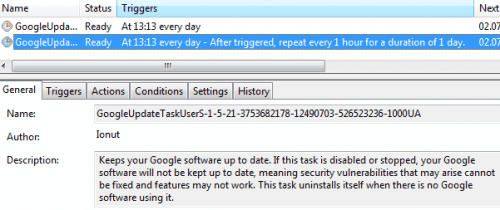
Users can check the Task Scheduler in the Windows Control Panel to change the frequency of the update checks.
The easiest way to do so is to tap on the Windows-key on the keyboard, type Tasks and select the schedule tasks option that appears. This opens the Task Scheduler listing all scheduled tasks on the system.
Locate the Google Update task there and modify its triggers to change when and how frequently it runs on the system. The default is set to check once every hour which may be too frequently depending on your requirements.
The Google team points out that the process might be running continuously on some computer systems if problems are encountered with the task scheduler and Windows Services.
Advertisement


















So what the process change will happen on its own or when we update a google app or if we download a new app?????
That’s a step in the right direction. It would be better if their programs simply checked for a new version independently when they are started, but I’ll settle for this.
Definitely a *huge* improvement. But as far as I’m concerned : no google update at all.
Those automatic update functions are usually for users who have no clue about computer security. We both know when a new version of a software which means that the automatic update check is not necessary at all, especially when implemented this way.